Procore vs Buildertrend vs Fieldwire vs PlanGrid vs CompanyCam: 2026 Comparison
Five construction apps compared on 2026 pricing and who each is built for, plus the job all five leave to a group chat: telling each person where to be.
Procore vs Buildertrend vs Fieldwire: the short answer
Procore vs Buildertrend vs Fieldwire comes down to who will use it, and the same goes for PlanGrid and CompanyCam: each was built for a different person on the job. Procore is built for commercial project teams, with unlimited users and an annual fee set by construction volume; it publishes no price. Buildertrend is built for residential builders and remodelers and now quotes every buyer; its last published tiers ran from $339 to $829 a month. Fieldwire is built for superintendents and field crews, free for up to 5 users and $39 to $89 per user per month after that. PlanGrid is closed to new customers, and its successor, Autodesk Forma Build, costs about $117 to $175 per user per month. CompanyCam is photo documentation from $63 a month. None of the five sends each worker their own week without an app or account; SubShare does, free for up to 10 people.
Walk onto a busy site and you can usually tell which apps the company bought by who is holding a phone. The project manager in the trailer is in Procore, answering an RFI. The super is in Fieldwire, pinning a punch item to room 204. The laborer photographing the slab is in CompanyCam. And the electrician who just pulled in asks the same question as on Friday: am I here all week? The answer is in a group chat, forty messages up.
That is not a failure of any one tool. Each of these five was built for a particular person on the job, and each is very good for that person. The trouble starts when you pick one for the wrong person, or expect it to cover someone it was never designed for. This comparison sets out what each costs in 2026, who it is built for, and where it stops. SubShare is our own product; it appears in the tables for comparison and gets its own section at the end, for the one job all five leave to that group chat.
Procore vs Buildertrend vs Fieldwire vs PlanGrid vs CompanyCam at a glance
| Built for | How it is priced | Published price | Free plan | |
|---|---|---|---|---|
| Procore | Commercial project teams | Annual fee by construction volume; unlimited users | No | Collaborator accounts only |
| Buildertrend | Residential builders and remodelers | Custom quote by builder type and revenue | No (since 2026) | No |
| Fieldwire | Superintendents and field crews | Per user: $39, $64 or $89 a month | Yes | Up to 5 users |
| PlanGrid (now Forma Build) | Project teams on Autodesk | Per user, about $117–$175 a month | No | No |
| CompanyCam | Photo documentation | $63–$199 a month, then $29 per user | Yes | No |
| SubShare | The crew's weekly plan | By crew size: $0, $29 or $59 a month | Yes | Up to 10 people |
From each vendor's pricing page and help documentation, checked September 25, 2026. Forma Build's range is from 2026 third-party listings; PlanGrid itself is closed to new customers.
Features compared: drawings, RFIs, photos and crew schedules
Procore vs Fieldwire is the closest pairing on features: both cover drawings, tasks and RFIs, and Fieldwire keeps RFIs for its top plan. Buildertrend adds the homeowner side, and CompanyCam and SubShare each do one job well.
| Procore | Buildertrend | Fieldwire | Forma Build | CompanyCam | SubShare | |
|---|---|---|---|---|---|---|
| Drawings and markups | Yes | Document files | Yes | Yes | No | PDFs attached to jobs |
| RFIs and submittals | Yes | RFIs | Business Plus only | Yes | No | No |
| Homeowner portal and selections | No | Yes | No | No | No | No |
| Budgets and financials | Yes | Yes | Business Plus only | Cost management | Payments | No |
| Photo documentation | Yes | Yes | Yes | Yes | Core feature | Photos attached to jobs |
| Schedule by person | Resource Planning | Job schedule | Manpower on Gantt | Project schedule | Task assignment | Yes, one row per person |
| Workers see their plan without an account | Texts via Resource Planning | No | No | No | No | Yes |
From each vendor's pricing page and help documentation, checked September 25, 2026. Plan names and inclusions change; confirm before you buy.
How much do Procore, Buildertrend, Fieldwire, PlanGrid and CompanyCam cost?
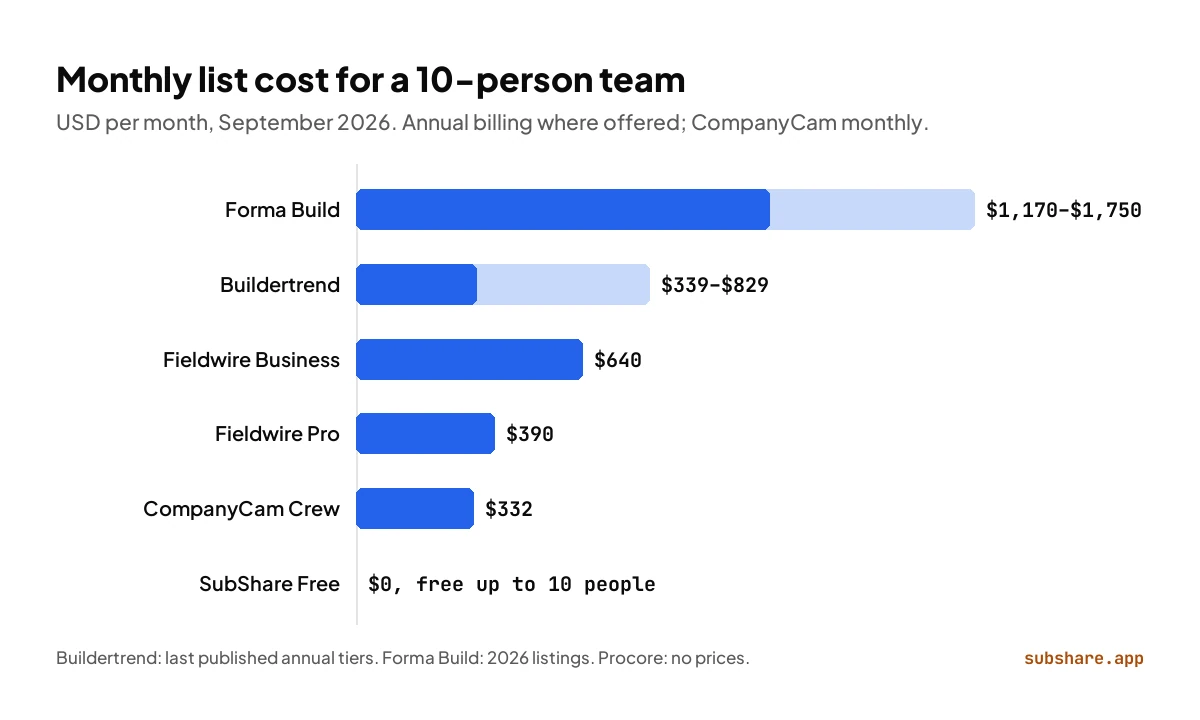
The five use four different pricing models, which is why their websites are so hard to compare. Fieldwire, Forma Build and CompanyCam charge per user, so the bill follows your headcount. Procore charges by annual construction volume with unlimited users, so the bill follows your revenue. Buildertrend now quotes by builder type and revenue. SubShare charges one monthly price for a crew-size bracket.
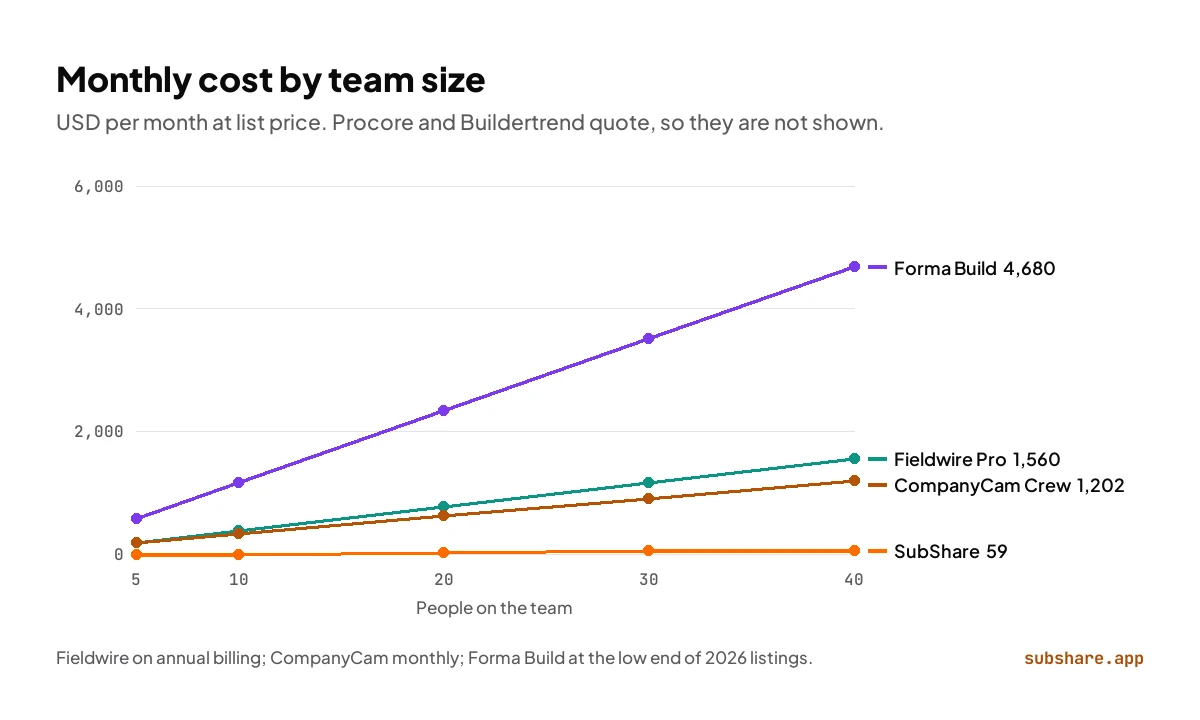
For a 10-person team, Fieldwire costs $390 a month on Pro and $640 on Business, Forma Build about $1,170 to $1,750, and CompanyCam $332 on its Crew plan. Buildertrend's last published tiers put it at $339 to $829. Procore does not publish a figure; third-party trackers put its contracts at about $4,500 to $60,000 a year. SubShare is free at that size. At 20 people the gaps widen: Fieldwire Pro reaches $780 a month, CompanyCam $622 and Forma Build at least $2,340, while SubShare costs $29. Per-user pricing is the reason, because every hire adds to the bill, where a crew-size bracket stays flat until the next step.
| 5 people | 10 people | 20 people | 40 people | |
|---|---|---|---|---|
| Procore | Quote | Quote | Quote | Quote |
| Buildertrend | Quote ($339–$829 at last list price) | Quote | Quote | Quote |
| Fieldwire Pro | $0 on Basic (3 projects) or $195 | $390 | $780 | $1,560 |
| Forma Build | $585–$875 | $1,170–$1,750 | $2,340–$3,500 | $4,680–$7,000 |
| CompanyCam Crew | $187 | $332 | $622 | $1,202 |
| SubShare | $0 | $0 | $29 | $59 |
Our arithmetic from list prices checked September 25, 2026: Fieldwire on annual billing, CompanyCam on monthly billing, Forma Build from 2026 third-party listings. Buildertrend's published plans had unlimited users, so its last list price did not depend on team size.
Where does the "$375 a month" Procore price come from?
Some review sites list Procore from $375 a month. That figure does not appear on Procore's own pricing page, which publishes no price at all. Procore sets an upfront annual fee by product and by your annual construction volume, with unlimited users, so treat any flat monthly number as a rough guess and ask for a quote on your real volume.
Procore: built for commercial project teams
Procore is the platform for jobs where many companies need to work in one place. Owners, architects, the GC and every sub can have an account without adding to the bill, because Procore never charges per user. It covers drawings, RFIs, submittals, meetings, quality and safety, and financials, and it sells crew scheduling separately as Resource Planning, which began as LaborChart. The fee is an upfront annual charge per product, set by your annual construction volume.
Pick Procore if your projects are commercial, many companies need to work inside them, and your volume makes a volume-based fee sensible.
Buildertrend: built for residential builders and remodelers
Buildertrend is organized around the homeowner. It runs the job schedule, daily logs, estimates and proposals, selections, change orders, warranty and payments, with a client portal that keeps the homeowner in the loop. Subs and vendors use a free portal, with their own login, to see the schedule and take bid requests. In 2026 it took its prices off the website in favor of custom quotes.
Pick Buildertrend if you build or remodel homes, the client experience helps you win work, and you want estimates, selections and payments in one system.
Fieldwire: built for superintendents and field crews
Fieldwire, owned by Hilti since 2021, is the field app of the group. Tasks and punch items are pinned to locations on the drawings, the sheets work offline, and the Gantt view can carry manpower. Its prices are published, and it is the only one of the five with a real free plan: Basic covers 5 users, 3 projects and 100 sheets. RFIs, submittals, change orders and budget arrive only on Business Plus, at $89 a user, and invited subcontractors count as users unless they have their own paid plan.
Pick Fieldwire if your supers and foremen work from drawings and punch lists, and you want to see the price before talking to sales. For more, see our Fieldwire alternatives guide.
PlanGrid: now Autodesk Forma Build
PlanGrid put the current drawing set on a tablet years before anyone else did it well. Autodesk bought it in 2018 for $875 million, closed it to new customers and moved its field tools into Autodesk Build, which was renamed Forma Build on March 24, 2026. Forma Build adds RFIs, submittals, cost management and Autodesk model data to the sheet workflow PlanGrid users know, at about $117 to $175 per user per month.
Pick Forma Build if your drawings start in Autodesk tools and a small core team needs document control. We compare it in detail in Fieldwire vs PlanGrid and PlanGrid vs Procore.
CompanyCam: built for photo documentation
CompanyCam does one thing and does it so well that crews use it without being asked: every photo and video is timestamped and filed under its project. Checklists and reports are built from those photos, and the Crew plan adds task assignment, real-time job tracking and a live map. Core costs $63 a month for one user, Crew $129 for three and Scale $199 for three, with extra users at $29 each; annual billing saves 20%.
Pick CompanyCam if photos are how you prove progress, update customers and settle disputes. It will sit next to any of the others.
Head to head: the comparisons people search for
Procore vs Buildertrend
Procore for commercial projects with many companies in one system; Buildertrend for residential builders who sell to homeowners. Both quote individually. Procore's fee follows construction volume with unlimited users; Buildertrend's quote follows builder type and revenue.
Procore vs Fieldwire
Procore covers field and office, financials included, for one volume-based fee. Fieldwire covers the field at a published per-user price: $390 to $890 a month for 10 people, or $780 for 20 people on Pro, against a Procore quote. Small teams usually pay less on Fieldwire; large teams with many outside collaborators can come out ahead on Procore's unlimited users.
Buildertrend vs Fieldwire
They barely overlap. Buildertrend manages the homeowner, the estimate and the job schedule, and now prices by custom quote. Fieldwire manages drawings, tasks and punch lists for a field team, keeps sheets available offline, and publishes a per-user price. The two treat subcontractors very differently: Buildertrend gives subs a free portal with their own login, while Fieldwire counts every invited sub as a paid user on your account unless the sub has its own plan. A remodeler usually wants Buildertrend; a commercial superintendent usually wants Fieldwire.
Fieldwire vs CompanyCam
Fieldwire starts from the drawing, CompanyCam from the photo. For 10 people, CompanyCam's Crew plan costs $332 a month on monthly billing and Fieldwire Pro $390 on annual billing. If your team needs both drawings and photos, Fieldwire covers photos too; if it only needs photos, CompanyCam is simpler.
PlanGrid vs Procore
PlanGrid was never part of Procore; Autodesk bought it in 2018, and its successor is Forma Build. The biggest difference is how you pay: Forma Build per named user, Procore by construction volume with unlimited users. See the full PlanGrid vs Procore comparison.
If your GC runs Procore, who schedules your crew?
Many trade contractors never buy Procore at all. They join each general contractor's Procore project free as a collaborator, where the GC's drawings, RFIs and submittals live. That covers the GC's project, but not your own week: your electricians or framers are spread across three GCs' jobs, and each project sits in a different GC's account. Someone still has to decide who goes where on Monday and tell them. That is the job SubShare does next to the GC's Procore: one board for your whole crew across every site, and one link per worker.
Who plans the crew's week?
Every one of these apps has a schedule, and every one of them looks at it from the project's side. Procore handles people scheduling in Resource Planning, priced as its own product, which can text or email each worker their schedule. Buildertrend shares its schedule with subs through a portal login. Fieldwire's Gantt view can carry manpower. Forma Build publishes a project schedule. CompanyCam's Crew plan assigns tasks. What none of the five offers at a published price is a schedule that starts from the person: here is your week, across every job, on your phone, without an account.
That is the question the electrician in the story was asking, and it is the one crews ask every day. The grid below shows how each app answers the things that decide whether a crew actually uses a schedule.
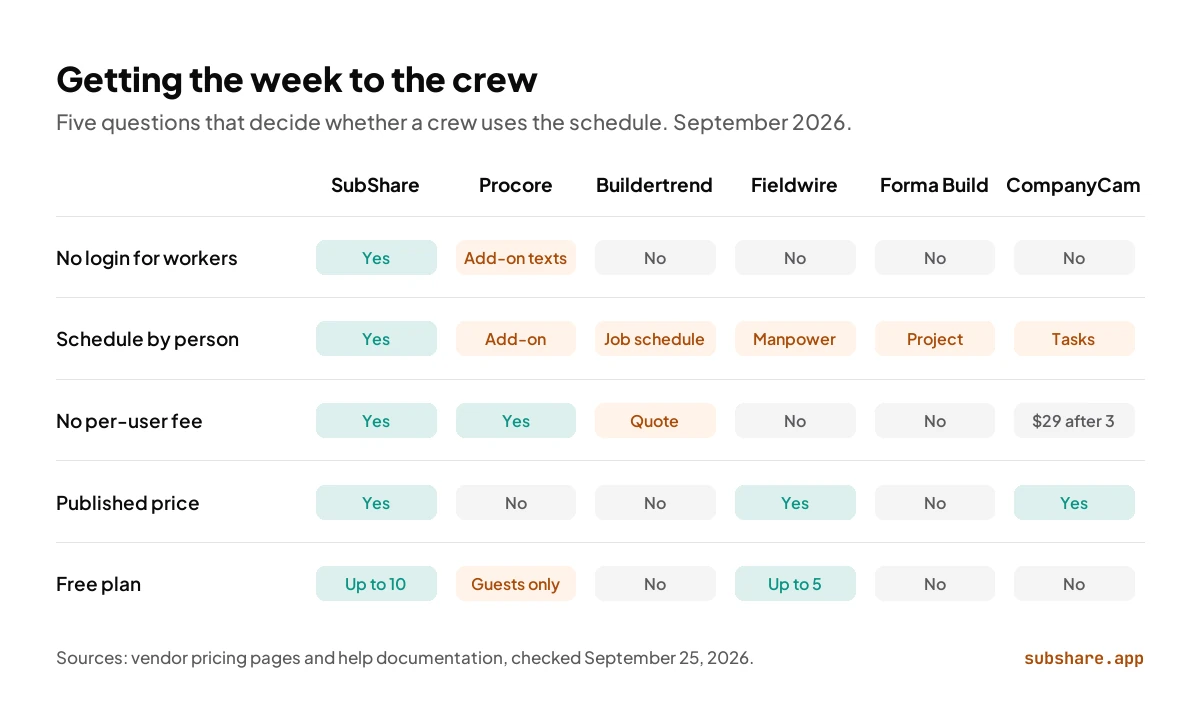
| SubShare | Procore | Buildertrend | Fieldwire | Forma Build | CompanyCam | |
|---|---|---|---|---|---|---|
| No login for workers | Yes | Texts via add-on | No | No | No | No |
| Schedule by person | Yes | Add-on | Job schedule | Manpower on Gantt | Project schedule | Task assignment |
| No per-user fee | Yes | Yes | Quote | No | No | $29 per user after 3 |
| Published price | Yes | No | No | Yes | No | Yes |
| Free plan | Up to 10 people | Collaborators only | No | Up to 5 users | No | No |
From vendor pricing pages and help documentation, checked September 25, 2026.
Where SubShare fits
Can SubShare replace Procore, Buildertrend or Fieldwire?
For the crew's weekly schedule, yes; for drawings, RFIs and homeowner portals, it runs next to them. SubShare is our product, and it is built for the electrician's question. You plan the week on one board, one row per person: every job with a duration, the site address, the access code and the drawings attached. When someone calls in sick, you drag the bar. Each person gets one permanent link by text or WhatsApp and opens their own week in the phone's browser, with no app, account or password, and it keeps working without signal once opened. Workers tick jobs done from their phone, and the board flags anyone booked twice or scheduled on a day off.
It runs next to any of the five, or on its own for teams that don't need a project platform. SubShare is free for up to 10 people, $29 a month for up to 20 and $59 for up to 40 (see pricing). For a whole 20-person crew, that is less than a single Fieldwire Pro seat. Every account starts with 14 days of Team features and no card, and billing is monthly. You can try the demo board without signing up. It is not a drawing or document system: RFIs, submittals and markups stay in the tools above.
Which one should you choose?
- Commercial projects with many companies in one system → Procore.
- Residential building or remodeling, sold to homeowners → Buildertrend.
- Supers and foremen working from drawings and punch lists → Fieldwire.
- Drawings from Autodesk tools and formal document control → Autodesk Forma Build, PlanGrid's successor.
- Photo records of every job → CompanyCam.
- Getting each person their week, with no app or login → SubShare, alone or next to any of the above.
Procore vs Buildertrend vs Fieldwire: frequently asked questions
Which is better: Procore, Buildertrend or Fieldwire?
Each is best for a different team. Procore is best for commercial projects where many companies work in one system. Buildertrend is best for residential builders and remodelers who sell to homeowners. Fieldwire is best for superintendents and field crews working from drawings. For planning your own crew and sending each person their week without an app, SubShare.
What is the difference between Procore and Buildertrend?
Procore is built for commercial construction, with RFIs, submittals, quality and safety, and financials, priced by annual construction volume with unlimited users. Buildertrend is built for residential construction, with a client portal, selections, estimates and payments, priced by a custom quote based on builder type and revenue.
Is Fieldwire cheaper than Procore?
For small teams, usually. Fieldwire publishes its prices: free for up to 5 users, then $39 to $89 per user per month, or $390 to $890 a month for 10 people. Procore publishes none; third-party trackers put its contracts at about $4,500 to $60,000 a year. For large teams, Procore's unlimited users can work out cheaper.
Is PlanGrid still available?
Only to existing customers. PlanGrid is closed to new buyers and gets no new features. Autodesk moved its field tools into Autodesk Build, renamed Forma Build on March 24, 2026, and sells that in its place at about $117 to $175 per user per month.
What is CompanyCam used for?
Photo and video documentation. Every picture is timestamped and filed under its project, and the Crew plan adds checklists, reports, task assignment and a live map. It does not manage drawings, schedules or budgets.
Is Procore overkill for a small contractor?
It can be. Procore is built for projects where many companies work in one system, and it charges an upfront annual fee set by construction volume. A small contractor that mainly needs drawings and a crew schedule usually pays less with Fieldwire, from $39 per user, or SubShare for the schedule alone, free for up to 10 people.
Do subcontractors pay for Fieldwire?
Not directly, but someone does. Fieldwire's help center says every person invited to a project counts as a user on the inviting account, subcontractors included, unless they already pay for their own Fieldwire plan. Procore and Buildertrend give invited subs free access instead.
What is the cheapest option for a 20-person crew?
For the crew's schedule, SubShare at $29 a month for up to 20 people. Fieldwire's free plan stops at 5 users, so 20 people on Fieldwire Pro cost $780 a month, and CompanyCam's Crew plan costs $622. Procore and Buildertrend quote individually.
Which of these apps can workers use without an account?
None of the five, as standard. Procore, Buildertrend, Fieldwire, Forma Build and CompanyCam all give each person a login, even where the login itself is free; Procore's Resource Planning can also text schedules. SubShare sends each worker a personal link that opens their whole week in the phone's browser with no account.
How we compared
We compared the five apps on September 25, 2026 by reading each vendor's pricing page and help documentation, then worked out monthly costs for teams of 5, 10, 20 and 40 people on annual billing where offered. Procore, Autodesk and, since 2026, Buildertrend quote individually, so their figures come from third-party trackers or last published tiers and are labeled that way. No vendor paid for placement or reviewed this article. SubShare is our product, as the introduction and the "Where SubShare fits" section say. This article was first published in June 2026 and rewritten on September 25, 2026 with re-checked prices, SubShare's current plans and new sections.
Related comparisons
Sources, accessed September 25, 2026
- Procore pricing, Procore Resource Planning and CostBench: Procore pricing estimates.
- Buildertrend pricing, Buildertrend subcontractor software; last published tiers from Down to Bid.
- Fieldwire pricing and Fieldwire help: pricing and overages.
- Wikipedia: PlanGrid, Autodesk: Autodesk Construction Cloud is now Autodesk Forma and Forma Build listings on Capterra.
- CompanyCam pricing.
- SubShare pricing.
About the author
James M. · Owner/Project Manager, JJB General Contractors
James M. is the owner and project manager at JJB General Contractors, where he runs jobs and coordinates subcontractors on site every day. That hands-on field perspective shapes what SubShare writes about planning crews and getting each person their week.
Connect with James M. on LinkedIn →Plan the week once. Everyone knows where to be.
14 days of Team features. No card required. Then continue on Free within its limits, or choose a paid plan.
Start free