6 Buildertrend Alternatives for Builders and Remodelers (2026)
Buildertrend no longer publishes prices. Six alternatives that do, compared on what a 10-person builder pays a month and what each is best at.
Best Buildertrend alternative: the short answer
The best Buildertrend alternative depends on which part of Buildertrend your team really uses. Buildertrend stopped publishing prices in 2026 and now quotes by builder type and annual revenue; its last published tiers ran from $339 to $829 a month on annual billing. If the schedule is what your team lives in, SubShare runs the crew's week on one board and sends each person a link with no login, free for up to 10 people and $29 a month for up to 20. JobTread is the closest full replacement, with estimating and job costing from $199 a month and free portal users. Contractor Foreman is the cheapest all-in-one at $221 a month for up to 15 users. Houzz Pro suits design-build firms from $99 a month, CompanyCam covers photo documentation from $63, and Procore is the step up for commercial work.
For a lot of builders, Buildertrend is the schedule. It is what the office opens at seven to see who is framing where, and what the drywall sub checks to find out whether Thursday is still on. So it stings when the renewal conversation starts and there is no price on the website to anchor it. In 2026 Buildertrend swapped its published tiers for a quote form that asks for your builder type and your annual revenue.
If you are reading this, you are probably in one of three places. The quote came back higher than last year's. You are a smaller builder paying for modules you never switched on. Or your crew still texts you for the plan, because nobody opens the app. Each of those points to a different alternative.
This guide compares six, each with a published 2026 price and the monthly cost for a 10-person team worked out. SubShare is our product and is listed first: it is the cheapest way to replace the part of Buildertrend most teams use every day, and its section says so.
What does Buildertrend cost in 2026?
Buildertrend pricing is no longer on its website. The pricing page asks a few questions about your business, including builder type and annual revenue, and a sales rep follows up with a custom quote. Its last published tiers were Essential, Advanced and Complete, from $339 to $829 a month on annual billing or $499 to $1,099 month to month, with unlimited users. Essential covered the schedule, daily logs, client communication and time tracking; Advanced added estimating, proposals and purchase orders; Complete added selections and warranty. Buildertrend's FAQ says a quote now depends on builder type, annual revenue and business needs, so two builders with the same crew can pay different amounts.
Subs and vendors can use Buildertrend's portal free, with their own login, to see the schedule, take bid requests and post updates. The software is broad and well liked by the builders it fits. The question is whether you need all of it.
Why do builders look for a Buildertrend alternative?
Most builders who look for a Buildertrend alternative are not unhappy with the software. They are unsure what it will cost next year, or they pay for a full suite when the schedule is the only part the crew opens.
- No published price. The quote follows your revenue, so a good year can raise it even if the team stays the same.
- Paying for modules you don't use. Selections, warranty and online payments earn their keep for custom home builders, less so for a remodeler with three jobs on.
- The crew still needs a login. Subs and field staff sign in to see the schedule, and the ones who won't keep calling the office.
- Setup and training. A full suite takes weeks to set up well, and someone has to own it.
What do Buildertrend alternatives cost for a 10-person team?
| Tool | Best for | Crew needs a login | Published price | 10 people per month | Per year |
|---|---|---|---|---|---|
| SubShare Free | Crew scheduling | No, a personal link | Yes | $0 | $0 |
| Contractor Foreman Pro | Cheapest all-in-one | Yes | Yes | $221 | $2,652 |
| JobTread | Estimating and job costing | Staff yes; portals by email link | Yes | $303 annual / $379 monthly | $3,638 |
| CompanyCam Crew | Photo documentation | Yes | Yes | $332 | $3,984 |
| Houzz Pro Teams | Design-build sales | Yes | Yes | From $399 | From $4,788 |
| Buildertrend | Residential all-in-one | Yes, free sub portal | No | $339–$829 at last list price | $4,068–$9,948 |
| Procore | Commercial projects | Yes | No | Quote only | About $4,500–$60,000 |
Our arithmetic from each vendor's list price, checked September 25, 2026, annual billing where offered; CompanyCam on monthly billing. Buildertrend's range uses its last published annual tiers. The tools cover different amounts of work; read each section before comparing prices.
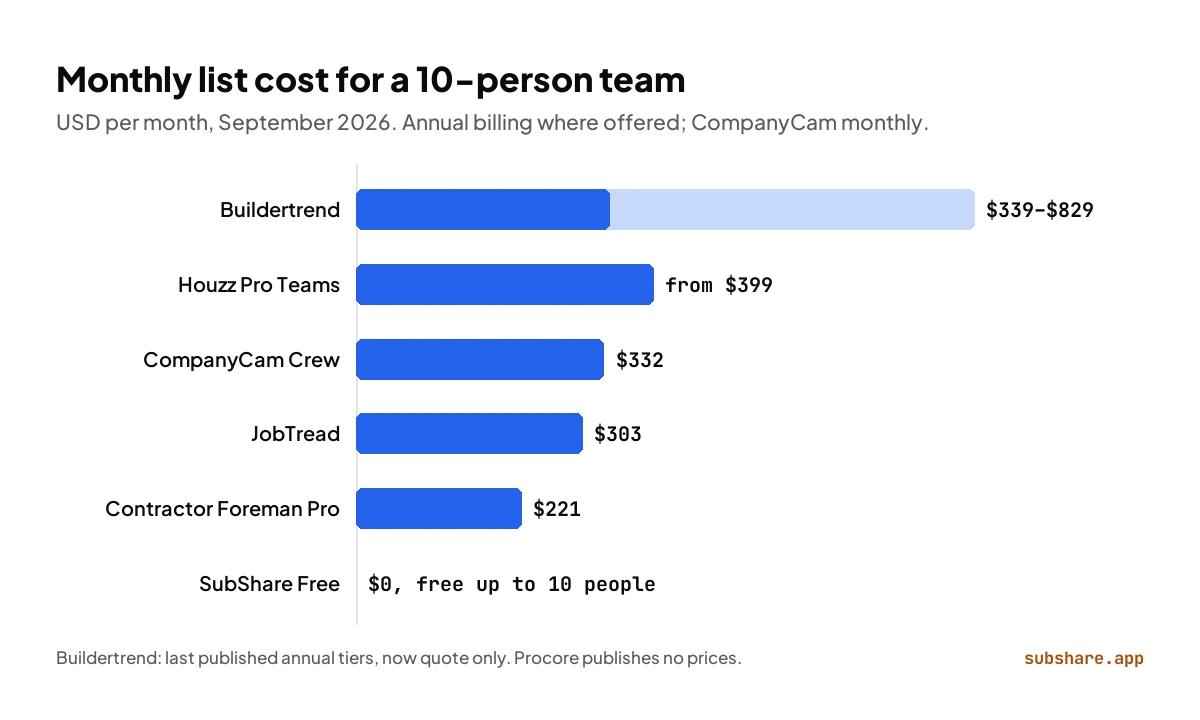
Every alternative in the table is cheaper than Buildertrend's last published annual tiers for a 10-person team, and all of them still show their prices.
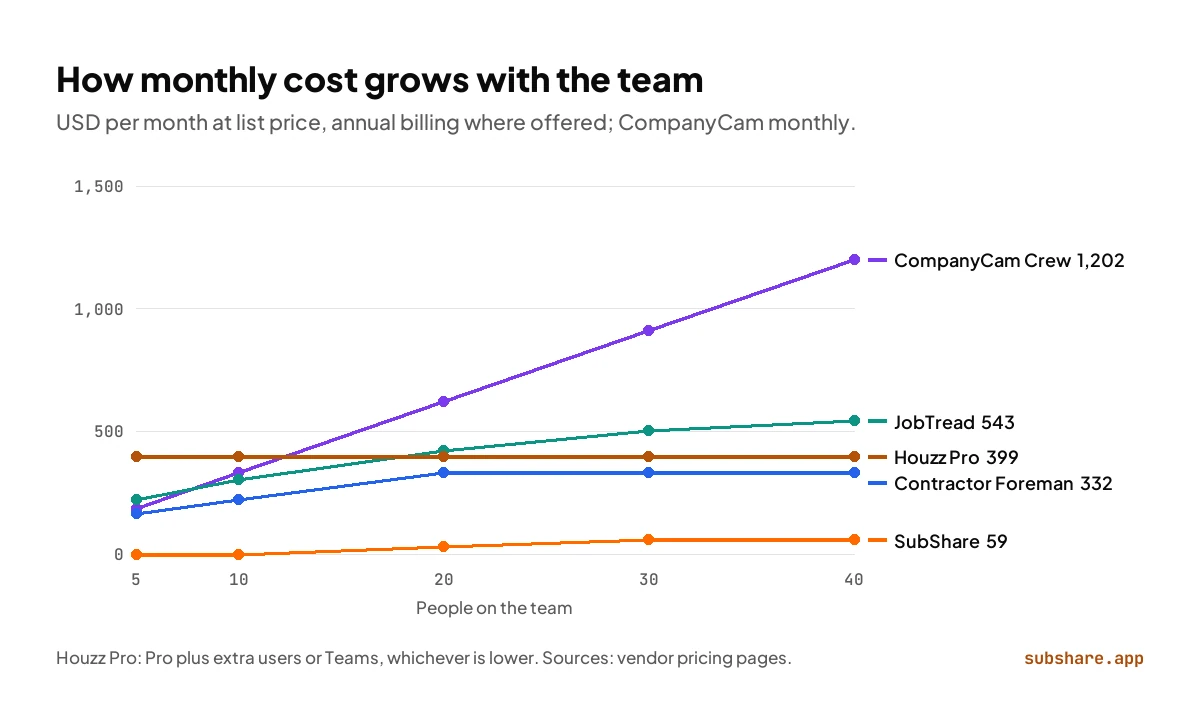
Team size changes the picture. Tools that charge per user climb with every hire; tools that price by plan size step up and then stay flat. At 40 people, CompanyCam's Crew plan costs $1,202 a month and JobTread $543 on annual billing, while SubShare's Team plan is $59.
1. SubShare: the crew schedule, with a published price and no logins
Best for: builders whose day runs on the schedule · Free up to 10 people, $29/month up to 20
Is SubShare a good Buildertrend alternative?
Yes, when the schedule is what you really use Buildertrend for. Disclosure: SubShare is our product. If the schedule is the part of Buildertrend your team lives in, SubShare does that job with less in the way. You put every job on a person on one board, with the site address, the access code and the drawings attached, and move a bar when the plumber is a day late. Each person, employee or sub, gets one permanent link by text or WhatsApp and opens their own week in the phone's browser. No portal login, no app, no password, and the plan stays readable on a site with no signal.
The price is on the website: free for up to 10 people, $29 a month for up to 20 and $59 for up to 40, billed monthly (see pricing). There is no per-seat charge, and every account starts with 14 days of Team features with no card. The same link works every week, and you can revoke it when someone leaves. Workers tick jobs done from their phone and the board shows it, and the board flags anyone booked twice or scheduled on a day off. SubShare does not handle the homeowner side: selections, estimates and payments. If you already cover those with an estimating tool and your accounting software, SubShare runs the rest of the week for a fraction of the cost. Try the demo board without signing up.
Choose SubShare over Buildertrend if
- The schedule is the Buildertrend feature your team uses every day.
- You want a published price, paid month to month.
- Your crews and subs will not log in to a portal.
- You have 10 people or fewer and want to start free.
Where SubShare falls short
- No client portal, selections, estimates or payments.
2. JobTread: the closest like-for-like, with the price on the website
Best for: Residential builders who live and die by the estimate · $199/month with 1 user, then $5–$20 per extra user
JobTread covers most of what builders buy Buildertrend for, and goes further on money. Estimates come from cost catalogs, budgets flow into purchase orders and change orders, and job costing shows margin while the job is still running. Scheduling, tasks, time tracking, selections and customer portals are all in the same plan, and there is no contract or setup fee.
The price is published: $199 a month with one internal user, plus $20 for each of the next nine, falling to $5 past 30; annual billing takes 20% off. A 10-person team pays $379 a month, or $303 on annual billing. Vendor and customer portal users are free and unlimited, and in most cases they open the portal from an emailed link without a password.
Buildertrend vs JobTread: choose JobTread if
- Estimating and job costing are where you lose money today.
- You want subs and clients in a portal without paying for them.
- You want a published monthly price with no contract.
Where JobTread falls short
- Your own staff pay per user.
- Field tools are lighter than a dedicated field app.
3. Contractor Foreman: the most suite for the money
Best for: Small builders who want an all-in-one on a tight budget · From $49/month; $221 for up to 15 users, billed annually
Contractor Foreman's plans include project management, scheduling, time cards and crew scheduling, and from Standard up add subcontracts and a client portal, with QuickBooks integration. Plans are sold by user count on annual billing: Basic at $49 a month for one user, Standard at $105 for three, Plus at $166 for eight, Pro at $221 for 15 and Unlimited at $332.
A 10-person team lands on Pro at $221 a month, less than Buildertrend's last published entry tier. Annual plans carry a 100-day money-back guarantee if you meet its usage conditions. The trade-off is polish: it covers a lot of ground, and each module is lighter than a specialist's.
Buildertrend vs Contractor Foreman: choose Contractor Foreman if
- Price is the main reason you are leaving Buildertrend.
- You want time cards and crew scheduling alongside the job.
- You can live with a busier interface.
Where Contractor Foreman falls short
- Breadth over depth.
- Lowest prices need an annual prepay.
4. Houzz Pro: for design-build firms that sell on looks
Best for: Remodelers and design-build firms whose clients buy from designs · From $99/month; Teams from $399 with unlimited users
Houzz Pro is strongest before the first stud goes up. It pairs 3D floor plans, mood boards, selections, estimates, proposals and online payments with a CRM, and its Pro plan at $199 a month adds takeoffs, bid management, change orders, budgets, contracts, a project schedule and daily logs.
Design and Pro include one user, with extra users at $50 a month, so a 10-person firm usually lands on Teams, from $399 a month with unlimited users. If your selling is visual and your jobs are remodels, it can cover the same homeowner journey Buildertrend does, with a marketplace behind it that sends leads.
Buildertrend vs Houzz Pro: choose Houzz Pro if
- Clients buy from your designs and presentation wins the job.
- You want lead generation from the Houzz marketplace.
- Your project management needs are real but modest.
Where Houzz Pro falls short
- Lighter on site coordination than Buildertrend.
- Per-user fees on the smaller plans.
5. CompanyCam: when the daily log is really a photo log
Best for: Builders who document every job in photos · From $63/month; Crew $129 for 3 users, plus $29 per extra user
For a lot of crews, the daily log is a handful of photos. CompanyCam makes those photos the record: every picture and video is timestamped and filed under its project, and checklists and reports are built from them. The Crew plan adds task assignment, real-time job tracking and a live map.
Core costs $63 a month for one user and Crew $129 for three, with extra users at $29 each on monthly billing; annual billing saves 20%. A 10-person team on Crew pays $332 a month. It will not run your schedule or estimates, so it replaces Buildertrend only where photos and daily logs were the point.
Buildertrend vs Procore, Fieldwire and CompanyCam, compared →
Buildertrend vs CompanyCam: choose CompanyCam if
- Photos are how you prove progress and settle disputes.
- You want the crew documenting without a lesson.
- Estimates and scheduling live somewhere else.
Where CompanyCam falls short
- No schedule, estimates or client portal of its own.
- Every user past the third costs $29 a month.
6. Procore: the step up for commercial work
Best for: Builders moving into commercial projects · Quote only; third-party estimates $4,500–$60,000 a year
If you are leaving Buildertrend because your work has turned commercial, Procore is the usual next stop. It is built for projects where the owner, the architect and many subcontractors work in one system, with drawings, RFIs, submittals, quality and safety, and financials. It never charges per user; the annual fee is set by product and by your construction volume.
Like Buildertrend now, Procore publishes no prices. Third-party trackers put contracts at roughly $4,500 to $60,000 a year, and crew scheduling comes as a separate product, Resource Planning. For a residential builder it is almost always more platform than the job needs.
7 Procore alternatives and competitors, with prices →
Buildertrend vs Procore: choose Procore if
- Your projects are commercial, with formal RFIs and submittals.
- Many companies need to work inside the same project.
- You are growing into a volume-based fee.
Where Procore falls short
- No published price; upfront annual fee.
- More setup and training than any tool here.
Other Buildertrend competitors you will see
A few more Buildertrend competitors turn up in every comparison. They are left out of the list above because their prices are not published or they serve a different kind of business:
- Jobber: field service management for home service businesses, better suited to repeat service calls than to building projects.
- Projul and Buildern: construction management for builders and contractors, both of which publish their own Buildertrend comparisons.
- CoConstruct: once Buildertrend's closest rival. Buildertrend bought it in February 2021 and has since merged it into Buildertrend, so it is no longer a separate choice.
Buildertrend vs SubShare, side by side
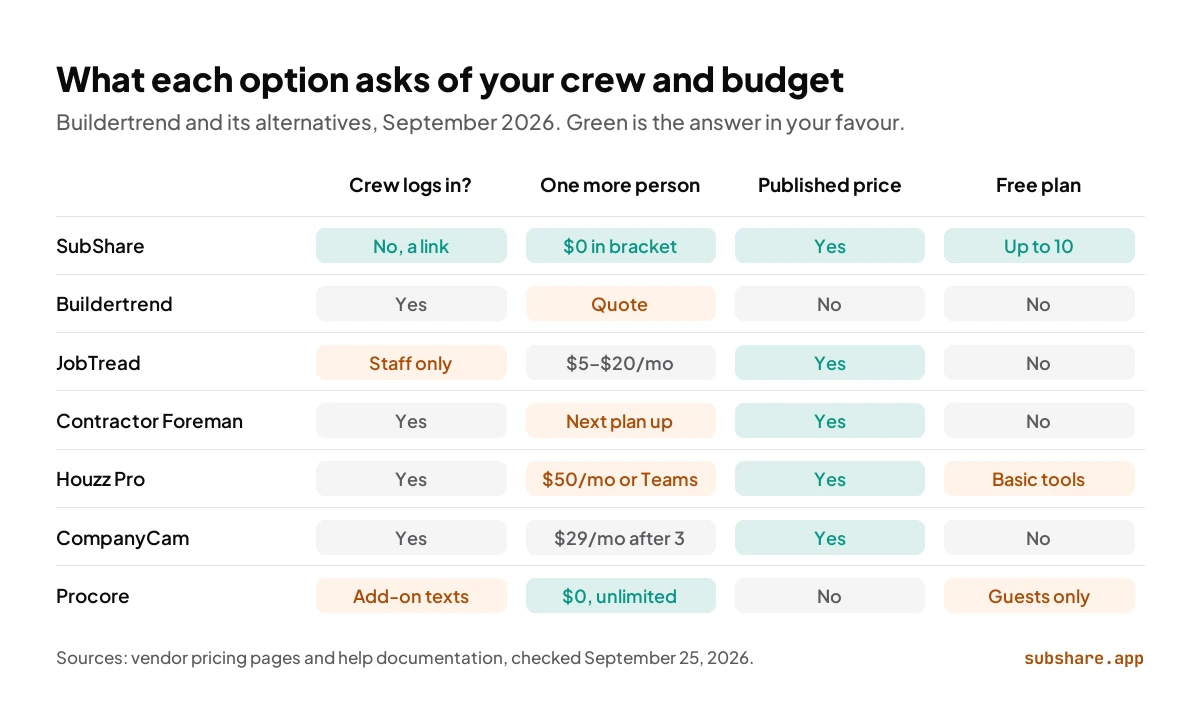
Buildertrend runs the whole homeowner journey; SubShare runs the crew's week. Where they overlap, on the schedule, this is how they compare.
| Buildertrend | SubShare | |
|---|---|---|
| Price | Custom quote by builder type and revenue | Published: $0, $29 or $59 a month |
| Cost for 10 people | $339–$829 a month at last list price | $0 |
| How the crew sees the plan | App or portal, with a login | A link in a text message |
| Subcontractors | Free portal, own login | On the board like anyone else, no login |
| Changing the plan | Edit the schedule item | Drag the bar; each link updates |
| Free plan | No | Yes, up to 10 people |
| Client portal, selections, payments | Yes | No |
| Estimates and proposals | Yes (from the Advanced tier) | No |
| Cost per year for 10 people | $4,068–$9,948 at last list price | $0 |
| Billing | Annual or month to month | Monthly, cancel any time; 14 days of Team features first |
Buildertrend from buildertrend.com and its help center, with last published tiers from third-party trackers; SubShare from subshare.app/pricing. Checked September 25, 2026.
How to move your crew's week off Buildertrend
You can move the schedule first and decide about the rest later:
- Add your people and subs to the SubShare board: a name and a phone number each.
- Enter the next two weeks of jobs, with each site's address, access code and drawings.
- Send each person their link by text or WhatsApp.
- Run both tools side by side for a week.
- Decide what Buildertrend is still worth keeping for, such as selections and payments, before the renewal.
Which Buildertrend alternative should you choose?
- The schedule is what you use, and the crew won't log in → SubShare.
- Estimating and job costing, with a published price → JobTread.
- The most features for the least money → Contractor Foreman.
- Design-led remodels that sell on presentation → Houzz Pro.
- Photos are the daily log → CompanyCam.
- Your work has turned commercial → Procore.
- Selections, warranty and payments are all in daily use → Staying on Buildertrend may be right; add SubShare for the crew's week.
Buildertrend alternatives: frequently asked questions
What is the best Buildertrend alternative?
It depends on which part of Buildertrend you rely on. For the crew schedule, with no login for workers and a published price, SubShare. For estimating and job costing, JobTread. For the cheapest all-in-one, Contractor Foreman. For design-build sales, Houzz Pro. For photo documentation, CompanyCam. For commercial projects, Procore.
How much does Buildertrend cost in 2026?
Buildertrend no longer publishes prices. Its pricing page asks for your builder type and annual revenue and then gives a custom quote. Its last published tiers ran from $339 to $829 a month on annual billing, or $499 to $1,099 month to month, with unlimited users.
What is cheaper than Buildertrend?
For crew scheduling, SubShare is free for up to 10 people and $29 a month for up to 20. Among full suites, Contractor Foreman costs $221 a month for up to 15 users and JobTread $303 a month for 10 users, both on annual billing.
Is JobTread better than Buildertrend?
JobTread is the better fit if estimating and job costing matter most and you want a published price with free portal users. Buildertrend goes further on homeowner selections and warranty. Both include scheduling.
Do subcontractors pay to use Buildertrend?
No. Builders can invite subs and vendors to a free portal to see the schedule, take bid requests and post updates. Each sub signs in with their own login.
What are Buildertrend's main competitors?
Buildertrend's main competitors for residential builders are JobTread, Contractor Foreman and Houzz Pro, with Procore as the step up for commercial work. CompanyCam competes on photo documentation, and SubShare on the crew's weekly schedule. CoConstruct, once its closest rival, was bought by Buildertrend in 2021.
Is there a free Buildertrend alternative?
For the schedule, yes: SubShare's Free plan covers up to 10 people, 3 sites and 5 files per site, with no login for workers. None of the full suites compared here has a free plan that replaces Buildertrend's estimates, selections and payments.
Does Buildertrend charge per user?
Its last published plans did not: Essential, Advanced and Complete all included unlimited users. Since 2026 Buildertrend quotes each buyer based on builder type and annual revenue, so ask the rep how team size affects your quote.
Can I use SubShare with Buildertrend?
Yes. Keep Buildertrend for the homeowner side, such as selections, change orders and payments, and run the crew's week in SubShare, so workers see their jobs from a link instead of a portal login.
How we compared
We priced every Buildertrend alternative for the same ten-person builder on September 25, 2026, from each vendor's pricing page and on annual billing where offered. Because Buildertrend no longer publishes prices, its figures are its last published tiers as recorded by third-party trackers and the archived pricing page, and Procore's are third-party estimates; both are labeled. No vendor paid for placement or reviewed this article. SubShare is our product; it is listed first, and its section discloses that. This article was first published in June 2026 and rewritten on September 25, 2026 with re-checked prices, SubShare's current plans and new sections.
Related comparisons
Sources, accessed September 25, 2026
- Buildertrend pricing, Buildertrend FAQ and Buildertrend subcontractor software.
- Buildertrend pricing page as archived in March 2025 and Buildertrend: acquisition of CoConstruct.
- Last published Buildertrend tiers: Down to Bid and Projul.
- JobTread pricing and JobTread vendor portal help.
- Contractor Foreman pricing, Houzz Pro pricing and CompanyCam pricing.
- Procore pricing and CostBench: Procore pricing estimates.
- SubShare pricing.
About the author
James M. · Owner/Project Manager, JJB General Contractors
James M. is the owner and project manager at JJB General Contractors, where he runs jobs and coordinates subcontractors on site every day. That hands-on field perspective shapes what SubShare writes about planning crews and getting each person their week.
Connect with James M. on LinkedIn →Plan the week once. Everyone knows where to be.
14 days of Team features. No card required. Then continue on Free within its limits, or choose a paid plan.
Start free