6 Fieldwire Alternatives for Construction Teams (2026)
Fieldwire bills every user, subs included. Six alternatives compared on 2026 prices for a 10-person team, from a free crew schedule to Forma Build.
Best Fieldwire alternative: the short answer
The best Fieldwire alternative depends on what your team opens Fieldwire for. If it is mostly the crew checking where they are today and pulling up the drawing, SubShare does that with no app or login for workers, free for up to 10 people and $29 a month for up to 20. Fieldwire itself costs $39 to $89 per user per month, and subcontractors you invite count as users. For drawings with RFIs and submittals, Autodesk Forma Build (formerly PlanGrid) runs about $117 to $175 per user per month. Procore suits larger contractors who want unlimited users priced by construction volume. Bluebeam Revu ($260 to $590 per user per year) wins on markups and takeoffs, CompanyCam on photo records from $63 a month, and Contractor Foreman is the budget all-in-one at $221 a month for up to 15 users.
Fieldwire tends to arrive the same way. A superintendent tries the free plan on one job. The crew likes having the sheets on their phones, the foreman starts pinning punch items to rooms, and within a month there are twelve people on the account. Then the first real invoice shows up. Fieldwire charges per user, and its help center is clear that subcontractors you invite count too, unless they pay for their own plan. Twelve people on the Business plan is $768 a month.
Nobody did anything wrong in that story. Fieldwire is good software. But it is worth asking what those twelve people actually open it for. For the super, it is drawings and punch lists. For most of the crew, it is one question, asked every morning: where am I today, and what am I doing there? Your answer to that decides which alternative fits.
Below are six Fieldwire alternatives, from full platforms to apps like Fieldwire that do one job well, each with its 2026 list price, the monthly cost for a 10-person team, and a plain account of who it suits. SubShare is our product. It is listed first because it is the cheapest answer to that morning question, and its section says so.
What is Fieldwire, and what does it cost?
Fieldwire is a construction field management app for superintendents, foremen and field crews. It puts the current drawings on a phone or tablet, pins tasks and punch items to locations on the sheets, and adds checklists, photos, forms and a Gantt schedule. Hilti agreed to buy it in November 2021, and it is now sold as Fieldwire by Hilti. The Basic plan is free for up to 5 users, 3 projects and 100 sheets. Paid plans are priced per user per month on annual billing: Pro at $39, Business at $64 and Business Plus at $89, the only tier with RFIs, submittals, change orders and budget. Every person you invite counts as a user, subcontractors included, unless they pay for their own plan. For a 10-person team that is $390, $640 or $890 a month. Fieldwire fits best where superintendents and foremen work from drawings and punch lists every day. Our Fieldwire pricing report covers monthly billing, larger teams and overage charges.
Why do teams look for a Fieldwire alternative?
Most teams start looking for a Fieldwire alternative for one of two reasons: the per-user bill grows with every worker and subcontractor they add, or most of the people on the account only ever open it to check their schedule.
- Every user is a paid seat, subs included. Ten people on Business cost $640 a month; twenty cost $1,280.
- The free plan runs out fast. Basic stops at 5 users, 3 projects and 100 sheets.
- The office features sit on the top tier. RFIs, submittals, change orders and budget are only in Business Plus, at $89 a user.
- Everyone needs the app and a login. On a crew where apprentices, temps and subs rotate through, someone is always waiting for an invite or locked out.
- It is organized around tasks, not people. Fieldwire pins work to sheets and can show manpower on its Gantt view. If your real question is who goes where, a board with one row per person answers it faster.
What do Fieldwire alternatives cost for a 10-person team?
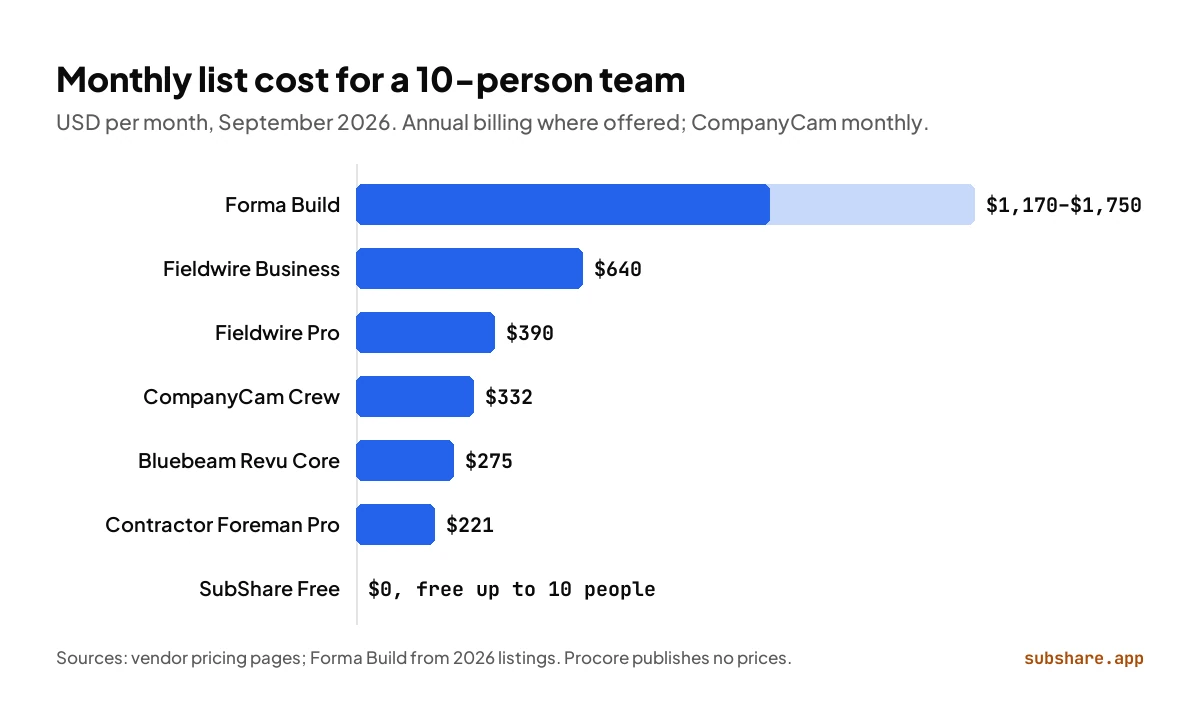
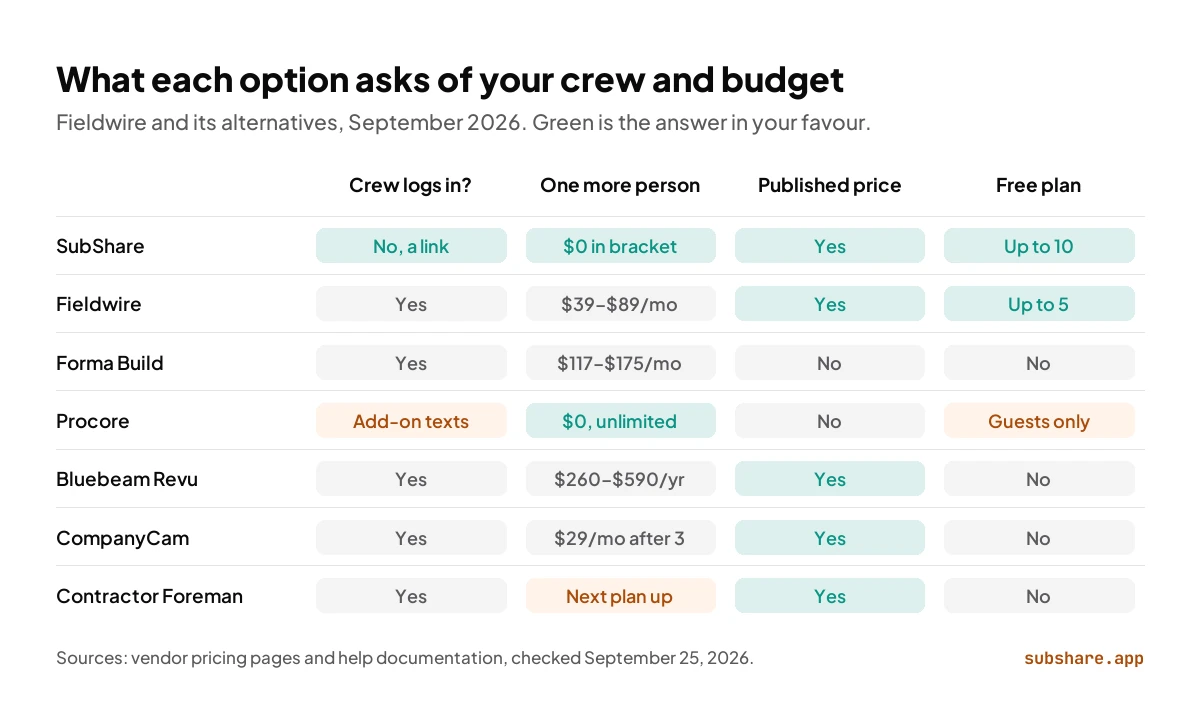
The table puts all seven tools side by side for the same team: ten people who all need to see their work. The last column is our own arithmetic from each vendor's list price.
| Tool | Best for | Workers need an account | Free plan | How it is priced | 10 people per month |
|---|---|---|---|---|---|
| SubShare Free | Crew scheduling, no app | No, a personal link | Up to 10 people | By crew size | $0 |
| Fieldwire Pro / Business | Tasks, punch lists, drawings | Yes | Up to 5 users | Per user, subs included | $390 / $640 |
| Autodesk Forma Build | Drawings, RFIs, submittals | Yes | No | Per user | About $1,170–$1,750 |
| Procore | Full project management | Yes | Collaborators only | Construction volume, unlimited users | Quote only |
| Bluebeam Revu Core | Markups and takeoffs | Yes | No | Per user per year | $275 |
| CompanyCam Crew | Photo documentation | Yes | No | 3 users, then $29 each | $332 |
| Contractor Foreman Pro | Budget all-in-one | Yes | No | Up to 15 users per plan | $221 |
List prices from each vendor's pricing page, checked September 25, 2026; annual billing where offered, CompanyCam on monthly billing. Forma Build is a range of 2026 third-party listings. Bluebeam Core is $330 per user per year, shown per month. The tools cover different amounts of work; read the sections below before comparing prices.
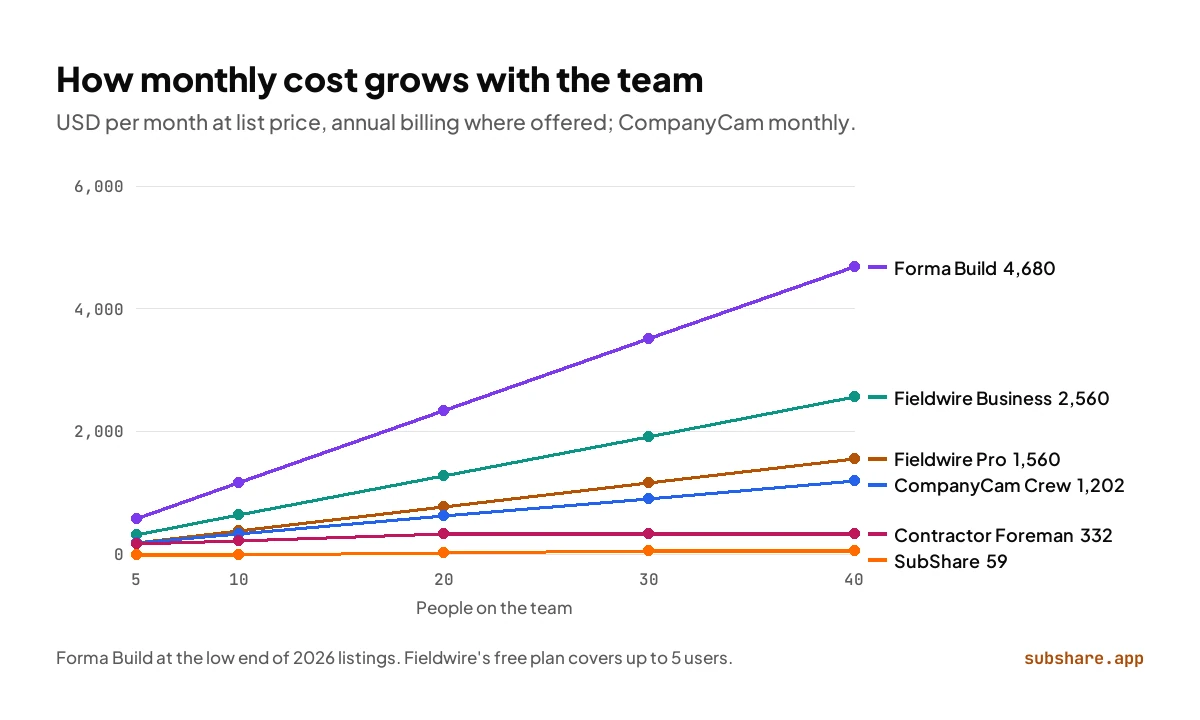
The gap gets wider as the team grows, because most of these tools charge for each person. At 40 people, Fieldwire Pro costs $1,560 a month and Forma Build at least $4,680. SubShare's Team plan covers the same 40 people for $59.
1. SubShare: the crew's schedule, with no app for anyone on site
Best for: foremen and supervisors who plan who goes where · Free up to 10 people, $29/month up to 20
Is SubShare a good Fieldwire alternative?
Yes, if the job you need done is the crew's schedule. Disclosure: SubShare is ours. We built it for the part of the job that decides whether a day goes well: every person knowing where to be, what they are doing there and where the drawing is. On SubShare's board you put each job on a person with a duration, and when someone calls in sick or a delivery slips, you drag the bar. Each worker has one permanent link, sent by text or WhatsApp. Tapping it opens their week in the phone's browser: the site address with a map link, the access code, the attached PDFs and who else is on the job. There is no app to install, no account and no password, and once opened the plan keeps working in a basement with no signal.
Price is where SubShare pulls furthest ahead. Fieldwire charges for every user, subs included; SubShare charges one monthly price for your crew size: free for up to 10 people, $29 for up to 20 and $59 for up to 40 (see pricing). For 20 people that is $29 a month against $780 on Fieldwire Pro. Every account starts with 14 days of Team features and no card, billing is monthly, and you can cancel any time. The same link keeps working week after week, and you can revoke it when someone leaves. Workers tick jobs done from their phone and the board shows it, and the board flags anyone booked twice or scheduled on a day off. You can try the demo board without signing up.
Choose SubShare over Fieldwire if
- Your crew mostly needs today's jobs, the address and the drawing.
- People come and go, and setting up accounts for each one is a chore.
- You want a price that does not climb with every person you add.
- You want to start free: up to 10 people cost nothing.
Where SubShare falls short
- No punch lists, sheet markups, RFIs or submittals; keep a drawing tool if your contracts need them.
2. Autodesk Forma Build: drawings, RFIs and submittals on one Autodesk platform
Best for: General contractors with document control on every job · About $117–$175 per user/month (third-party listings)
Forma Build is where PlanGrid ended up. Autodesk bought PlanGrid in 2018, folded it into Autodesk Build, and on March 24, 2026 renamed Autodesk Build to Forma Build. It covers the ground Fieldwire keeps for its top tier: RFIs, submittals, cost management and change orders are part of the product, sheets keep a version history, and it all shares data with Autodesk's design tools.
It is also the most expensive option here per head. Autodesk quotes most buyers directly, and 2026 listings put it at about $117 to $175 per user per month, so a 10-person team lands between $1,170 and $1,750 a month. That makes sense for a project team drowning in submittals. It makes less sense for a crew that mostly needs today's sheet.
Fieldwire vs PlanGrid (Forma Build), compared in detail →
Fieldwire vs Forma Build: choose Forma Build if
- RFIs and submittals are contract requirements on most of your jobs.
- Your drawings start life in Revit, AutoCAD or other Autodesk tools.
- You want one version history for sheets from design to closeout.
Where Forma Build falls short
- Every field user is a paid seat, at about three times Fieldwire Pro.
- No free plan and no single published price.
3. Procore: unlimited users, priced by construction volume
Best for: Mid-size and larger contractors with many companies on each job · Quote only; third-party estimates $4,500–$60,000 a year
Procore flips Fieldwire's pricing model around. It never charges per user, so you can put every sub, owner and designer on a project without a seat count. Instead you pay an annual fee per product, set by your annual construction volume. Procore publishes no rates; third-party trackers put contracts at roughly $4,500 to $60,000 a year.
In return you get the broadest platform in the category: drawings, RFIs, submittals, quality and safety, financials, and crew scheduling through Resource Planning, which Procore prices as its own product and which can send schedules by text or email. The catch for a small crew is the rest of the package. The fee is paid upfront for the year, setup is a project in itself, and anyone who needs more than an alert still signs up and learns the app.
7 Procore alternatives and competitors, with prices →
Fieldwire vs Procore: choose Procore if
- Many companies need to work in the same project, and per-user fees would punish that.
- You want field, office and financials in one system.
- Your construction volume makes a volume-based fee predictable.
Where Procore falls short
- No published price; upfront annual fee.
- Workers who use it day to day need an account and the app.
4. Bluebeam Revu: the markup and takeoff specialist
Best for: Estimators, project managers and detailers who live in PDFs · $260–$590 per user/year
If the thing you love about Fieldwire is marking up drawings, Bluebeam does that part better than anyone. Revu is PDF software built for construction: markups, measurements, drawing comparison and shared Studio sessions where a team marks up the same set together. It is priced per user per year, from $260 for Basics to $330 for Core, $440 for Complete and $590 for Max.
Bluebeam is an office and estimating tool first. It is not built to assign the day's work to a crew or follow a punch list through a building, so teams that switch to it usually pair it with something lighter for the field.
Fieldwire vs Bluebeam: choose Bluebeam if
- Markups, measurements and takeoffs are the Fieldwire features you use most.
- Your drawing work happens at a desk more than on site.
- You want an annual per-user price that is easy to budget.
Where Bluebeam falls short
- Not a field task or crew scheduling tool.
- Per-user licensing, like Fieldwire.
5. CompanyCam: photo documentation crews actually use
Best for: Photo records of every job, shared with the office and the customer · From $63/month; Crew $129 for 3 users, plus $29 per extra user
Plenty of teams discover that the Fieldwire feature their crew really uses is the camera. CompanyCam is built around that: every photo and video is timestamped and filed under its project automatically, and checklists and reports are built from them. The Crew plan adds task assignment, real-time job tracking and a live map.
Core costs $63 a month for one user, Crew $129 for three users and Scale $199 for three, each with extra users at $29 on monthly billing; annual billing saves 20%. A 10-person team on Crew pays $332 a month. It does not manage drawing sets, so it replaces Fieldwire only where photos were the point.
Fieldwire vs CompanyCam: choose CompanyCam if
- Photos are how you prove progress, settle disputes and update customers.
- Your crew already takes the pictures and you want them organized.
- You do not need sheet management or RFIs.
Where CompanyCam falls short
- No drawing sets, markups or punch lists pinned to sheets.
- Every user past the third costs $29 a month.
6. Contractor Foreman: the budget all-in-one
Best for: Small contractors who want one inexpensive system · From $49/month; $221 for up to 15 users, billed annually
Contractor Foreman's pitch is breadth for the price. Every plan includes project management, scheduling, time cards and crew scheduling, and the Standard plan and up add subcontracts and a client portal, with QuickBooks integration. Plans are sold by user count on annual billing: Basic at $49 a month for one user, Standard at $105 for three, Plus at $166 for eight, Pro at $221 for 15 and Unlimited at $332.
For a 10-person team that means Pro at $221 a month, less than Fieldwire Pro's $390. The trade-off is depth. Each module is lighter than the specialist tools, the cheapest prices need an annual prepay, and everyone who uses it needs a login.
Fieldwire vs Contractor Foreman: choose Contractor Foreman if
- Price is the main reason you are leaving Fieldwire.
- You want time cards, scheduling and simple financials in one place.
- You can live with more menus and fewer guardrails.
Where Contractor Foreman falls short
- Breadth over depth; drawing tools are basic next to Fieldwire.
- Lowest prices need annual billing up front.
Other Fieldwire competitors worth knowing
The six tools above each replace a clear part of Fieldwire at a published or well-documented price. A few other Fieldwire competitors come up often when teams compare:
- Raken: daily reports, time cards and production tracking for field teams. Its pricing page lists no prices, so you will need a quote.
- Buildertrend: project management for residential builders, with a client portal and selections. It moved to custom quotes in 2026; see our Buildertrend alternatives.
- JobTread: estimating and job costing from $199 a month, with free portals for subs and customers.
- Houzz Pro: design-build sales and light project management from $99 a month.
Fieldwire vs SubShare, side by side
The two overlap on one job, getting the right work in front of the right person, and take opposite routes to it. Fieldwire starts from the drawing; SubShare starts from the person.
| Fieldwire | SubShare | |
|---|---|---|
| Built around | Tasks pinned to drawings | People and their week |
| What a worker needs | The app and an account | A link in a text message |
| Cost for 10 people | $390–$890 a month | $0 |
| Cost for 20 people | $780–$1,780 a month | $29 a month |
| Invited subcontractors | Paid users, unless they have their own plan | Another person on your board |
| Changing the plan | Edit the task and its dates | Drag the bar; their link updates |
| Offline on site | Yes | Yes, once the link is opened |
| Drawings | Sheet management, markups, compare | PDFs attached to the job |
| Punch lists, RFIs, submittals | Yes (RFIs and submittals on Business Plus) | No |
| Free plan | Up to 5 users, 3 projects, 100 sheets | Up to 10 people, 3 sites |
| Billing | Per user; list prices on annual billing | Monthly, cancel any time; 14 days of Team features first |
| Getting a new worker started | Invite them; they create an account | Text them their link |
Fieldwire from fieldwire.com/pricing and its help center; SubShare from subshare.app/pricing. Checked September 25, 2026.
How to move your crew off Fieldwire (and keep it for the super)
You don't have to switch everything at once. The cheapest setup for many crews keeps Fieldwire for the one person who works from drawings and moves everyone else's week to SubShare:
- Add your people to the SubShare board: a name and a phone number, nothing to install.
- Add each site with its address and access code.
- Attach the PDFs each job needs: the current sheet, a spec, a checklist.
- Put next week's jobs on people and text or WhatsApp each person their link.
- Run one week alongside Fieldwire, then drop the seats of people who only needed their schedule.
For a 20-person crew that works out at $68 a month, one Fieldwire Pro seat at $39 plus SubShare Pro at $29, against $780 a month with all 20 people on Fieldwire Pro.
Which Fieldwire alternative should you choose?
- Your crew needs today's jobs, the address and the drawing, with no app → SubShare.
- Up to 10 people and you want to start free → SubShare Free.
- Formal RFIs and submittals on Autodesk design data → Autodesk Forma Build.
- Many companies on one platform, priced by construction volume → Procore.
- Markups, measurements and takeoffs → Bluebeam Revu.
- Photo records of every job → CompanyCam.
- One inexpensive system with time cards and scheduling → Contractor Foreman.
- Punch lists pinned to sheets are the heart of your day → Stay on Fieldwire for the super, and move the crew's plan to SubShare.
Fieldwire alternatives: frequently asked questions
What is the best Fieldwire alternative?
It depends on what you use Fieldwire for. For planning who works where and sending each worker their jobs without an app, SubShare, free for up to 10 people. For drawings with RFIs and submittals, Autodesk Forma Build. For unlimited users priced by construction volume, Procore. For markups and takeoffs, Bluebeam Revu. For photo documentation, CompanyCam. For a cheap all-in-one, Contractor Foreman.
Who owns Fieldwire?
Hilti. The Hilti Group agreed to buy Fieldwire on November 16, 2021, in a deal reported at about $300 million, and the product is now sold as Fieldwire by Hilti. Its founders stayed on to run it, and it still publishes per-user prices from $39 a month.
Who are Fieldwire's main competitors?
Fieldwire's main competitors are Autodesk Forma Build (formerly PlanGrid) and Procore for drawings and project management, Bluebeam Revu for markups, CompanyCam for photos, Raken for daily reports and Contractor Foreman as a budget suite. For crew scheduling without an app, SubShare competes with Fieldwire's task and Gantt views.
Are there apps like Fieldwire that workers can use without an account?
Among the tools compared here, only SubShare. Fieldwire, Forma Build, Procore, Bluebeam, CompanyCam and Contractor Foreman give each user a login. SubShare sends each worker one permanent link by text or WhatsApp that opens their week, with addresses, access codes and drawings, in the phone's browser.
Is there a free alternative to Fieldwire?
Yes. SubShare is free for up to 10 people, with 3 sites and 5 files per site, and workers never need an account. Fieldwire's own Basic plan is also free, for up to 5 users, 3 projects and 100 sheets. Procore offers free accounts, but only for collaborators on another company's projects.
Do subcontractors count as Fieldwire users?
Yes. Fieldwire's help center says every person you invite to a project adds to your user count, whether they join as a follower, a member or an admin, unless they already pay for their own Fieldwire subscription.
How much does Fieldwire cost in 2026?
Basic is free for up to 5 users, 3 projects and 100 sheets. Pro costs $39, Business $64 and Business Plus $89 per user per month on annual billing, so a 10-person team pays $390, $640 or $890 a month.
What is cheaper than Fieldwire for a 20-person crew?
SubShare Pro costs $29 a month for up to 20 people, against $780 a month for 20 users on Fieldwire Pro. Contractor Foreman's Unlimited plan costs $332 a month on annual billing. Both handle scheduling, but not Fieldwire's sheet management.
Can I use SubShare alongside Fieldwire?
Yes. Keep Fieldwire for the superintendent's drawings and punch lists, and put the crew's daily plan on SubShare. Workers who only need their jobs, the address and the drawing then don't need a paid Fieldwire seat.
How we compared
We priced every Fieldwire alternative for the same ten people on September 25, 2026, from each vendor's pricing page and on annual billing where offered, and read Fieldwire's help center on how invited subcontractors are billed. Autodesk and Procore publish no list prices, so their figures come from third-party listings and say so. No vendor paid for placement or reviewed this article. SubShare is our product; it is listed first, and its section discloses that. This article was first published in June 2026 and rewritten on September 25, 2026 with re-checked prices, SubShare's current plans and new sections.
Related comparisons
Sources, accessed September 25, 2026
- Fieldwire pricing and Fieldwire help: pricing and overages (invited users and subcontractors).
- Fieldwire: Hilti acquisition announcement and ENR: Hilti acquires Fieldwire in $300M deal (2021).
- Autodesk: Autodesk Construction Cloud is now Autodesk Forma; Forma Build price listings on SoftwareConnect and Capterra.
- Procore pricing, CostBench: Procore pricing estimates and Procore Resource Planning.
- Bluebeam pricing, CompanyCam pricing and Contractor Foreman pricing.
- SubShare pricing.
About the author
James M. · Owner/Project Manager, JJB General Contractors
James M. is the owner and project manager at JJB General Contractors, where he runs jobs and coordinates subcontractors on site every day. That hands-on field perspective shapes what SubShare writes about planning crews and getting each person their week.
Connect with James M. on LinkedIn →Plan the week once. Everyone knows where to be.
14 days of Team features. No card required. Then continue on Free within its limits, or choose a paid plan.
Start free