7 Procore Alternatives and Competitors for Contractors (2026)
Procore quotes by construction volume and publishes no prices. Seven alternatives compared on what a 15-person team pays a year, and what each asks of the crew.
Best Procore alternative: the short answer
The best Procore alternatives in 2026 are SubShare for crew scheduling, Autodesk Forma Build for commercial document control, Buildertrend and JobTread for residential builders, Fieldwire for field teams, Contractor Foreman as the cheapest full suite and Houzz Pro for design-build firms. Which one fits depends on the part of Procore you actually use. Procore publishes no prices: it charges an upfront annual fee based on your construction volume, with unlimited users, and third-party trackers put contracts at about $4,500 to $60,000 a year. For contractors whose daily problem is getting their own crews to the right job, SubShare schedules the week and sends each worker a link with no app or login, free for up to 10 people and $29 a month for up to 20. Autodesk Forma Build is the closest like-for-like for commercial document control, at about $117 to $175 per user per month. Buildertrend and JobTread suit residential builders, Fieldwire covers the field side from $39 per user, and Contractor Foreman is the cheapest full suite at $221 a month for up to 15 users. Houzz Pro fits design-build firms that sell with visuals.
Nobody goes looking for a Procore alternative on a quiet day. It is usually renewal week. The quote lands, priced on your annual construction volume, and you do the uncomfortable sum: what did the team actually open in Procore last month? Drawings, the daily log, a few RFIs. Meanwhile the thing that really runs your week, who goes to which site tomorrow, still went out by text on Sunday night.
That gap is why so many people search for software and programs like Procore. Procore is excellent at what it was built for: large commercial projects where the owner, the architect and thirty subcontractors work in one system. It is a lot of platform for a contractor whose biggest daily headache is getting eight people to the right place with the right drawing.
This guide compares seven Procore alternatives and competitors on their 2026 prices. To keep the numbers comparable, each one is priced for the same example: a contractor with 15 people who all need to see their work. SubShare is our product and is listed first. It is the cheapest option by a wide margin, and its section spells out exactly what it covers.
What does Procore cost in 2026?
Procore does not publish a price. Its pricing page says it charges an upfront annual fee by product, based on your annual construction volume, the total value of the work across your projects, and that it will never charge you for adding users. Everyone on a project, from your staff to subs and owners, can have an account at no extra cost. Third-party trackers put Procore contracts at roughly $4,500 to $60,000 a year, and CostBench's own estimate puts the fee at about $700 to $1,000 per million dollars of annual volume. Some review sites quote Procore from $375 a month, but that figure is not on Procore's own pricing page. Because the fee follows volume, a strong year can raise the next quote even when the same team uses it.
That model is generous to big project teams and awkward for small contractors. Your software bill follows your revenue, not your headcount, so a good year raises the next quote even if the same eight people use it. Crew scheduling is also its own product: Procore sells Resource Planning, which began as LaborChart, separately from project management.
Why do contractors look for software like Procore?
Contractors rarely leave Procore because it does too little. They leave because they pay for more platform than their crews use, at a price they can't see until the quote arrives.
- No published price. You cannot compare Procore without a sales call, and the quote rises with your construction volume.
- An upfront annual fee. The money is committed for the year, whether or not the team takes to it.
- A platform the crew doesn't open. The office uses drawings and RFIs; the people doing the work still get their plan by text.
- Setup takes real time. Rolling out Procore is a project, and it usually needs someone to own it.
- Crew scheduling costs extra. Planning your own people means buying Resource Planning on top.
Procore alternatives compared: what a 15-person team pays a year
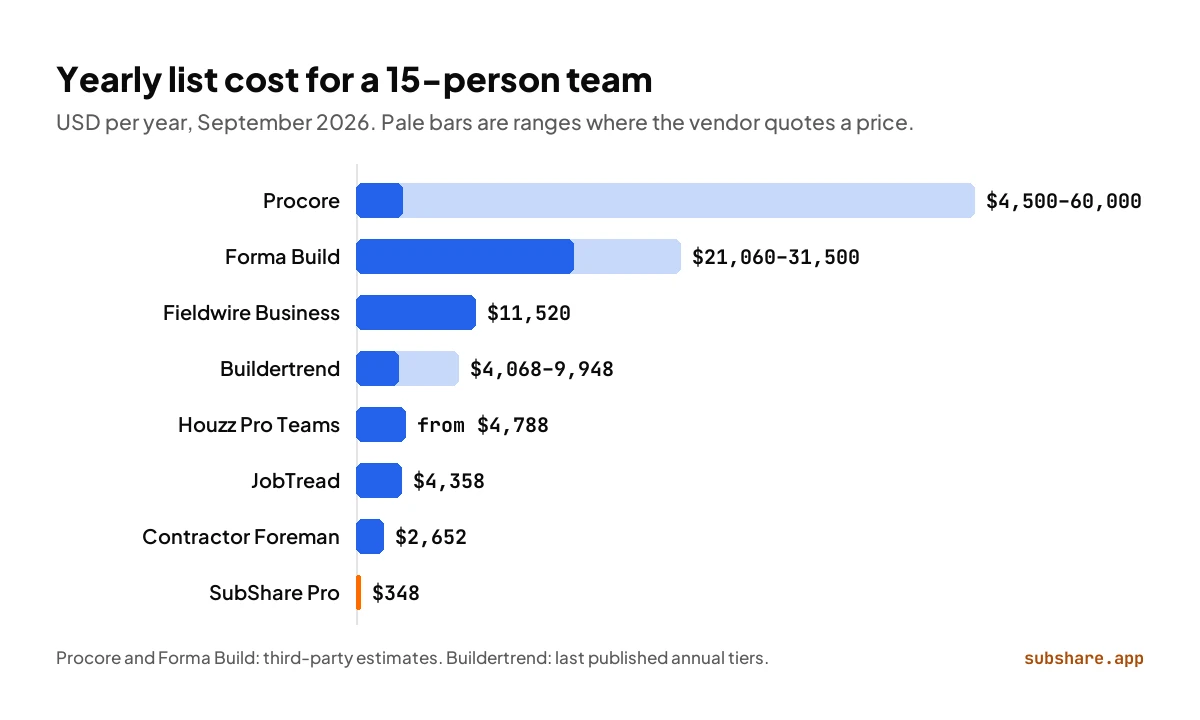
| Tool | Best for | Workers log in | Free plan | Published price | 15 people per year |
|---|---|---|---|---|---|
| SubShare Pro | Crew scheduling, no app for workers | No, a personal link | Up to 10 people | Yes | $348 |
| Contractor Foreman Pro | Cheapest full suite | Yes | No | Yes | $2,652 |
| JobTread | Estimating and job costing | Staff yes; portals by email link | No | Yes | $4,358 |
| Houzz Pro Teams | Design-build sales | Yes | Basic tools only | Yes | From $4,788 |
| Buildertrend | Residential builders | Yes; free sub portal | No | No | $4,068–$9,948 at last list price |
| Fieldwire Pro / Business | Field tasks and drawings | Yes | Up to 5 users | Yes | $7,020 / $11,520 |
| Autodesk Forma Build | Commercial documents | Yes | No | No | About $21,060–$31,500 |
| Procore | Large commercial projects | Yes; texts via Resource Planning | Collaborators only | No | About $4,500–$60,000 |
Our arithmetic from each vendor's list price, checked September 25, 2026, annual billing where offered. Buildertrend's range uses its last published annual tiers; Forma Build and Procore use third-party listings. The tools cover different amounts of work; read each section before comparing prices.
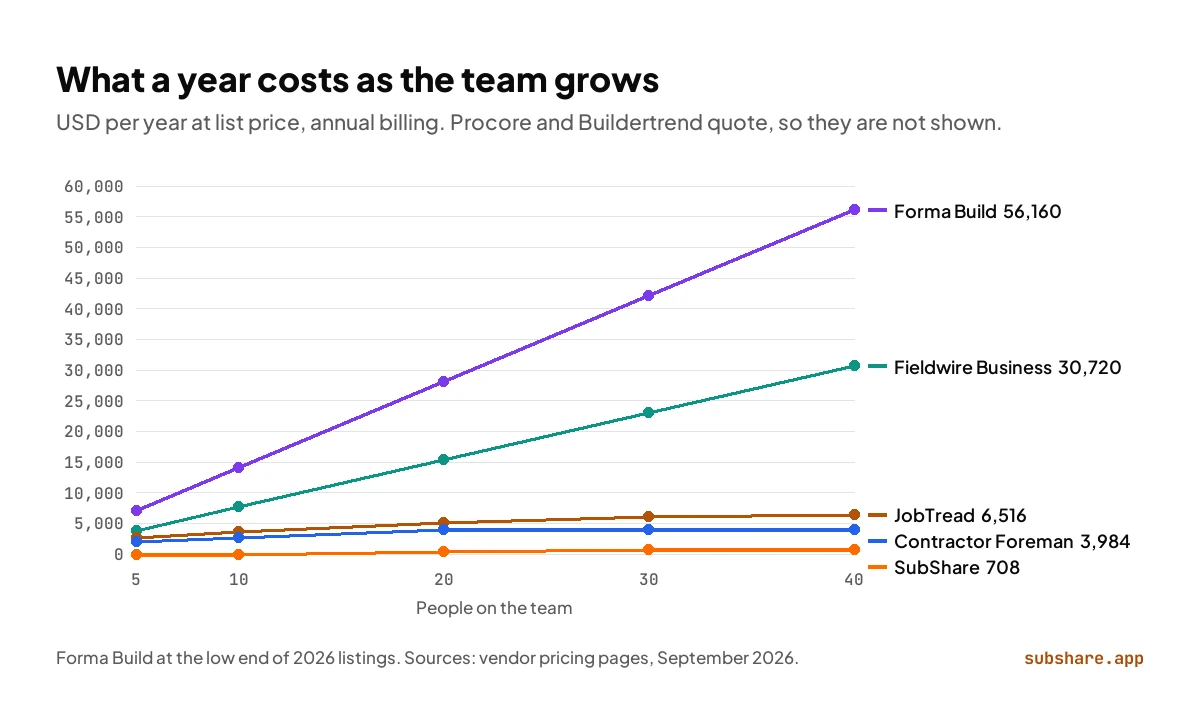
Headcount changes the order. Per-user tools grow with every hire, so at 40 people Forma Build runs past $56,000 a year and Fieldwire Business past $30,000, while tools priced by plan size level off: Contractor Foreman at $3,984 a year and SubShare at $708.
1. SubShare: a crew schedule your whole crew can open, for $29 a month
Best for: contractors with their own crews who plan the week · Free up to 10 people, $29/month up to 20
Is SubShare a good Procore alternative?
Yes, for contractors whose hardest daily job is running their own crews. Disclosure: SubShare is our product. It takes the part of Procore that touches every worker every day, the schedule, and removes everything a worker has to do to see it. You build the week on one board: every job on a person, with a duration, the site address, the access code and the drawings attached. When the plan changes, you drag a bar. Each person gets one permanent link by text or WhatsApp and opens their week in the phone's browser. No app, no account, no password, and it keeps working without signal once it has been opened.
For our 15-person example, SubShare Pro costs $29 a month, or $348 a year, with a published price and no annual contract; Team covers up to 40 people for $59 a month (see pricing). There is no per-seat charge, and every account starts with 14 days of Team features with no card. It is also a natural fit for specialty contractors. When a general contractor runs a job in Procore, you can usually join that project free as a collaborator. What Procore will not give you for free is a way to run your own people across every GC's jobs at once, and that is exactly what SubShare's board does. Workers tick jobs done from their phone, and the board flags anyone booked twice or scheduled on a day off. Try the demo board without signing up.
Choose SubShare over Procore if
- You run your own crews and the weekly plan is your biggest headache.
- You already join GCs' Procore projects as a collaborator and need to plan your own people.
- You want a published monthly price you can cancel.
- Your crew will not install another app.
Where SubShare falls short
- No RFIs, submittals or financials; keep those in your GC's system or your accounting software.
SubShare vs Procore Resource Planning
Procore's own answer to crew scheduling is Resource Planning, which began as LaborChart. It is built for large self-performing contractors and forecasts labor across many projects. SubShare does the week-to-week part and nothing else.
| Procore Resource Planning | SubShare | |
|---|---|---|
| Price | Not published; request a demo | $0, $29 or $59 a month by crew size |
| How you buy it | From Procore sales, as part of its platform | Sign up online; free up to 10 people |
| How workers get their schedule | Automated emails, texts or in-app notifications | One permanent link that opens their whole week |
| Addresses, access codes and drawings | In Procore | On each job in the worker's link |
Procore Resource Planning from procore.com/resource-planning; SubShare from subshare.app/pricing. Checked September 25, 2026.
2. Autodesk Forma Build: the closest like-for-like for commercial work
Best for: Commercial contractors with a small core team and Autodesk design data · About $117–$175 per user/month (third-party listings)
If you want everything Procore does on a commercial job, Forma Build is the nearest match. It is the product that replaced PlanGrid, renamed from Autodesk Build in March 2026, and it covers drawings with version history, RFIs, submittals, issues, meetings, a schedule tool and cost management. Where it beats Procore is the design side: if your drawings and models start in Revit or AutoCAD, they stay in one Autodesk platform from design to site.
The pricing model is the opposite of Procore's. Forma Build is sold per named user, and 2026 listings put it at about $117 to $175 per user per month. For our 15-person example that is $21,060 to $31,500 a year, so it tends to beat a Procore quote only when a handful of people use it.
PlanGrid vs Procore: Forma Build and Procore compared in detail →
Procore vs Forma Build: choose Forma Build if
- Your drawings and models come from Autodesk tools.
- Only a small office team needs to log in.
- RFIs, submittals and cost control are on every job.
Where Forma Build falls short
- Per-user pricing gets expensive once the field is on it.
- No free plan and no single published price.
3. Buildertrend: the residential builder's Procore
Best for: Home builders and remodelers who sell to homeowners · Custom quote; last published list $339–$829/month on annual billing
Buildertrend is built around the homeowner rather than the owner's rep. It runs the schedule, daily logs, estimates and proposals, selections, change orders, warranty and payments, with a client portal tying it together. Subs and vendors get a free portal, with their own login, to see the schedule, take bid requests and post updates.
In 2026 Buildertrend stopped publishing prices. Its pricing page now asks for your builder type and annual revenue, then books a call. Its last published tiers ran from $339 to $829 a month on annual billing, or $499 to $1,099 month to month, so budget somewhere in that range and expect the quote to follow your volume, as Procore's does.
6 Buildertrend alternatives with published prices →
Procore vs Buildertrend: choose Buildertrend if
- Your work is residential and the homeowner experience wins you jobs.
- You want estimates, selections and payments in the same system as the schedule.
- Procore's commercial workflows are more than you need.
Where Buildertrend falls short
- Quote-only pricing, like Procore.
- Subs and crews still need a login and the app.
4. Fieldwire: Procore's field side, at a published price
Best for: Superintendents and foremen who work from drawings · Free up to 5 users; $39–$89 per user/month
Fieldwire, owned by Hilti, takes on Procore from the field. Tasks and punch items are pinned to locations on the sheets, drawings work offline, and the Gantt view can carry manpower. The Basic plan is free for up to 5 users, 3 projects and 100 sheets. Paid plans cost $39, $64 or $89 per user per month on annual billing, and only the $89 tier adds RFIs, submittals, change orders and budget.
The price is published, which Procore's is not, but it is per user, and Fieldwire's help center says invited subcontractors count unless they pay for their own plan. Our 15-person example costs $7,020 a year on Pro and $11,520 on Business.
6 Fieldwire alternatives, compared on price →
Procore vs Fieldwire: choose Fieldwire if
- Drawings, tasks and punch lists are the Procore features you really use.
- You want to start free and see prices before you talk to sales.
- Financials live in your accounting software anyway.
Where Fieldwire falls short
- Every user is a seat, subcontractors included.
- Office workflows only on the top tier.
5. JobTread: estimating and job costing with free portals
Best for: Builders whose margins leak between the estimate and the invoice · $199/month with 1 user, then $5–$20 per extra user
JobTread goes deep on money: estimates from cost catalogs, budgets that flow into purchase orders and change orders, job costing and invoicing, with scheduling, tasks and time tracking alongside. It publishes its price. The base plan is $199 a month with one internal user, and extra internal users cost $20 each for the second to the tenth, falling to $5 each past 30. Annual billing takes 20% off, and there is no contract or setup fee.
Its best idea for crews and subs is the portal. Vendor and customer portal users are free and unlimited, and in most cases they open the portal from a link in an email without a password. Our 15-person example, all internal users, costs $4,358 a year on annual billing.
Procore vs JobTread: choose JobTread if
- Estimating and job costing are where you lose money today.
- You want subs and customers in a portal without paying for them.
- You want a published price with no contract.
Where JobTread falls short
- Field and drawing tools are lighter than Procore's.
- Your own staff still pay per user.
6. Contractor Foreman: the cheapest full suite
Best for: Small contractors who want one inexpensive system · From $49/month; $221 for up to 15 users, billed annually
Contractor Foreman covers a long Procore-style checklist at a small-business price. Every plan includes project management, scheduling, time cards and crew scheduling; subcontracts and a client portal come with Standard and up, and it connects to QuickBooks. Plans are priced by user count on annual billing, from Basic at $49 a month for one user to Pro at $221 for up to 15 and Unlimited at $332.
For our 15-person example that is $2,652 a year, the lowest price here for a full project management suite. You pay for it in depth and polish: each module is lighter than the specialist tools, and the lowest prices need an annual prepay.
Procore vs Contractor Foreman: choose Contractor Foreman if
- Price is the main reason you are leaving Procore.
- You want time cards, crew scheduling and financials in one place.
- You are comfortable trading polish for breadth.
Where Contractor Foreman falls short
- Breadth over depth.
- Everyone who uses it needs a login.
7. Houzz Pro: for design-build firms that sell with visuals
Best for: Design-build and remodeling firms that win work on presentation · From $99/month; Teams from $399 with unlimited users
Houzz Pro starts where Procore never goes: the sale. It pairs 3D floor plans, mood boards, selections, estimates, proposals and invoices with a CRM. The Pro plan at $199 a month adds takeoffs, bid management, change orders, budgets, contracts, a project schedule and daily logs.
Design and Pro include one user, with extra users at $50 a month; Teams starts at $399 a month with unlimited users, which is where a 15-person company lands, at $4,788 a year or more. It is lighter than everything above for running a job on site, and strongest before the job starts.
Procore vs Houzz Pro: choose Houzz Pro if
- Clients buy from your designs, and presentation wins you work.
- You want sales, estimating and light project management in one tool.
- Leads from the Houzz marketplace matter to your pipeline.
Where Houzz Pro falls short
- Not built for commercial documentation or heavy field coordination.
- Per-user fees on the smaller plans.
Procore alternatives for subcontractors
If you are a specialty contractor, you may not need a Procore alternative for the projects at all. When a general contractor runs a job in Procore, you can usually join it free as a collaborator, and that is where the GC's drawings, RFIs and submittals live. What you still need is a way to run your own people across every GC's jobs at once, because each project sits in a different GC's account. That is the job SubShare is built for: one board for your whole crew, and one link per worker that shows their week across every site.
Two details matter when you pick a tool for your own crew. Fieldwire counts every invited subcontractor as a paid user on your account unless they have their own plan, while JobTread's vendor portal is free and opens from an emailed link. SubShare counts everyone on your board toward one crew-size price, with no per-seat charge.
Who are Procore's main competitors?
Procore's main competitors depend on the kind of contractor asking, because Procore competes on several fronts at once. On large commercial projects, its direct rivals are Autodesk with Forma Build, Oracle with Aconex and Primavera, Trimble with Viewpoint, and CMiC. With residential builders and remodelers, it meets Buildertrend and JobTread. In the field, Fieldwire by Hilti competes for the superintendent's phone. And for the crew's daily plan, a focused scheduling tool like SubShare replaces the part of Procore, Resource Planning, that is sold separately. For how Procore compares with PlanGrid's successor in detail, see PlanGrid vs Procore in 2026.
What does each option ask of your crew?
Price is only half the cost of a tool. The other half is what it asks of the people who have to use it: an app to install, an account to create, a password to forget. The chart below puts the four questions that decide whether a crew actually uses the thing.
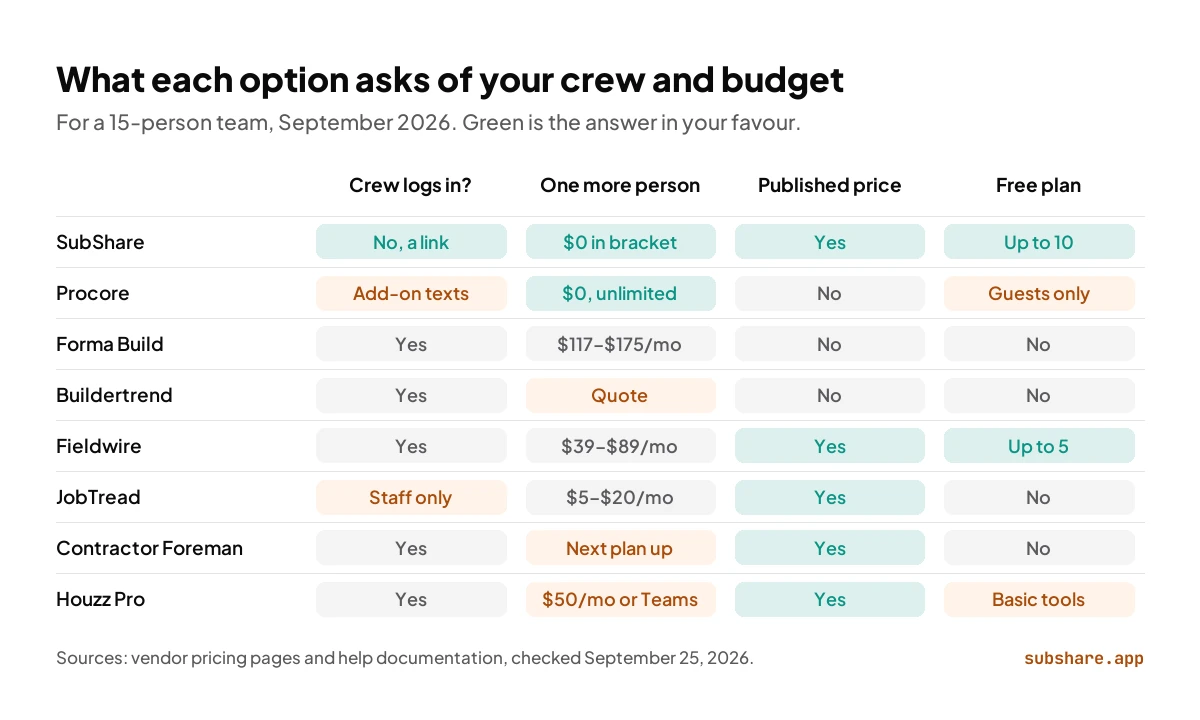
| Tool | Crew logs in? | One more person | Published price | Free plan |
|---|---|---|---|---|
| SubShare | No, a personal link | $0 within the crew-size bracket | Yes | Up to 10 people |
| Procore | Yes; texts via Resource Planning | $0, unlimited users | No | Collaborators only |
| Autodesk Forma Build | Yes | About $117–$175 a month | No | No |
| Buildertrend | Yes | Part of the quote | No | No |
| Fieldwire | Yes | $39–$89 a month | Yes | Up to 5 users |
| JobTread | Staff yes; portals by email link | $5–$20 a month | Yes | No |
| Contractor Foreman | Yes | Next plan up | Yes | No |
| Houzz Pro | Yes | $50 a month, or Teams | Yes | Basic tools only |
From vendor pricing pages and help documentation, checked September 25, 2026.
Before you leave Procore: three checks
- See what the team actually used. List the Procore tools people opened in the last 90 days; that list, not the feature sheet, is what the alternative must cover.
- Find your renewal date. The fee is paid upfront for the year, so plan the switch for the renewal rather than mid-term.
- Export first. Download drawings, RFIs, submittals and daily logs you may need later before access ends.
Which Procore alternative should you choose?
- Your own crews, a weekly plan that keeps changing, no app for workers → SubShare.
- Commercial work with Autodesk design data and a small office team → Autodesk Forma Build.
- Residential building with a homeowner portal → Buildertrend.
- Field tasks and drawings at a published price → Fieldwire.
- Margins leaking between the estimate and the invoice → JobTread.
- The cheapest full suite for a small contractor → Contractor Foreman.
- Design-led remodels that sell on presentation → Houzz Pro.
- Dozens of companies working in one project → Staying on Procore may be right; add SubShare for your crew's week.
Procore alternatives: frequently asked questions
What is the best Procore alternative?
It depends on what you need Procore for. For planning your own crews and sending each person their week without an app, SubShare, from free to $59 a month. For commercial document control, Autodesk Forma Build. For residential builders, Buildertrend or JobTread. For field tasks and drawings, Fieldwire. For the cheapest full suite, Contractor Foreman. For design-build sales, Houzz Pro.
What software is similar to Procore?
The closest like-for-like platform for commercial work is Autodesk Forma Build. For residential work, Buildertrend and JobTread cover similar ground. Fieldwire covers Procore's field side, and SubShare covers crew scheduling without an app for workers.
Who are Procore's biggest competitors?
Procore's biggest competitors in commercial construction management are Autodesk with Forma Build, Oracle with Aconex and Primavera, Trimble with Viewpoint, and CMiC. With residential builders it competes with Buildertrend and JobTread, and in the field with Fieldwire by Hilti. For crew scheduling, SubShare competes with Procore's Resource Planning.
How much does Procore cost?
Procore publishes no prices. It charges an upfront annual fee per product, based on your annual construction volume, with unlimited users. Third-party trackers put contracts at roughly $4,500 to $60,000 a year.
What is the cheapest Procore alternative?
For crew scheduling, SubShare: free for up to 10 people and $29 a month for up to 20, or $348 a year. Among full project management suites, Contractor Foreman is cheapest, from $49 a month, or $221 a month for up to 15 users on annual billing.
Does Procore charge per user?
No. Procore's pricing page says it will never charge for adding users, so staff, subs and owners can all have accounts. Instead, the upfront annual fee depends on which Procore products you buy and on your annual construction volume, which is why two companies of the same size can pay very different amounts.
Is there a free Procore alternative?
For crew scheduling, yes: SubShare's Free plan covers up to 10 people and 3 sites, and workers never need an account. Fieldwire's Basic plan is free for up to 5 users and 3 projects. Procore's own free account only lets you join other companies' projects as a collaborator.
Do workers need an app or login to see their schedule?
With most of these tools, yes: each worker gets an account and uses the app. Procore's Resource Planning can send schedules by text or email. SubShare gives each worker one permanent link that opens their whole week, with addresses, access codes and drawings, in the phone's browser, with no account.
What programs like Procore suit a small contractor?
Contractor Foreman is the cheapest full suite at $221 a month for up to 15 users on annual billing. JobTread suits builders who need estimating and job costing from $199 a month. Fieldwire covers drawings and field tasks from $39 per user. If the weekly crew plan is the real headache, SubShare is free for up to 10 people.
Can I use SubShare with Procore?
Yes. Keep Procore for project records such as drawings, RFIs and submittals, and run your crew's week in SubShare. Specialty contractors who work on a general contractor's Procore projects can usually join them free as collaborators, and use SubShare to plan their own people across those jobs.
How we compared
We priced every Procore alternative for the same 15-person contractor on September 25, 2026, from each vendor's pricing page and on annual billing where offered. Procore, Autodesk and, since 2026, Buildertrend quote individually, so their figures come from third-party trackers or last published tiers and are labeled that way. For the crew questions we read each vendor's help documentation, including Procore's page on Resource Planning. No vendor paid for placement or reviewed this article. SubShare is our product; it is listed first, and its section discloses that. This article was first published in June 2026 and rewritten on September 25, 2026 with re-checked prices, SubShare's current plans and new sections.
Related comparisons
Sources, accessed September 25, 2026
- Procore pricing, Procore free account for collaborators, Procore Resource Planning and CostBench: Procore pricing estimates (July 2026).
- Autodesk: Autodesk Construction Cloud is now Autodesk Forma; Forma Build listings on SoftwareConnect and Capterra.
- Buildertrend pricing, Buildertrend: subcontractor overview and last published tiers from Down to Bid and Projul.
- Fieldwire pricing and Fieldwire help: pricing and overages.
- JobTread pricing and JobTread vendor portal help.
- Contractor Foreman pricing and Houzz Pro pricing.
- SubShare pricing.
About the author
James M. · Owner/Project Manager, JJB General Contractors
James M. is the owner and project manager at JJB General Contractors, where he runs jobs and coordinates subcontractors on site every day. That hands-on field perspective shapes what SubShare writes about planning crews and getting each person their week.
Connect with James M. on LinkedIn →Plan the week once. Everyone knows where to be.
14 days of Team features. No card required. Then continue on Free within its limits, or choose a paid plan.
Start free