Forma Build vs PlanGrid in 2026: What Changed, and What to Do
Forma Build replaced PlanGrid, but its cheaper plan drops RFIs and submittals. What each name means, what carries over, what it costs and how PlanGrid projects move.
Forma Build vs PlanGrid: the short answer
Forma Build is the product Autodesk built to replace PlanGrid, so the two are not rivals: one is the successor of the other. PlanGrid, the drawing app Autodesk bought in 2018, is closed to new customers and no longer gains features. Forma Build, launched as Autodesk Build in February 2021 and renamed on March 24, 2026, keeps PlanGrid's sheets, markups, issues, photos and forms and adds meetings, schedule, assets and cost management. It comes in two plans. Forma Build Essentials costs $67 per user per month on annual billing and covers field work, but not RFIs or submittals. The full Forma Build costs $117 and includes them. PlanGrid's last plans cost $39, $59 or $119. Existing PlanGrid customers can still sign in, Autodesk says it has no plans to shut PlanGrid down, and its Data Transitions tool imports PlanGrid projects into Autodesk Forma. Checked October 11, 2026.
Autodesk has changed almost every name around PlanGrid. Autodesk Construction Cloud is now Autodesk Forma. Autodesk Build is now Forma Build. The 550-sheet plan is gone, and there is a new plan called Forma Build Essentials.
That is why “Forma Build vs PlanGrid” is a harder question than it looks. Half the answer is working out which names refer to the same thing.
This guide sets out what each name means, what PlanGrid did that each Forma Build plan does or does not do, what the move costs, and how PlanGrid projects get into Forma. Disclosure: we make SubShare, a crew scheduling tool. It appears in one labeled section near the end.
What is the difference between Forma Build and PlanGrid?
Forma Build is PlanGrid's successor, not its competitor. PlanGrid is a construction drawing app that Autodesk stopped selling to new customers and no longer develops. Forma Build is the product Autodesk sells in its place. It has PlanGrid's field tools, adds project management, cost and model tools, and runs on the Autodesk Forma platform.
Autodesk's PlanGrid page says Forma Build “was developed by combining the best-in-class features of PlanGrid and BIM 360.” It adds that many familiar capabilities are in Forma Build “along with net new features.” Three practical differences follow from that:
- Availability. You can buy Forma Build. You cannot buy PlanGrid unless you already were a customer.
- Scope. PlanGrid was about sheets and the work done from them. Forma Build covers that plus meetings, schedule, assets and cost.
- How you pay. PlanGrid's plans were set by sheet count: 550, 5,000 or unlimited. Forma Build's two plans are set by which tools you get, and neither has a sheet limit.
Autodesk Forma, Forma Build, Forma Build Essentials: which name means what?
Autodesk Forma is the platform, Forma Build is the construction management product on it, and Forma Build Essentials is the cheaper, field-only plan of that product. PlanGrid is the older app that Forma Build grew out of.
| Name | What it is | Used to be called | Is it the PlanGrid replacement? |
|---|---|---|---|
| PlanGrid | Drawing and field app, closed to new customers | PlanGrid | It is PlanGrid |
| Autodesk Forma | Autodesk's industry cloud for design and construction | Autodesk Construction Cloud (ACC) | No, it is the platform |
| Forma Build | Field and project management: sheets, issues, RFIs, submittals, meetings, schedule, cost | Autodesk Build | Yes, the full successor |
| Forma Build Essentials | Field-only plan: sheets, files, issues, forms, photos | New on March 25, 2026 | Yes, for field-only teams |
| Forma Data Management | Document management and file storage | Autodesk Docs | No |
| Forma Data Management Essentials | Lighter document management for AutoCAD, Revit and Civil 3D subscribers | New on March 25, 2026 | No |
Sources: Autodesk News (March 24, 2026), Eagle Point's summary of the rename (March 26, 2026) and Autodesk's PlanGrid page. Checked October 11, 2026.
So “Forma platform vs PlanGrid” compares a whole platform with one app, and “Forma Data Management vs PlanGrid” compares a document store with a field tool. The fair comparison is PlanGrid against Forma Build, or against Forma Build Essentials if your team only works in the field.
The March 2026 change was a rename, not a new product. Autodesk's announcement said: “There is no data migration, no disruption to existing workflows, and no changes to licensing, integrations, or project data.” If you used Autodesk Build in February, you used Forma Build in April without doing anything.
How did PlanGrid become Forma Build?
PlanGrid became Forma Build in four steps over eight years. Autodesk bought it in 2018, folded it into Autodesk Construction Cloud in 2019, launched Autodesk Build on top of it in 2021, and renamed that product Forma Build in 2026.
The dates below come from Wikipedia, Autodesk's PlanGrid page and Autodesk News. PlanGrid was about seven years old when Autodesk paid $875 million for it, and it has now spent about as long inside Autodesk.
| Date | What happened |
|---|---|
| 2011 | PlanGrid is founded in San Francisco. |
| December 20, 2018 | Autodesk completes its $875 million purchase of PlanGrid. |
| November 2019 | Autodesk announces Autodesk Construction Cloud, bringing together PlanGrid, BuildingConnected, Assemble and BIM 360. |
| February 2021 | Autodesk Build launches, combining PlanGrid and BIM 360 in one product. |
| October 16, 2024 | Autodesk says it has no set plans to end PlanGrid, but that development is focused on Autodesk Construction Cloud. |
| March 24, 2026 | Autodesk Construction Cloud is renamed Autodesk Forma, and Autodesk Build becomes Forma Build. |
| March 25, 2026 | Forma Build Essentials launches as a field-only plan. |
| May 7, 2026 | The 550- and 5,000-sheet plans stop being sold or renewed. Two plans remain. |
Sources: Wikipedia (founding and acquisition), Autodesk's PlanGrid page and transition FAQ, Autodesk News, and MicroCAD's notice of the May 7 change. Checked October 11, 2026.
One detail shows how direct the line is. Autodesk's PlanGrid page now sends mobile users to the Autodesk Forma app. That app's App Store listing says it connects to Forma Build Essentials, Forma Build and PlanGrid projects alike. It holds 4.7 out of 5 from about 22,000 ratings.
Forma Build vs PlanGrid at a glance
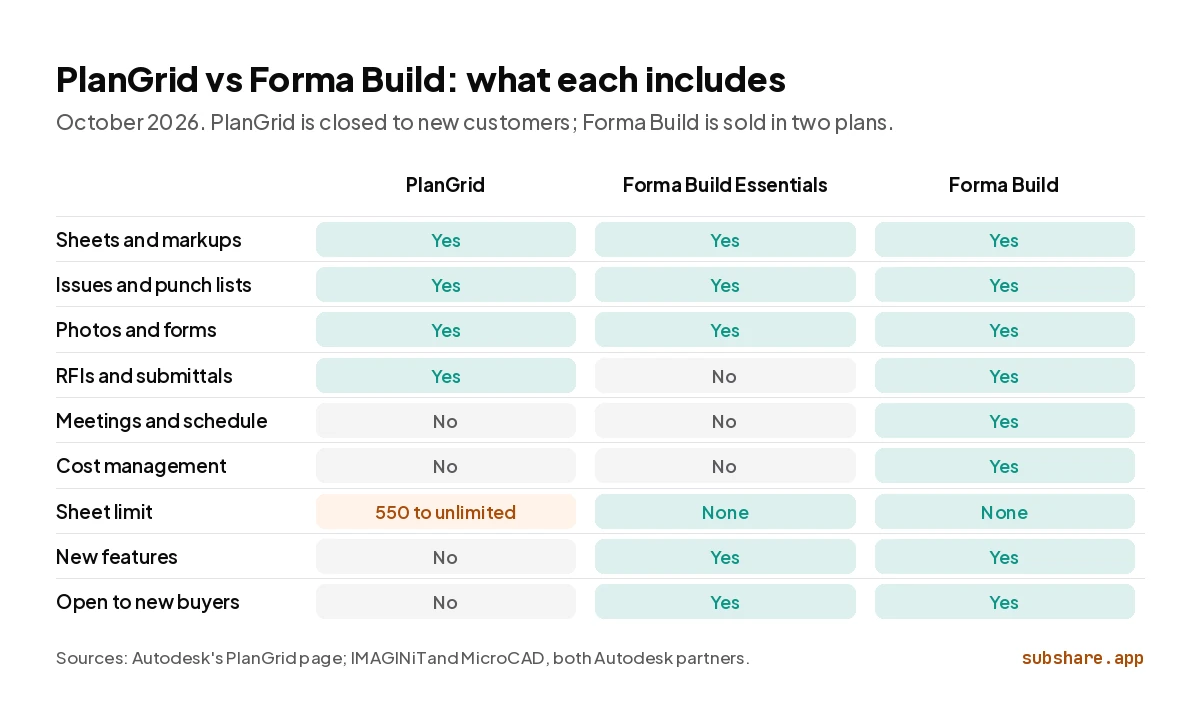
The table compares PlanGrid with both Forma Build plans, because the plan you would move to decides most of the answers.
| PlanGrid | Forma Build Essentials | Forma Build | |
|---|---|---|---|
| Can new customers buy it? | No | Yes | Yes |
| Still gaining features? | No | Yes | Yes |
| Price per user per month, annual billing | Was $39 (Nailgun), $59 (Dozer) or $119 (Crane) | $67 | $117 |
| Price per user, month to month | Was $49, $69 or $139 | $100 | $175 |
| Sheet limit | 550, 5,000 or unlimited, by plan | None | None |
| Sheets, markups, issues, photos, forms | Yes | Yes | Yes |
| RFIs and submittals | Yes | No | Yes |
| Meetings, schedule and assets | No | No | Yes |
| Cost management | No | No | Yes |
| Free trial | None for new customers | 30 days, no credit card | 30 days |
| Mobile app | Autodesk Forma app | Autodesk Forma app | Autodesk Forma app |
Sources: ITQlick's listing for PlanGrid's plans; Autodesk's PlanGrid page and IMAGINiT's migration guide for PlanGrid's features; MicroCAD and Autodesk's trial pages for the Forma Build plans; Autodesk's buy page, SoftwareConnect and Constructable for Forma Build prices. Checked October 11, 2026.
What can PlanGrid do that Forma Build can't, and the other way round?
Almost nothing PlanGrid did is missing from the full Forma Build. The gap is in Forma Build Essentials, which leaves out RFIs and submittals, two things PlanGrid handled.
What carries over from PlanGrid
IMAGINiT, an Autodesk reseller, lists the PlanGrid features that have a direct equivalent in the full product. They are sheet management and sharing, issues and punch lists, RFIs and submittals, field reports and checklists, and photo and document storage. One word changes on the way. A punch list item in PlanGrid is an “issue” in Forma Build.
What Forma Build adds
Autodesk's PlanGrid page names five additions:
- Meetings and schedule tools.
- Asset tracking and model-based tracking.
- Cost controls: budget, expense, change order and forecasting tools.
- Risk analysis based on machine learning.
- RFIs and submittals that can be configured further than PlanGrid's.
IMAGINiT adds 3D models, native viewing of AutoCAD and Revit files, and commissioning to that list, none of which had an equivalent in PlanGrid. If your drawings arrive as PDFs from an architect, most of this will not matter to you. If they come out of your own Revit models, it is the main reason to move.
Forma Build Essentials vs PlanGrid: is it the same thing?
No. Forma Build Essentials is the plan closest to PlanGrid in purpose and price, but it is narrower in one way and wider in another. It leaves out RFIs and submittals, which PlanGrid had. It has no sheet limit, which PlanGrid's two cheaper plans did.
MicroCAD, an Autodesk Platinum Partner, lists what is in the plan: sheets with 3D viewing, files, issues, forms, photos, members, locations, Bridge and core admin. It also lists what is not: specifications, RFIs, submittals, meetings, correspondence, schedule, assets, reports and Autodesk AI. Micrographics, another Autodesk partner, notes that summary reports for issues and forms are left out of Essentials as well.
Autodesk's trial page says Essentials is for subcontractors, specialty trades, small and mid-size general contractors, and “field crews, superintendents, and foremen.” That is the same crowd PlanGrid was built for. The trial runs 30 days and needs no credit card.
On price, Essentials sits between PlanGrid's old plans. It costs $67 per user per month on annual billing, against $39 for PlanGrid's Nailgun plan, $59 for Dozer and $119 for Crane.
A fair rule: if your PlanGrid account was sheets, punch lists and photos, Essentials is a like-for-like move at a higher price. If your team answered RFIs in PlanGrid, it is a step down, and you need the full Forma Build.
How do Forma Build and PlanGrid compare on price?
PlanGrid was cheaper at the bottom and about the same at the top. Its last published plans cost $39, $59 and $119 per user per month on annual billing, according to ITQlick's listing. Forma Build Essentials costs $67 and the full Forma Build $117. On monthly billing they cost $100 and $175.
For a 10-person team, PlanGrid came to $390, $590 or $1,190 a month. The same team pays $670 on Forma Build Essentials and $1,170 on Forma Build at list price, as our PlanGrid pricing report works out. A team that was on PlanGrid's cheapest plan pays 72% more for Essentials and three times as much for the full product. A team that was on the unlimited-sheet plan pays $20 a month less than it used to.
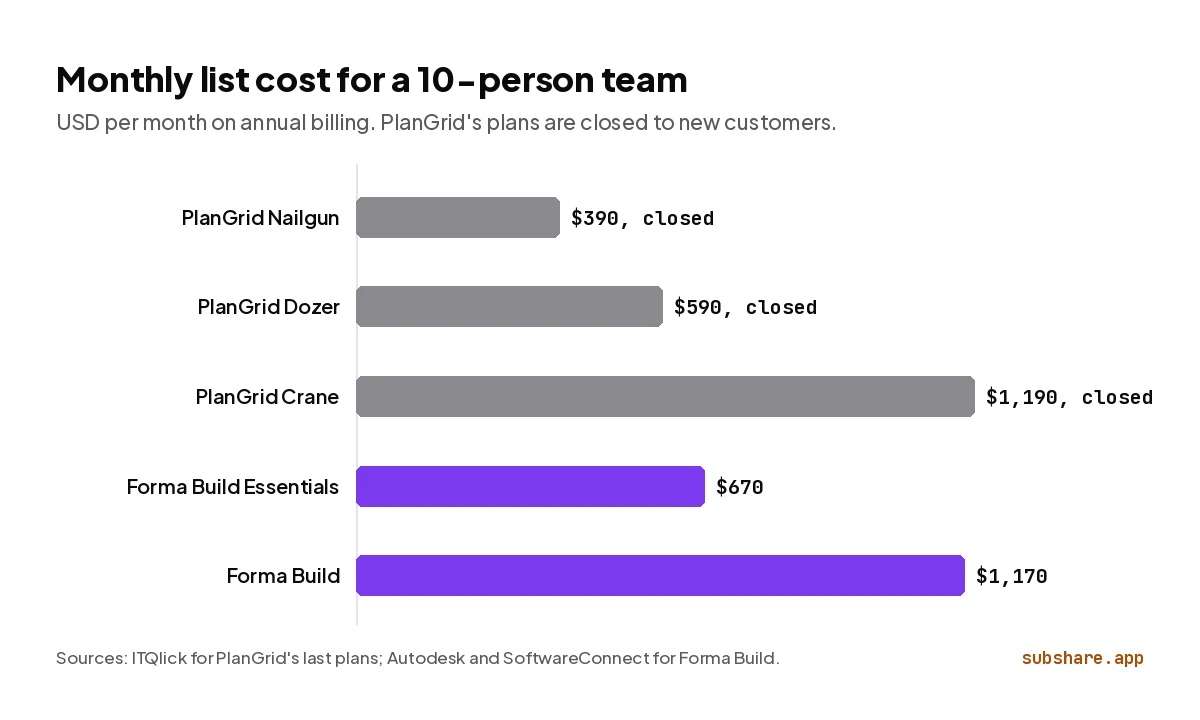
That report also prices teams of 5 to 40 on annual and on monthly billing, and covers the free trial and what happened to the sheet plans.
Can you move PlanGrid projects into Forma Build?
Yes. Autodesk's Data Transitions tool imports PlanGrid projects into Autodesk Forma. It runs from Hub Admin, takes up to 50 projects at a time, and brings files, models, issues and project settings into Forma Data Management. According to Autodesk's help center, the import works like this:
- In Hub Admin, open Data Transitions and choose PlanGrid as the source.
- Pick the PlanGrid organization and accept the notice that adds you as a project administrator on the projects being moved.
- Select up to 50 projects. The tool validates and imports them, then emails you whether each import succeeded, partly succeeded or failed.
- Open an imported project in the file browser to check it. Transition it if you need an active Forma project made from the copy.
Two conditions apply. You must be a member of the project you want to move, and a hub administrator of the hub it is going to. If Data Transitions is not switched on for your hub, you have to request access first.
There are limits too. A project that is too big for the tool is marked “Limit exceeded” and is not imported. And Autodesk warns that Forma “doesn't show imported metadata in a human-readable format yet,” giving the example that you cannot view imported issues or RFIs as a PDF report.
This is newer than most guides say. In its October 2024 FAQ, Autodesk wrote that a native migration tool was in development and “not currently available.”
Our advice: finish live work in PlanGrid and start new projects in Forma Build. Test the import on one closed project first. Export PDF reports of open issues and RFIs from PlanGrid before you rely on the copy.
Is PlanGrid going away?
Not on any announced date. Autodesk's Forma FAQ says: “There are no plans to shut down PlanGrid or BIM 360 Build and we will provide customers with the access and support they need for their projects.” Existing customers can sign in on the web, on iOS and Android, and in a Windows app that needs Windows 10 or later.
What has ended is everything around it. Autodesk's PlanGrid page says: “PlanGrid is no longer available for purchase by net-new customers.” The app gains no new features. In October 2024, Autodesk wrote that it was “focusing more on the future development of Autodesk Construction Cloud, not PlanGrid/BIM 360.” And the page that used to sell PlanGrid is now a login page with a Forma Build advert on it.
Our reading: PlanGrid is safe to finish a job in and a poor place to start one. Nothing forces a move this year, but a five-year project started in PlanGrid today would be betting on a product its owner has stopped building.
Should a PlanGrid team move to Forma Build?
Move when your next project starts, not in the middle of one. Pick the plan by one question: does your team need RFIs and submittals in the same tool as its drawings?
Stay on PlanGrid for now if
- Your current jobs are mid-construction and the crew knows the app.
- You have your PlanGrid renewal price in writing and it is lower than a Forma Build quote.
- You do not need the tools PlanGrid never got: meetings, schedule and cost.
Move to Forma Build Essentials ($67 per user) if
- Your team used PlanGrid for sheets, markups, punch lists, photos and daily reports.
- A 550- or 5,000-sheet limit was holding you back. Essentials has none.
- You are a subcontractor or a small general contractor with few formal RFIs.
Move to the full Forma Build ($117 per user) if
- RFIs and submittals ran through PlanGrid and have to keep running.
- Your drawings and models come out of Revit, AutoCAD or other Autodesk tools.
- The office wants meetings, schedule, cost and reports in the same system as the field.
Look outside Autodesk if
- A low price per user was why you chose PlanGrid. Fieldwire Pro costs $39 per user per month on annual billing.
- Many outside companies need a login. Procore charges by construction volume and includes unlimited users.
We compare both of those routes in detail in Fieldwire vs PlanGrid and PlanGrid vs Procore.
Where does SubShare fit?
Disclosure: SubShare is our product, and it is not a PlanGrid replacement. It has no markups, issues or RFIs. PlanGrid and Forma Build both reach the crew the same way, through an app each worker installs and signs in to. SubShare handles the part of the day that needs neither: telling each person where they are working this week and handing them the drawing for it.
A foreman or lead plans the week on one crew scheduling board and drags jobs when plans change. Each worker opens their own week from a permanent link sent by text or WhatsApp, with the site address, the access code and the attached drawings, and no account. It keeps working without signal once it has been opened.
SubShare is free for up to 10 people, then $29 a month for up to 20 or $59 for up to 40, less for a whole crew than a single Forma Build Essentials seat. Keep Forma Build for the people who work on the sheets, and try the demo board for everyone else's week.
Forma Build vs PlanGrid: frequently asked questions
What is the difference between Forma Build and PlanGrid?
Forma Build is PlanGrid's successor. PlanGrid is a construction drawing app that Autodesk no longer sells to new customers or develops. Forma Build is the product Autodesk sells in its place: it has PlanGrid's sheets, markups, issues, photos and forms, and adds meetings, schedule, assets and cost management.
Is Forma Build the same as PlanGrid?
No. Forma Build was built by combining features from PlanGrid and BIM 360 on a new platform, so it does more than PlanGrid did and is priced differently. PlanGrid still exists as a separate app for existing customers.
What is the difference between Forma Build Essentials and PlanGrid?
Forma Build Essentials is the field-only plan of Forma Build: sheets, files, issues, forms and photos, with no sheet limit, for $67 per user per month on annual billing. Unlike PlanGrid, it does not include RFIs or submittals. Those are in the full Forma Build plan at $117.
What is the difference between Autodesk Forma and PlanGrid?
Autodesk Forma is a platform and PlanGrid is one app. Autodesk Forma is the name Autodesk Construction Cloud took on March 24, 2026, and it holds several products, including Forma Build and Forma Data Management. Forma Build is the part of it that replaced PlanGrid.
Is Autodesk Build the same as Forma Build?
Yes. Autodesk Build was renamed Forma Build on March 24, 2026. Autodesk said the change involved no data migration and no changes to licensing, integrations or project data.
Is PlanGrid going away?
Not on any announced date. Autodesk's FAQ says "There are no plans to shut down PlanGrid or BIM 360 Build." PlanGrid is closed to new customers and no longer gains features. Existing customers can keep working in it, but should plan their next projects in Forma Build or another tool.
Can I migrate PlanGrid projects to Forma Build?
Yes. Autodesk's Data Transitions tool in Hub Admin imports PlanGrid projects into Autodesk Forma, up to 50 projects at a time, including files, models, issues and project settings. You must be a member of the project and a hub administrator of the destination hub.
Does the PlanGrid app still work?
Yes, for existing customers. They can sign in on the web at app.plangrid.com, on iOS and Android through the app now listed as Autodesk Forma, and in a Windows app that needs Windows 10 or later.
Is Forma Build more expensive than PlanGrid?
For most teams, yes. Forma Build costs $117 per user per month on annual billing, three times PlanGrid's $39 Nailgun plan and about twice the $59 Dozer plan. It costs $2 less than the $119 Crane plan. Forma Build Essentials costs $67.
Do I have to move from PlanGrid to Forma Build?
No. Autodesk has set no deadline and says it will keep giving PlanGrid customers access and support. The practical reasons to move are new features, the end of sheet limits, and keeping new projects on a product that is still being developed.
How we compared
We wrote this guide on October 11, 2026. We read Autodesk's PlanGrid page, its Forma FAQ, its announcement of the rename and its help articles on Data Transitions. Every status claim and quote here comes from those pages.
The split between the two Forma Build plans comes from MicroCAD and Micrographics, both Autodesk partners, and from Autodesk's trial page for Essentials. Forma Build prices are US list prices from SoftwareConnect and Constructable, checked against Autodesk's buy page. PlanGrid's old prices come from ITQlick's listing.
What we did not do: we did not run a migration ourselves or use a paid account for either product, so the migration steps are Autodesk's description, not our test. Autodesk did not sponsor or review this guide. The only product we sell is SubShare, and its section is labeled. If something here is out of date, email [email protected] and we will correct it.
Related comparisons
Sources, accessed October 11, 2026
- Autodesk: PlanGrid (purchase status, what Forma Build adds, logins, apps, the 2019 and 2021 dates).
- Autodesk Forma FAQ (no plans to shut down PlanGrid) and Autodesk: FAQ on the transition from PlanGrid, October 16, 2024.
- Autodesk News: Autodesk Construction Cloud is now Autodesk Forma, March 24, 2026 and Eagle Point: the product name changes, March 26, 2026.
- Autodesk help: Data Transitions and PlanGrid Data Transition (requirements, the 50-project limit, statuses, the metadata warning).
- MicroCAD: Autodesk Forma Build (the May 7, 2026 change, what each plan includes), Micrographics: Forma Build Essentials for contractors and Autodesk: Forma Build Essentials trial.
- IMAGINiT: Moving from PlanGrid to Autodesk Build (which PlanGrid features carry over, what had no equivalent).
- Prices: Autodesk: Buy Forma Build, SoftwareConnect, Constructable and ITQlick: PlanGrid pricing.
- Apple App Store: Autodesk Forma and Wikipedia: PlanGrid.
About the author
James M. · Owner/Project Manager, JJB General Contractors
James M. is the owner and project manager at JJB General Contractors, where he runs jobs and coordinates subcontractors on site every day. That hands-on field perspective shapes what SubShare writes about planning crews and getting each person their week.
Connect with James M. on LinkedIn →Plan the week once. Everyone knows where to be.
14 days of Team features. No card required. Then continue on Free within its limits, or choose a paid plan.
Start free