Fieldwire vs PlanGrid in 2026: Fieldwire or Forma Build?
PlanGrid is no longer sold to new customers, so “Fieldwire vs PlanGrid” now means Fieldwire vs Autodesk Forma Build. Here is how they compare on price, drawings, tasks and fit.
Answer summary
Fieldwire vs PlanGrid is now really Fieldwire vs Autodesk Forma Build. Autodesk bought PlanGrid in 2018, closed it to new customers and moved its field tools into Autodesk Build, which was renamed Forma Build in March 2026. Fieldwire, owned by Hilti since 2021, is the lighter, field-first option: it is free for up to 5 users and costs $39, $64 or $89 per user per month on annual billing. Third-party 2026 listings put Forma Build at roughly $117 to $175 per user per month, and it adds formal RFIs, submittals, cost management and Autodesk model data in one platform. Choose Fieldwire when superintendents and foremen need tasks, punch lists, drawings and a schedule on their phones at a published price. Choose Forma Build when the office already runs Autodesk design tools and needs document control and cost workflows across many projects.
Most pages that rank for “Fieldwire vs PlanGrid” still compare two products you can buy. That stopped being true years ago. If you are picking a field app for a construction team in 2026, the useful comparison is Fieldwire against the product that replaced PlanGrid. This guide covers what happened to PlanGrid, what each option costs for a 10-person team, and which one fits which kind of work.
What happened to PlanGrid?
PlanGrid was a construction drawing app, founded in 2011, that put the current set of sheets on a tablet and let field teams mark them up and log issues against them. Autodesk bought PlanGrid in December 2018 for $875 million. It then moved development into Autodesk Build, which it described as combining the best of PlanGrid and BIM 360 Build. PlanGrid itself went into maintenance mode: it is closed to new customers, and existing customers can still sign in on the web and in the PlanGrid Build mobile app, but it no longer gains features, and Autodesk routes new buyers to Build. On March 24, 2026, Autodesk Construction Cloud was renamed Autodesk Forma, and Autodesk Build became Forma Build. So in 2026, a Fieldwire vs PlanGrid comparison is in practice a comparison between Fieldwire and Forma Build.
Autodesk describes the 2026 change as a rename: the platform, projects and workflows stayed the same. If you are evaluating tools from scratch, Forma Build is what Autodesk or a reseller will quote you.
Fieldwire vs PlanGrid at a glance
The first table answers whether you can still buy each product. The second compares the two you can buy today, feature by feature.
| Fieldwire | PlanGrid | Forma Build | |
|---|---|---|---|
| Owner | Hilti (since November 2021) | Autodesk (since December 2018) | Autodesk |
| Can new customers buy it? | Yes | No, maintenance mode | Yes |
| Free plan | Yes: 5 users, 3 projects, 100 sheets | No longer sold | No (free trial) |
| List price | $39–$89 per user/month, billed annually | Was from about $39 per user/month | About $117–$175 per user/month |
Fieldwire prices from fieldwire.com/pricing. Autodesk does not publish one list price for Forma Build; the range comes from 2026 listings on SoftwareConnect and Capterra. Checked September 24, 2026.
| Fieldwire | Forma Build | |
|---|---|---|
| Built for | Superintendents, foremen and field crews | The general contractor's project team and office |
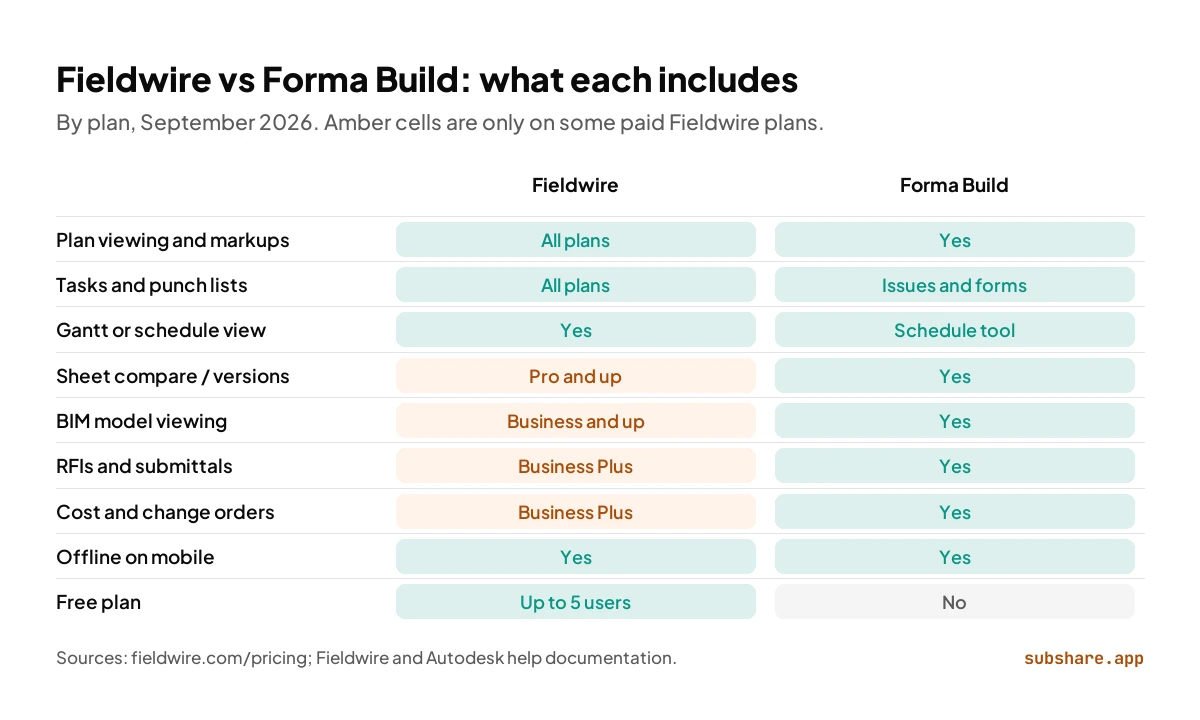
| Drawings | Plan viewing on every plan; sheet compare from Pro | Sheets with version history; 550, 5,000 or unlimited sheets by tier |
| Markups | Yes, with tasks pinned to locations on sheets | Yes, with issues pinned to sheets |
| Tasks and punch lists | Core feature on every plan, with checklists | Issues, forms and checklists |
| Scheduling | Gantt, calendar and Kanban views; manpower on the Gantt | Schedule tool for the project schedule |
| RFIs and submittals | Business Plus plan ($89) only | Included |
| Cost, budget and change orders | Business Plus plan ($89) only | Included (cost management) |
| BIM model viewing | Business plan ($64) and up | Yes, inside Autodesk Forma |
| Offline on mobile | Yes | Yes: download sheets, files and photos |
| Unlimited users | Custom contract | Custom quote |
Feature lists from each vendor's pricing page and help documentation, September 2026. Plan names and inclusions change; confirm before you buy.
How much do Fieldwire and PlanGrid cost in 2026?
Fieldwire publishes its prices. The Basic plan is free for up to 5 users, 3 projects and 100 sheets. Paid plans are priced per user per month on an annual contract: Pro at $39 adds reports, exports and sheet compare; Business at $64 adds custom forms, app integrations and the BIM viewer; Business Plus at $89 adds RFIs, submittals, change orders and budget. Custom contracts cover single sign-on, API access and dedicated support.
PlanGrid's old plans started at about $39 per user per month, but new customers can no longer buy them. Forma Build is sold per named user, with a sheet allowance of 550, 5,000 or unlimited sheets. Autodesk routes most buyers to a quote or a reseller, and 2026 listings range from about $117 per user per month on annual billing to $165–$175 on other terms. Plans for unlimited users are quoted.
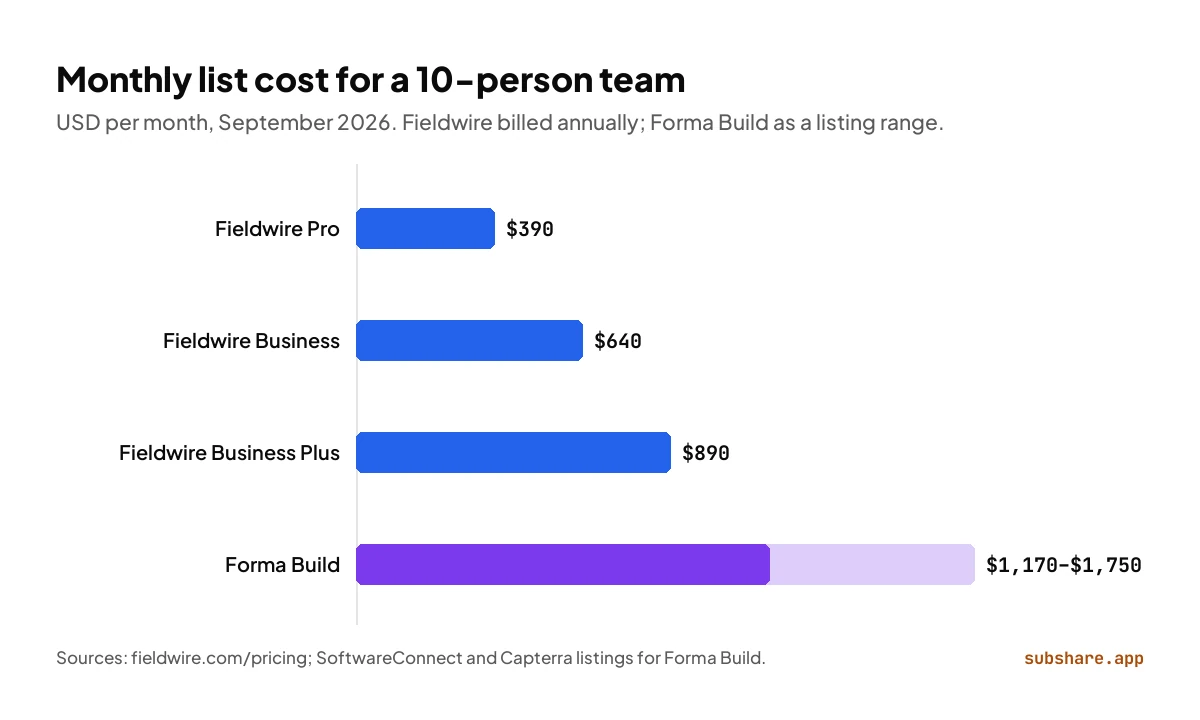
For a 10-person field team, Fieldwire costs $390 a month on Pro, $640 on Business and $890 on Business Plus. Based on third-party listings, the same team on Forma Build lands between about $1,170 and $1,750 a month before any discount; Autodesk's own quote may differ. The gap narrows if you need Fieldwire's Business Plus features anyway, because RFIs, submittals and cost are exactly what Forma Build includes as standard.
Which is better for drawings and markups?
Short answer: Fieldwire for field markup on a budget; Forma Build for document control tied to Autodesk design data.
Both tools put the current drawings on a phone or tablet and keep working without signal. The difference is how far each goes beyond the field.
Fieldwire includes plan viewing on every plan, the free one too. Markups and tasks sit on the sheet at the spot they refer to, so a punch item and its location travel together. Pro adds sheet compare, and Business adds a BIM viewer. For a superintendent who needs the latest sheet, a markup and a task tied to a room, Fieldwire does the job at a lower price.
Forma Build keeps sheets with a version history and pins issues to them, and its files feed the rest of Autodesk Forma: data management, takeoff and model coordination. If your drawings start life in Revit or AutoCAD, keeping them in Autodesk's platform means fewer exports and one version history from design to site.
Which is better for tasks, punch lists and scheduling?
Short answer: Fieldwire for day-to-day tasks and punch lists in the field; Forma Build when the schedule is a formal project document the office owns.
Fieldwire started as a task manager for the jobsite, and it still shows. Every plan includes task management, checklists, photos and files. Tasks carry statuses, and Pro adds custom statuses. Fieldwire also shows tasks in Gantt, calendar and Kanban views, and its Gantt chart can carry manpower, so a foreman can see how many people each piece of work needs across the week.
Forma Build covers field work through issues, forms, checklists and meetings, plus a schedule tool for publishing and updating the project schedule. It is built for the general contractor's project team more than for the foreman assigning the day's work.
Which handles RFIs, submittals and cost?
This is where Forma Build pulls ahead. RFIs, submittals, and cost management with budgets and change orders are part of the product, and they share data with the rest of Autodesk Forma. Fieldwire offers RFIs, submittals, change orders and budget only on Business Plus, its $89 tier. If your team needs those workflows, you are comparing $890 a month against about $1,170 for 10 users, not $390, and Forma Build's tighter link to design data may be worth the difference.
Fieldwire vs Autodesk Construction Cloud for field teams: which is better?
For field teams comparing task management, drawing markup and site coordination, Fieldwire is usually the better fit, and Autodesk Construction Cloud, now Autodesk Forma, is usually the better fit for the office. Task management is Fieldwire's core: tasks pinned to sheets, checklists, punch lists, and Gantt or calendar views are on every plan, and crews pick them up quickly. Drawing markup is close to a tie, because both support markups on current sheets and offline access, while Forma Build adds tighter version control inside Autodesk's data environment. Site coordination depends on who coordinates. If a superintendent coordinates trades day to day, Fieldwire's scheduling views and lower per-user price make it easier to put everyone on it. If coordination runs through formal RFIs, submittals, issues and model review, Forma Build is stronger. You can also split the job: Forma Build in the office, and a lighter tool for the people on site.
Which one should you choose?
Choose Fieldwire if
- Your superintendents and foremen are the main users, not the office.
- You want published per-user prices, and a free plan to trial with up to 5 users.
- Tasks, punch lists and a field schedule matter more than formal RFIs.
- Your drawings come as PDFs from architects rather than from your own Autodesk models.
Choose Forma Build if
- Your design and preconstruction work already runs on Revit, AutoCAD or other Autodesk tools.
- RFIs, submittals and cost management are contract requirements on most of your jobs.
- You need one version history for drawings from design through closeout.
- You are standardizing many projects and roles on one platform.
Still on PlanGrid?
- List what your team actually uses: sheets, issues, RFIs, photos or forms.
- Export current sheet sets and close or record open issues before switching.
- Price both options for your real user count, then pilot on one project.
- Switch between project phases, not in the middle of a busy week.
Where does SubShare fit?
Disclosure: SubShare is our product. Fieldwire and Forma Build both put the crew's work in an app that every worker installs and logs in to. SubShare handles the job that decides whether the day starts well, telling each person which job they are on this week, and it asks nothing of them to see it.
SubShare is a crew-scheduling board. A foreman or lead engineer puts every job on a person, drags jobs around when plans change, and each worker opens their own week from a permanent link, with the site address, access code and attached drawings, without an account or an app. Workers tick jobs done from their phone, and the plan stays readable without signal. It is free for up to 10 people, and $29 a month for up to 20, less for the whole crew than one Fieldwire Pro seat. Keep Fieldwire or Forma Build for sheets, RFIs and punch lists, and try the demo board for the crew's week.
Fieldwire vs PlanGrid: frequently asked questions
Is PlanGrid still available?
Only for existing customers. PlanGrid is in maintenance mode and closed to new customers. Autodesk sells Forma Build, formerly Autodesk Build, in its place.
PlanGrid vs Fieldwire: which should a PlanGrid user move to?
If your team used PlanGrid mainly for current sheets, markups and punch lists, Fieldwire usually feels closer and costs less per user. If PlanGrid sat inside a wider Autodesk setup with BIM 360 or Revit data, Forma Build keeps everything on one platform.
Is Fieldwire free?
Fieldwire's Basic plan is free for up to 5 users, 3 projects and 100 sheets. Paid plans start at $39 per user per month on annual billing.
Who owns Fieldwire?
The Hilti Group agreed to acquire Fieldwire on November 16, 2021, in a deal reported at about $300 million. The product is now branded Fieldwire by Hilti, and its founders stayed on to lead it.
Is Fieldwire cheaper than Forma Build?
At list prices, yes. A 10-person team pays $390 to $890 a month for Fieldwire depending on the plan. Third-party 2026 listings put Forma Build at roughly $1,170 to $1,750 for the same team, and Autodesk quotes most buyers directly, so get quotes for your real team size.
Can I move from PlanGrid to Fieldwire?
Yes, but treat it as a fresh start. Drawings go into Fieldwire as uploaded PDF sets. Ask Fieldwire's onboarding team what they can import from PlanGrid, and close or record open issues and markups before you switch.
How we compared
On September 24, 2026 we read each vendor's pricing page and help documentation and rechecked every price in this article against them. Fieldwire's prices come from its public pricing page. Autodesk does not publish one list price for Forma Build, so the Forma Build figures are a range from 2026 third-party listings, marked as such wherever they appear. We did not use paid accounts for either product. Fieldwire, Hilti and Autodesk did not sponsor or review this article; the only product we sell is SubShare, and its section is labeled.
Related comparisons
Sources
- Fieldwire pricing and Fieldwire help: the Gantt view.
- Fieldwire: Hilti acquisition announcement and ENR: Hilti acquires Fieldwire in $300M deal (2021).
- Wikipedia: PlanGrid (Autodesk acquisition, December 2018, $875 million).
- Autodesk: Autodesk Construction Cloud is now Autodesk Forma and Autodesk Forma pricing.
- Autodesk help: sync and download projects for offline use.
- Forma Build price listings: SoftwareConnect and Capterra; historical PlanGrid pricing and status: Projul and illustrarch.
- Autodesk's positioning of Build as PlanGrid plus BIM 360: Symetri.
About the author
James M. · Owner/Project Manager, JJB General Contractors
James M. is the owner and project manager at JJB General Contractors, where he runs jobs and coordinates subcontractors on site every day. That hands-on field perspective shapes what SubShare writes about planning crews and getting each person their week.
Connect with James M. on LinkedIn →Plan the week once. Everyone knows where to be.
14 days of Team features. No card required. Then continue on Free within its limits, or choose a paid plan.
Start free