PlanGrid vs Procore in 2026: Forma Build or Procore?
PlanGrid became Autodesk Build, now Forma Build, so the real choice is Forma Build or Procore. The biggest difference is how you pay: per user, or by construction volume.
Answer summary
PlanGrid vs Procore in 2026 is really Procore vs Autodesk Forma Build. PlanGrid is closed to new customers, and its successor, Autodesk Build, was renamed Forma Build in March 2026. The biggest difference is how you pay. Procore charges an annual fee per product, based on your annual construction volume. It never charges for extra users, so owners, designers and subcontractors can join a project without adding seats. Forma Build is sold per named user, at roughly $117 to $175 per user per month in third-party 2026 listings, and unlimited-user plans are quoted. Both handle drawings, RFIs, submittals and offline field access. Procore reaches further into financials, quality and safety, and crew planning. Forma Build fits teams whose drawings and models already live in Autodesk tools. Many companies on one platform points to Procore; a small core team inside Autodesk points to Forma Build.
PlanGrid and Procore were the two names on most general contractors' shortlists in the late 2010s. One of them is no longer sold. This guide explains what replaced PlanGrid. Then it compares that product with Procore on what decides the choice: how the bill grows with your team, what each does with drawings, and how much of the project each one covers.
Is PlanGrid part of Procore?
No. PlanGrid has never been part of Procore. PlanGrid was an independent construction drawing app, founded in 2011, until Autodesk bought it in December 2018 for $875 million. Autodesk then built Autodesk Build, which it described as bringing together the best of PlanGrid and BIM 360 Build, and closed PlanGrid to new customers. When Autodesk Construction Cloud was renamed Autodesk Forma on March 24, 2026, Autodesk Build became Forma Build. Procore is a separate company. It was founded in 2002 in California, sells its own construction management platform, and has traded on the New York Stock Exchange as PCOR since May 2021, competing with Autodesk for the same general contractors. So a PlanGrid vs Procore decision today is really Forma Build vs Procore. Existing PlanGrid customers can still sign in, but the app is in maintenance mode and no longer gains features.
Procore vs PlanGrid (Forma Build) at a glance
| PlanGrid | Forma Build | Procore | |
|---|---|---|---|
| Owner | Autodesk (since December 2018) | Autodesk | Procore Technologies (NYSE: PCOR) |
| Can new customers buy it? | No, maintenance mode | Yes | Yes |
| Pricing model | Was per user | Per named user, by sheet tier | Annual fee per product, by annual construction volume |
| Published price | Was from about $39 per user/month | None from Autodesk; third-party listings about $117–$175 per user/month | None; quote only |
Sources: procore.com/pricing; Autodesk Forma pricing page; Forma Build range from 2026 SoftwareConnect and Capterra listings; historical PlanGrid pricing from Projul. Checked September 24, 2026.
| Procore | Forma Build (formerly PlanGrid / Autodesk Build) | |
|---|---|---|
| Adding users | Unlimited users at no extra cost | Each named user is licensed; unlimited-user plans quoted |
| Drawings | Version control, OCR sheet naming, markups, links to RFIs and punch items, offline | Sheets with 550, 5,000 or unlimited tiers, markups, issues, offline download |
| RFIs and submittals | Yes | Yes |
| Financials | Budgets, change orders and other financial tools | Cost management with budgets and change orders |
| Crew planning | Resource Planning (formerly LaborChart) | Schedule tool for the project schedule |
| Integrations | 500+ apps in the Procore marketplace | Autodesk design tools and Forma data management |
| Best for | Contractors bringing many companies onto one platform | Teams whose drawings and models live in Autodesk tools |
Sources: Procore's pricing and Drawings pages, Procore's LaborChart announcement, Autodesk Forma pricing and help pages. Checked September 24, 2026.
How does Procore pricing compare with PlanGrid and Forma Build?
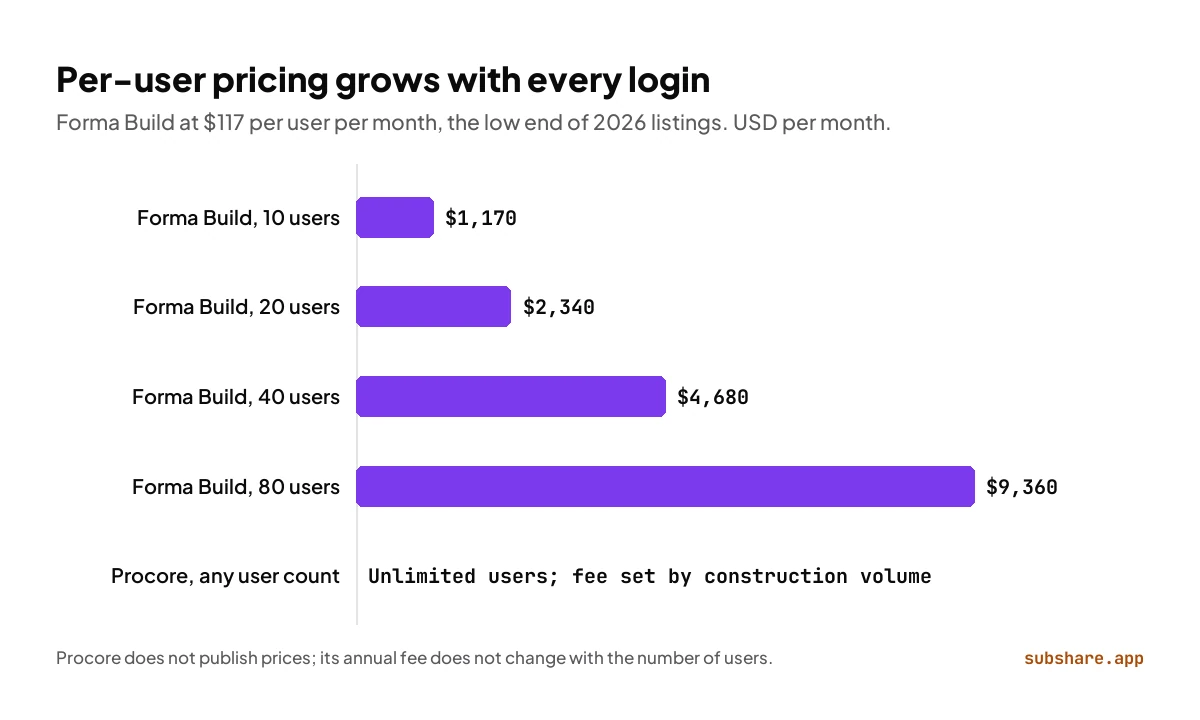
Procore and Forma Build charge in opposite ways. Procore does not publish prices. Its pricing page says it charges “an upfront annual fee by product and based upon your Annual Construction Volume.” It also says: “We'll never charge you for adding more users to Procore.” Contracts include unlimited users, unlimited storage and support, so the fee follows the value of the work you build, not the number of people who log in. Forma Build follows the per-user model PlanGrid used. Every named user needs a license, the price depends on the sheet tier, and 2026 listings put it at about $117 to $175 per user per month. At $117, 10 users cost $1,170 a month, 20 users $2,340, 40 users $4,680 and 80 users $9,360. Unlimited-user agreements exist, but Autodesk quotes them.
The practical rule: per-user pricing is easier to budget when a small core team uses the platform and everyone else receives PDFs. Volume pricing gets more attractive as you invite superintendents, subcontractors, owners and consultants into the same system, because none of them adds to the bill. Get both quotes with your real user count before you decide.
Which is better for drawings in the field?
Short answer: on drawings alone, PlanGrid vs Procore is close. Choose Forma Build if your drawings come out of Revit or AutoCAD and you want one Autodesk version history. Choose Procore if drawings need to link to RFIs, punch lists and financial records in the same system.
Drawings are where PlanGrid made its name. Forma Build keeps that focus: sheets with a version history, markups, issues pinned to locations, and offline downloads of sheets, files and photos on iOS and Android. Sheet tiers of 550, 5,000 or unlimited sheets decide how big a drawing set each license covers.
Procore's Drawings tool covers the same ground and ties drawings to the rest of the project. It splits and names uploaded sets with OCR and keeps revisions under version control. Teams mark up sheets and link RFIs, punch items and submittals to them, and the tool works offline with automatic syncing.
Which covers more of the project: RFIs, financials and crews?
Short answer: Procore if you want one platform for field, office and labor planning; Forma Build if the thread you care about runs from the model to the site.
Procore covers more of the contractor's business. Beyond drawings, RFIs and submittals, it sells financial tools such as budgets and change orders, quality and safety tools, and Resource Planning for scheduling crews. Resource Planning began as LaborChart, a workforce management app for specialty and self-performing contractors that Procore acquired in October 2021, as ENR reported. It handles scheduling, dispatching, forecasting and communicating with field staff.
Forma Build covers more of the design-to-construction data chain. It includes RFIs, submittals, issues, forms, meetings, a schedule tool and cost management, and it shares data with the other Forma products for data management, takeoff and estimating.
Which is easier to roll out to subcontractors?
Procore's unlimited users mean a general contractor can invite every subcontractor to a project without paying for their seats. Subs still need an account and have to learn the tool, which is often the harder part. With Forma Build, check how Autodesk will license people from other companies on your projects before you roll it out, because per-user pricing makes that a budget question.
Which one should you choose?
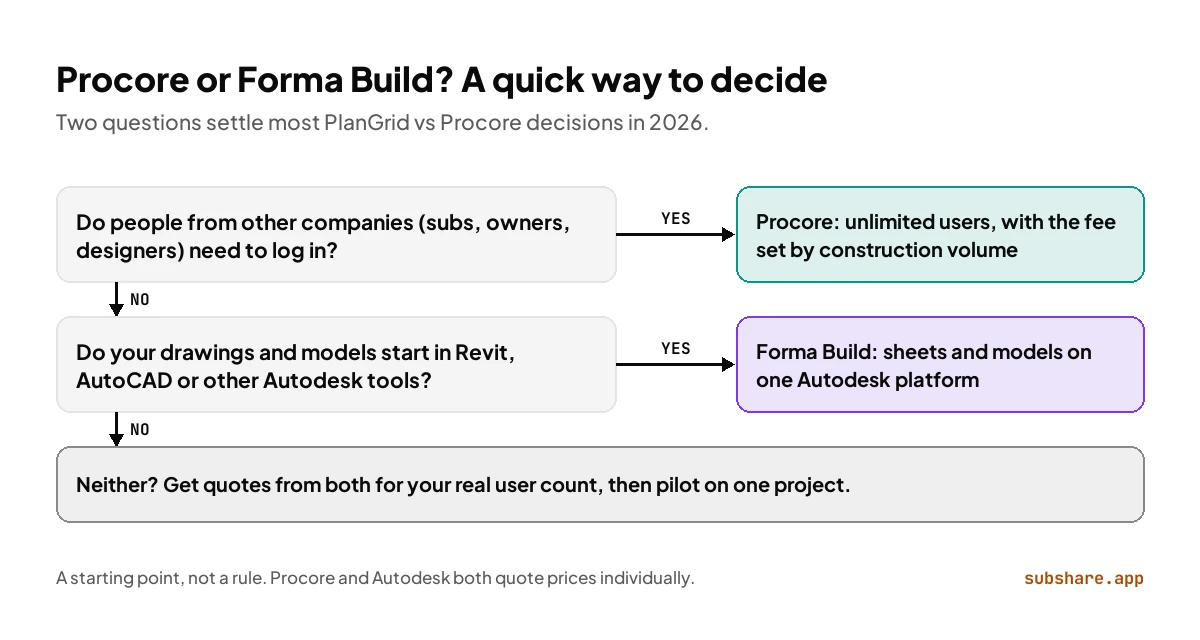
For most teams weighing PlanGrid vs Procore today, the deciding question is who needs to log in. Count the people from your company and from others, then match that number to the pricing model.
Choose Procore if
- Many companies need to work in the same project: subs, owners, designers.
- You want field, office financials, quality and safety in one platform.
- You want crew planning inside the same system through Resource Planning.
- Your annual construction volume makes a volume-based fee predictable.
Choose Forma Build if
- Your drawings and models are produced in Revit, AutoCAD or other Autodesk tools.
- A small core team uses the platform, so per-user licensing stays affordable.
- You already use Autodesk Forma for data management, takeoff or estimating.
- Your team liked PlanGrid and wants its sheet workflow with more controls around it.
Still on PlanGrid? How to plan the move
- List what your team uses in PlanGrid today: sheets, issues, RFIs, photos, forms.
- Export current sheet sets and record open issues so nothing is lost at cutover.
- Get quotes from Procore and Autodesk for your real number of users and projects.
- Pilot the new platform on one project with one superintendent before rolling it out.
- Switch between project phases, not in the middle of a busy week.
Where does SubShare fit?
Disclosure: SubShare is our product. Procore and Forma Build both reach the crew the same way: every worker installs an app and logs in. SubShare takes the one job that matters most to the people doing the work, knowing who goes where this week, and gets it to them with nothing to install.
A foreman or lead engineer plans the week on one board and drags jobs when plans change. Each worker opens their own plan from a permanent link sent by text or WhatsApp, with the address, access code and attached drawings, and no account; it keeps working without signal once opened. Workers tick jobs done from their phone and the board shows it. It is free for up to 10 people, then $29 a month for up to 20 or $59 for up to 40, less for a whole crew than a single Forma Build seat. It runs next to either platform, which keep the drawings, RFIs and financials. Try the demo board without signing up.
PlanGrid vs Procore: frequently asked questions
Is PlanGrid owned by Procore?
No. Autodesk owns PlanGrid. It bought the company in December 2018 for $875 million, and PlanGrid's successor is Autodesk's Forma Build.
What replaced PlanGrid?
Autodesk Build, renamed Forma Build on March 24, 2026, when Autodesk Construction Cloud became Autodesk Forma. PlanGrid is in maintenance mode and closed to new customers.
Does Procore charge per user?
No. Procore charges an annual fee per product based on your annual construction volume, and includes unlimited users.
Is Procore more expensive than PlanGrid?
It depends on your team. Neither Procore nor Autodesk publishes a list price. Forma Build's cost grows with every named user: about $1,170 a month for 10 users at the low end of third-party 2026 listings. Procore's fee stays the same however many people you invite, so compare quotes for your real user count.
Can PlanGrid users switch to Procore?
Yes. Treat it as a move to a new platform: export sheet sets, record open issues, and pilot on one project before switching the rest.
How we compared
Neither Procore nor Autodesk publishes a price list, so this comparison rests on what each company does publish. We quote Procore's pricing policy word for word from its pricing page, take features from Procore's product pages and Autodesk's help center, and give Forma Build costs as a range from 2026 third-party listings. Everything was checked on September 24, 2026. Neither company paid for or reviewed this piece. SubShare, the one product we sell, appears only in its own labeled section.
Related comparisons
Sources
- Procore pricing (quotes on annual construction volume and unlimited users) and Procore Drawings.
- Procore: Procore acquires LaborChart (October 2021) and ENR: Procore acquires workforce management app LaborChart.
- Wikipedia: Procore and Wikipedia: PlanGrid.
- Autodesk: Autodesk Construction Cloud is now Autodesk Forma, Autodesk Forma pricing and offline download help.
- Symetri: Autodesk Build and PlanGrid; Forma Build listings on SoftwareConnect and Capterra; historical PlanGrid pricing from Projul.
About the author
James M. · Owner/Project Manager, JJB General Contractors
James M. is the owner and project manager at JJB General Contractors, where he runs jobs and coordinates subcontractors on site every day. That hands-on field perspective shapes what SubShare writes about planning crews and getting each person their week.
Connect with James M. on LinkedIn →Plan the week once. Everyone knows where to be.
14 days of Team features. No card required. Then continue on Free within its limits, or choose a paid plan.
Start free