Look-Ahead Schedule: How to Build a 3-Week Look-Ahead (Free Template)
A look-ahead schedule plans the next few weeks of work in detail, so problems surface while there is still time to fix them. How to build a 3-week look-ahead, with an example and a free template.
Look-ahead schedule: the short answer
A look-ahead schedule is a short-range construction plan, usually covering the next 2 to 6 weeks, that breaks the master schedule's activities into tasks, each with a crew, dates and the constraints to clear before it starts. Three weeks is the most common window: long enough to order materials, book inspections and line up subcontractors, short enough to plan task by task. The superintendent updates it weekly with the trade foremen. It comes from the Last Planner System of lean construction, where teams track Percent Plan Complete, the share of committed tasks finished each week. The Lean Construction Institute says a typical team completes only 54%. A worked example and a free Excel template with 3 sheets (look-ahead, constraint log, PPC tracker) are below.
Most construction schedules are accurate about the finish date and vague about next Tuesday. The master schedule says drywall starts in week 4. It does not say whether the board has been delivered, whether the inspection is booked or which 4 people are hanging it.
The look-ahead fills that gap. This guide covers what it is, how long it should be, how to build a 3-week look-ahead in 7 steps, and how to run the weekly meeting that keeps it honest, with a worked example and a free Excel template. Disclosure: we make SubShare, a crew scheduling tool. It appears in one labeled section near the end.
What is a look-ahead schedule?
A look-ahead schedule is a detailed plan of the next few weeks of construction work, taken from the master schedule and broken down into tasks by crew. It lists who does what, where and when, and what has to be in place before each task can start. The terms lookahead schedule, look-ahead plan and short-interval schedule all mean the same thing.
Its purpose is to find problems while there is still time to fix them. A missing drawing found 3 weeks out is an RFI. The same missing drawing found on the morning of the work is a crew standing around. The look-ahead is the tool that moves that discovery earlier.
The idea comes from the Last Planner System, a method developed by Glenn Ballard and Greg Howell in the 1990s and formalized in Ballard's 2000 doctoral thesis. The Lean Construction Institute describes the step as make-ready planning: “Ensure the work that is planned will be able to happen by removing constraints ahead of time.”
How is a look-ahead different from the master schedule?
The master schedule covers the whole project in activities and is updated about monthly. The look-ahead covers the next few weeks in tasks and is updated weekly. The master schedule answers “will we finish on time?” The look-ahead answers “can we do next week's work?”
| Master schedule | Look-ahead schedule | Weekly work plan | |
|---|---|---|---|
| Covers | The whole project | The next 2 to 6 weeks, most often 3 | Next week |
| Unit of work | Activities and milestones | Tasks by crew and area | Tasks crews commit to |
| Shows constraints | Rarely | Yes, for every task | Only tasks already cleared |
| Updated | Monthly, or weekly on fast jobs | Weekly | Weekly |
| Owned by | Project manager or scheduler | Superintendent | Trade foremen |
| Answers | Will we finish on time? | Can we do this work when planned? | What will we finish this week? |
Our summary of common practice and of the Last Planner System's planning levels.
Our construction scheduling guide covers all 5 levels of a construction schedule, from the master schedule down to the daily crew plan, and how the master schedule is built with the critical path method.
How far ahead should a look-ahead schedule look?
Most look-ahead schedules cover 2 to 6 weeks, and 3 weeks is the most common. Pick the window from your longest routine lead time: it has to be long enough to clear a typical constraint, such as a delivery or an inspection, before the work is due.
| Window | Suits | Watch out for |
|---|---|---|
| 2 weeks (10 working days) | Small jobs, service work, residential remodels with local suppliers | Too short to fix a late delivery or a missing submittal |
| 3 weeks (15 working days) | Most commercial and residential building work | Long-lead items still need their own procurement tracking |
| 4 to 6 weeks (20 to 30 working days) | Large or complex jobs with many trades and long lead times | Detail in weeks 4 to 6 goes stale before it is used |
Our guidance. Last Planner System write-ups often describe a window of about 6 weeks for make-ready planning; Mastt's guide to the system gives that figure.
Whatever the length, keep it fixed. A 3-week look-ahead always shows the coming 3 weeks: every update drops the week just finished and adds a new third week from the master schedule.
What goes in a 3-week look-ahead schedule?
A 3-week look-ahead lists every task for the next 15 working days, with its crew, its days on a calendar grid, its constraints, who is clearing each constraint and by when, and whether the task is ready. These are the columns our template uses:
- Task and area. One crew, one place: “Hang drywall, sales floor,” not “Drywall.”
- Master schedule activity. The activity ID the task comes from, so progress rolls back up.
- Company and crew size. Who is doing it, and how many people.
- Day grid. Fifteen working days, Monday to Friday for 3 weeks, with the task's days marked.
- Constraints. What must be in place: information, materials, labor, equipment, prior work, approvals, access.
- Owner and due date. One name per constraint, and the date it must be cleared by.
- Status. Ready, or open. Only ready tasks go onto next week's work plan.
How do you build a 3-week look-ahead schedule? 7 steps
To build a 3-week look-ahead, pull the next 3 weeks from the master schedule and break them into crew tasks on a day grid. Then list each task's constraints, give each one an owner and a date, review it with the foremen, and publish it every week.
1. Pull the next 3 weeks from the master schedule
Filter the master schedule to activities that start or are under way in the next 15 working days. Include procurement activities and inspections, not just site work.
2. Break activities into crew tasks
Split each activity until one crew does each task in one area. “MEP rough-in, 6 days” becomes electrical, plumbing and ductwork rough-in, each with its own crew and days.
3. Place each task on the day grid
Mark the days each task runs. Check that each crew is booked once per day and that trades working in the same area are not on top of each other.
4. List the constraints on every task
For each task, ask what must be true before the crew starts: the drawings and answers they need, the materials on site, enough people, the right equipment, the work before theirs finished, the approvals in hand and the area clear.
5. Give every constraint an owner and a date
One name per constraint, and a due date at least 2 working days before the task starts, to leave room to react. A constraint without an owner is a constraint nobody is working on.
6. Review it with the foremen
Walk the look-ahead in the weekly meeting. The foremen will correct durations, add constraints the office did not know about and flag clashes between trades.
7. Publish it, then roll it forward every week
Send the look-ahead to every foreman and subcontractor, post it in the site office and set the update day. Each week, drop the finished week, add a new third week and recheck every constraint.
3-week look-ahead schedule example
This example covers weeks 3 to 5 of the retail fit-out scheduled in our construction scheduling guide. The master schedule shows one 6-day “MEP rough-in” activity; the look-ahead splits it into 3 trades and lists 8 tasks, 2 ready and six with open constraints.
| Task | Crew | Days | Constraint | Owner, clear by | Status |
|---|---|---|---|---|---|
| Electrical rough-in | Electrician, 3 | Wk 3 Mon – Wk 4 Mon (days 11–16) | Panel location confirmed (RFI 07) | Project manager, wk 2 Fri | Ready |
| Plumbing rough-in | Plumber, 2 | Wk 3 Mon – Thu (days 11–14) | Fixture rough-in sheets on site | Plumbing foreman, wk 2 Fri | Ready |
| HVAC duct rough-in | HVAC sub, 2 | Wk 3 Tue – Wk 4 Mon (days 12–16) | Ductwork delivered | HVAC foreman, wk 3 Mon | Open |
| Rough-in inspection | City inspector | Wk 4 Tue (day 17) | Inspection requested 48 hours ahead | Superintendent, wk 3 Fri | Open |
| Storefront delivered | Glazier | Wk 4 Tue (day 17) | Delivery date confirmed in writing | Project manager, wk 3 Wed | Open |
| Install storefront | Glazier, 2 | Wk 4 Wed – Thu (days 18–19) | Openings measured; lift booked | Glazier foreman, wk 3 Fri | Open |
| Insulate and hang drywall | Drywall sub, 4 | Wk 4 Wed – Wk 5 Mon (days 18–21) | Board stocked; inspection passed | Drywall foreman, wk 4 Tue | Open |
| Tape, finish and sand | Drywall finishers, 3 | Wk 5 Tue – Fri (days 22–25) | Finish level agreed with owner | Project manager, wk 4 Fri | Open |
Our worked example. Week 3 starts on working day 11 of the master schedule. 'Ready' means every constraint on the task is cleared.
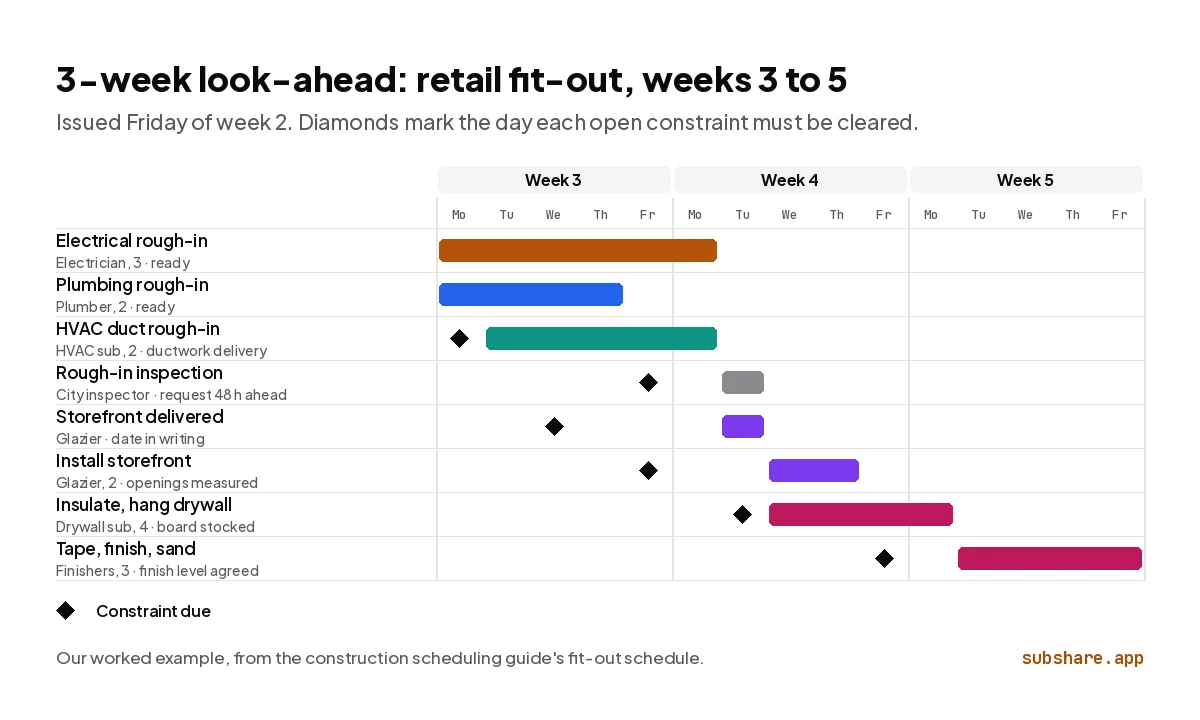
Reading it on Friday of week 2, as the superintendent would, 3 things need action next week:
- The inspection is the hinge. It sits between rough-in and drywall, both on the critical path. The request must go in by Friday of week 3 to hold Tuesday of week 4.
- The ductwork delivery is unconfirmed. HVAC is due to start Tuesday of week 3. If the supplier cannot confirm by Monday, the start moves, and the HVAC crew should hear that on Monday, not on Tuesday morning at the gate.
- The storefront has float, but only if it arrives. It can slip without moving the finish, so its delivery is tracked here but does not hold up other trades.
How do you find and clear constraints?
A constraint is anything that would stop a crew from starting or finishing a task when planned. Find them by asking the same 7 questions of every task in the look-ahead, and clear them by giving each one an owner and a date.
| Check | The question | Examples |
|---|---|---|
| Information | Do they have current drawings, answers and approvals? | RFI answered, submittal approved, latest sheet issued |
| Materials | Is everything on site, or confirmed to arrive in time? | Board delivered, fixtures on site, delivery date in writing |
| Labor | Is the right crew booked, at the right size? | Subcontractor confirmed 4 people for Wednesday |
| Equipment | Are the tools, lifts and power ready? | Scissor lift booked, temporary power live |
| Prior work | Is the work before theirs finished and accepted? | Framing complete, inspection passed |
| Approvals | Are permits, inspections and owner sign-offs in hand? | Inspection booked, finish level agreed |
| Space and access | Can they get to the area and work in it safely? | Area cleared by other trades, access code sent |
Our checklist. The categories follow common Last Planner System practice.
Keep cleared and open constraints in a constraint log, separate from the grid. When the log gets long, sort it by due date: the top of the list is this week's to-do list for the superintendent and project manager.
How do you run the weekly look-ahead meeting?
Hold the look-ahead meeting on the same day each week, with the superintendent and every trade foreman working in the next 3 weeks. An hour is enough when the look-ahead is updated before the meeting. This agenda works on most jobs:
- Safety and last week (10 minutes). Incidents and near misses, then last week's Percent Plan Complete.
- Why tasks were missed (10 minutes). One reason per missed task, recorded without blame.
- Walk weeks 2 and 3 (20 minutes). New tasks from the master schedule, clashes between trades, constraints added or cleared.
- Commit next week's work (15 minutes). Each foreman commits only to tasks that are ready.
- Owners and dates (5 minutes). Read back every open constraint with its owner and due date.
The commitment step is what makes it work. A foreman who commits to 5 ready tasks and finishes five gives the next trade a plan it can rely on. A foreman who commits to eight hopeful tasks and finishes five does not.
How do you measure whether the look-ahead works?
Measure it with Percent Plan Complete (PPC): the tasks finished in a week divided by the tasks committed for that week. If the crews committed to 8 tasks and finished six, PPC is 6 ÷ 8 = 75%. Track it every week and record a reason for every miss.
| Committed task | Crew | Done? | Reason if not |
|---|---|---|---|
| Panel and home runs | Electrician, 3 | Yes | — |
| Sales floor boxes and conduit | Electrician, 3 | Yes | — |
| Back-of-house boxes and conduit | Electrician, 3 | No | Labor: crew one short on Wednesday |
| Restroom rough-in | Plumber, 2 | Yes | — |
| Break room sink rough-in | Plumber, 2 | Yes | — |
| Water heater rough-in | Plumber, 2 | Yes | — |
| Main supply trunk | HVAC sub, 2 | Yes | — |
| Sales floor branch runs | HVAC sub, 2 | No | Materials: ductwork arrived a day late |
Our illustrative example, continuing the look-ahead above. 6 of 8 tasks done = 75% PPC. Both misses roll into week 4 and must be replanned before the rough-in inspection.
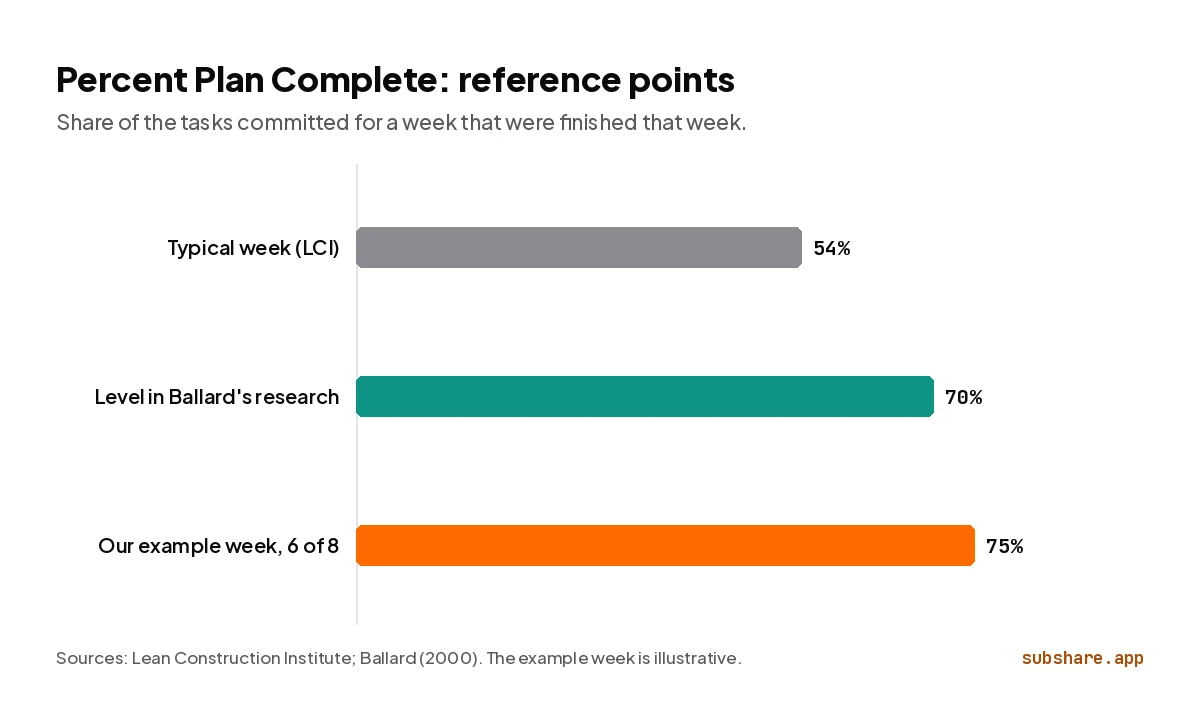
The Lean Construction Institute says that “only 54% of work planned for a given week is completed within the allotted schedule.” Ballard's thesis set out to find what could raise plan reliability above the 70% PPC level. A PPC that stays near 100% for months is not a triumph either: it often means the crews are committing to less than they could do.
The reasons matter more than the number. If most misses trace to late materials, the look-ahead window is too short or deliveries are not being confirmed. If they trace to prior work, the trades are not talking about handoffs.
Free 3-week look-ahead schedule template
Our free 3-week look-ahead template is an Excel file with 3 sheets, filled in with the example from this guide so you can see how it works before clearing it for your own job. It opens in Excel, Google Sheets and Apple Numbers.
- Look-ahead. Task, area, master schedule ID, company, crew size and a 15-day grid across 3 weeks, with constraints, owner, due date and status.
- Constraint log. Every open and cleared constraint with its task, owner, due date and the date it was cleared.
- PPC tracker. Tasks committed and completed each week, with Percent Plan Complete calculated and a column for the reason behind each miss.
The look-ahead sheet holds 33 tasks (the 8 example rows plus 25 blank ones), every date follows a single first-Monday cell, and the PPC tracker runs for 52 weeks.
Download the 3-week look-ahead template (.xlsx, 13 KB, free, no sign-up). To start your own, set the first Monday in cell C3, delete the example rows and paste in the activities from your master schedule.
What are common look-ahead schedule mistakes?
The most common look-ahead mistake is copying bars out of the master schedule without breaking them into crew tasks or listing constraints. That produces a shorter master schedule, not a look-ahead. These are the other common ones:
- No constraints column, so problems still surface on the day.
- Built by the superintendent alone, without the foremen who know the real durations.
- Updated only when someone remembers, instead of on a fixed day every week.
- Crews committing to tasks that are not ready.
- Misses recorded without reasons, so the same problem repeats.
- A window too short for the job's lead times.
- The look-ahead stops at the foremen and never reaches the people doing the work.
How do you get the look-ahead to the crew?
The look-ahead is written for foremen, but the work is done by their crews. Each crew member needs a smaller plan from it: which site, what time, what task and what to bring. Turn next week's committed tasks into a daily plan per person, send it the day before, and send changes the moment they happen.
This is the step most often left to a group chat or a whiteboard in the site office. The FMI and PlanGrid Construction Disconnected survey found that 52% of rework is caused by poor project data and miscommunication. A plan that changed on Wednesday and reached half the crew is one way that happens.
Where does SubShare fit?
Disclosure: SubShare is our product. It does not build look-aheads, track constraints or calculate PPC; use the template above or your scheduling software for that. It handles the last step: getting each day's plan to each person.
SubShare is a crew scheduling board. The foreman puts next week's committed tasks on the people doing them and drags a task when the plan changes. Each worker gets one permanent link by text or WhatsApp that opens their week in the phone's browser, with the site address, access details and the drawings for the job. There is no app to install and no account, and the plan stays readable without signal once it has been opened.
It is free for up to 5 people, then $29 a month for up to 20 and $59 for up to 40. You can try the demo board without signing up.
Look-ahead schedules: frequently asked questions
Who is responsible for the look-ahead schedule?
The superintendent owns it and runs the weekly meeting. Trade foremen supply tasks, crew sizes and constraints; the project manager clears office constraints such as RFIs, submittals and deliveries.
How often should a look-ahead schedule be updated?
Every week, on the same day. Drop the week just finished, add a new third week from the master schedule, and recheck every constraint.
What is a 2-week look-ahead schedule?
A look-ahead covering the next 2 weeks, common on small jobs with local suppliers. It is often too short to recover from a late delivery or a missing submittal, which is why 3 weeks is the usual default.
Is a look-ahead schedule part of the Last Planner System?
Yes. Look-ahead (make-ready) planning is one level of the Last Planner System, developed by Glenn Ballard and Greg Howell in the 1990s. It sits between phase scheduling and the weekly work plan.
Is there a free 3-week look-ahead template in Excel?
Yes. Ours has a 15-working-day grid, a constraint log and a Percent Plan Complete tracker, filled in with this guide’s example. It opens in Excel, Google Sheets and Numbers.
How we wrote this guide
We wrote this guide from published sources on October 24, 2026. Here is what we did:
- Took the definition of make-ready planning, Percent Plan Complete and the 54% figure from the Lean Construction Institute's Last Planner System page.
- Took the system's origins and the 70% PPC research question from Ballard's 2000 thesis and its University of Birmingham record, and the 6-week make-ready window from Mastt's guide to the system.
- Took the rework figure from the FMI and PlanGrid Construction Disconnected report.
- Built the worked example ourselves from weeks 3 to 5 of the fit-out in our construction scheduling guide, and built the template around the same rows. The example week's 75% PPC is illustrative.
No organization quoted here sponsored or reviewed this guide. SubShare is the one product we sell, and its section is labeled. If something here is wrong, email [email protected] and we will correct it and update the date on this page.
Related guides
Sources, accessed October 24, 2026
- Lean Construction Institute: Last Planner System (make-ready planning, Percent Plan Complete, 54% of weekly planned work completed).
- Ballard, The Last Planner System of Production Control, University of Birmingham (2000) (origins, the 70% PPC level).
- Mastt: Last Planner System, the 5 levels and PPC (about 6 weeks for make-ready planning; Ballard and Howell in the 1990s).
- FMI and PlanGrid: Construction Disconnected (2018) (52% of rework caused by poor data and miscommunication).
- SubShare pricing.
About the author
Brandon Marsh · Master Electrician (Red Seal) and small business owner
Brandon Marsh is a certified Master Electrician with Red Seal certification and runs a small business in Calgary, Canada. A trade contractor’s view of planning the weeks ahead is the perspective behind SubShare’s look-ahead guide.
Connect with Brandon Marsh on LinkedIn →Plan the week once. Everyone knows where to be.
30 days of Team features. No card required. Then continue on Free within its limits, or choose a paid plan.
Start free