Construction Scheduling: How to Build a Schedule Crews Follow
Construction scheduling turns a project into dated, linked tasks. Six methods, the five levels of schedule, seven steps to build one and a worked critical path example.
Construction scheduling: the short answer
Construction scheduling is breaking a construction project into activities, estimating how long each takes, linking them in the order they must happen, assigning crews and dating everything, so every company on the job knows what happens when. A construction schedule works on 5 levels: the master schedule, a phase schedule, a look-ahead for the next 3 to 6 weeks, a weekly work plan and a daily crew plan. The critical path method (CPM), developed in the late 1950s, calculates the dates; a Gantt chart shows them. To build one: define the scope, list activities, estimate durations from crew output, link the logic, find the critical path, load the crews, then baseline and update weekly. In our 13-activity worked example, the critical path sets a 33-working-day finish.
Every company on a job reads the schedule differently. The owner looks at the finish date. The project manager looks at the milestones that trigger payments. The superintendent looks at the next 3 weeks, and the foreman looks at tomorrow. A good schedule answers all four without contradicting itself.
This guide covers what goes in a schedule, the 5 levels, 6 methods and how to choose, a seven-step build, and a 13-activity retail fit-out worked through the critical path method day by day. Disclosure: we make SubShare, a crew scheduling tool. It appears in one labeled section near the end.
What is construction scheduling?
Construction scheduling is planning the order, timing and crews for every piece of work on a construction project. It turns the drawings and the contract into a dated sequence of activities, and it keeps that sequence current as the job runs. The output is the construction schedule.
It matters because construction projects often finish late. McKinsey's June 2016 report Imagining construction's digital future found that large projects “typically take 20 percent longer to finish than scheduled.” On a smaller scale, the Lean Construction Institute says that “only 54% of work planned for a given week is completed within the allotted schedule.” A schedule cannot stop delays, but it shows which ones matter and gives the team time to react.
What does a construction schedule contain?
A construction schedule contains 6 things: activities, durations, dependencies, dates, resources and milestones. Leave one out and the schedule stops being a plan and becomes a list of hopes.
| Part | What it is | Example |
|---|---|---|
| Activities | Distinct pieces of work, each with one responsible crew | Frame interior walls |
| Durations | Working days each activity takes, from quantity and crew output | 5 working days |
| Dependencies | Which activities must finish or start before others | Drywall starts after the rough-in inspection passes |
| Dates | Start and finish dates calculated from the above | Days 6 to 10 |
| Resources | The crew, subcontractor and equipment each activity needs | Framing crew of four, scissor lift |
| Milestones | Zero-duration events that mark key points | Rough-in inspection passed; substantial completion |
Examples are from the worked fit-out schedule later in this guide.
What are the 5 levels of a construction schedule?
A working construction schedule has 5 levels: the master schedule, the phase schedule, the look-ahead, the weekly work plan and the daily crew plan. Each one covers less time in more detail than the level above it, and each is owned by someone closer to the work.
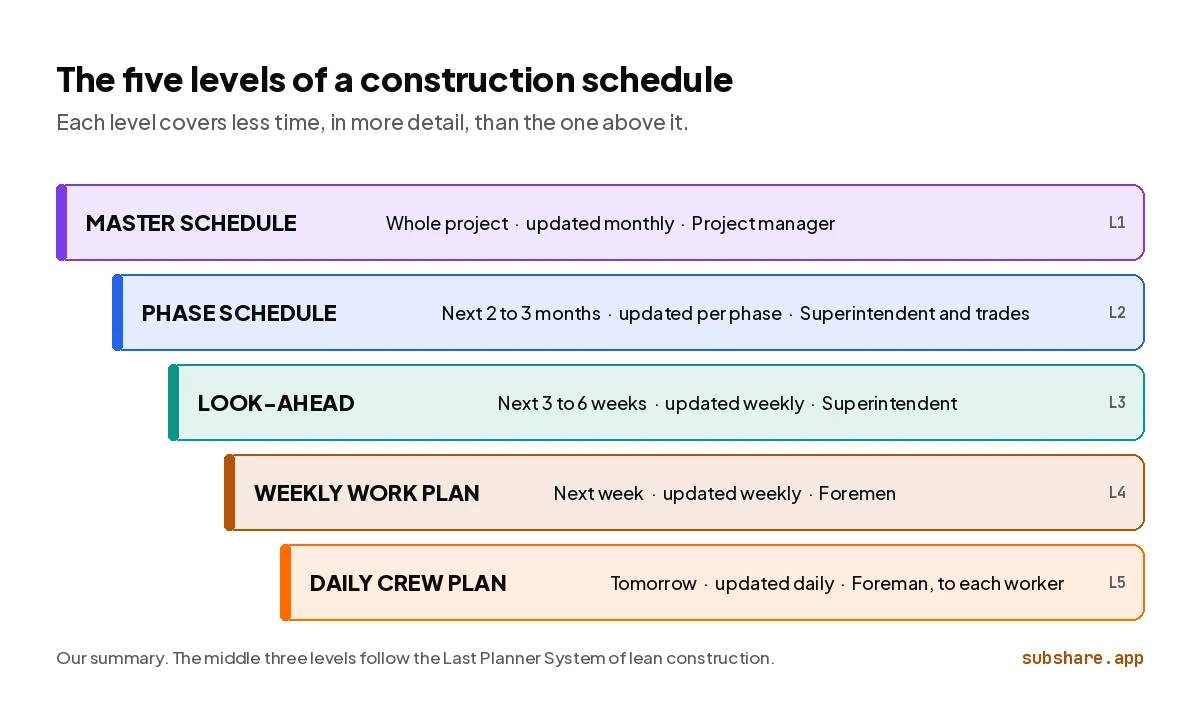
| Level | Covers | Updated | Owned by | Detail |
|---|---|---|---|---|
| Master schedule | The whole project | Monthly, or weekly on fast jobs | Project manager or scheduler | Activities by phase and area, critical path, milestones |
| Phase schedule | The next phase, often 2 to 3 months | Once per phase | Superintendent with trade leads | Handoffs between trades, often built by pull planning |
| Look-ahead schedule | The next 3 to 6 weeks | Weekly | Superintendent | Tasks by crew, with constraints to clear |
| Weekly work plan | Next week | Weekly | Foremen | Tasks the crews commit to finishing |
| Daily crew plan | Tomorrow | Daily | Foreman | Who goes where, at what time, to do what |
Our summary. The middle 3 levels follow the Last Planner System of lean construction; many smaller contractors run only the master schedule, a look-ahead and a daily plan.
The look-ahead is the level most teams are missing. It is where problems get found while there is still time to fix them, and our 3-week look-ahead guide covers how to build one, with a free template.
Which construction scheduling method should you use?
Most construction schedules use the critical path method to calculate dates and a Gantt chart to show them. Repetitive work such as highways and high-rise floors suits line of balance, and the near term is best planned with the Last Planner System. The 6 common methods are compared below.
| Method | How it works | Best for | Watch out for |
|---|---|---|---|
| Gantt (bar) chart | Each activity is a bar on a calendar. Henry Gantt designed his version around 1910 to 1915. | Showing a schedule to anyone, quickly | Bars without logic links do not move when one slips |
| Critical path method (CPM) | Activities, durations and dependencies form a network. A forward and backward pass gives dates and float. | Master schedules on most commercial jobs | Only as good as its durations and links |
| PERT | Like CPM, with 3 time estimates per activity: optimistic, most likely and pessimistic. | Work with uncertain durations | More estimating effort; rarely used on its own in building |
| Line of balance | Plots repetitive activities as lines across locations over time, so crews move continuously. | Highways, pipelines, rail, high-rise floors | Poor fit when each unit is different |
| Last Planner System | The trades plan handoffs together, clear constraints ahead of time and commit to weekly tasks. | Reliable short-term plans with many trades | Needs a weekly meeting that people attend |
| Location-based and takt planning | The building is split into zones, and each trade moves through them at a set rhythm. | Repetitive floors, apartments, hotels | Needs zones of similar work content |
Sources: Wikipedia articles on Gantt charts, the critical path method, PERT and line of balance; Lean Construction Institute on the Last Planner System. 'Best for' and 'watch out for' are our assessment.
The methods are older than most people expect. Every one of them was in use before the first scheduling software reached a job site trailer:
| When | Method | Who |
|---|---|---|
| 1896 | Harmonogram, an early bar chart | Karol Adamiecki |
| 1910 to 1915 | Gantt chart | Henry Gantt |
| Late 1950s | Critical path method | Morgan R. Walker (DuPont) and James E. Kelley Jr. (Remington Rand) |
| 1958 | PERT | U.S. Navy Special Projects Office, with Lockheed and Booz Allen Hamilton, for the Polaris missile |
| 1990s | Last Planner System | Glenn Ballard and Greg Howell |
| 2000 | Last Planner System formalized | Ballard's doctoral thesis, University of Birmingham |
Sources: Wikipedia articles on the Gantt chart, the critical path method and PERT; Ballard's thesis record at the University of Birmingham.
You do not have to pick one. A typical commercial job runs a CPM master schedule, shows it as a Gantt chart, and plans the next few weeks with a look-ahead taken from the Last Planner System.
How do you create a construction schedule? 7 steps
To create a construction schedule, define the scope, list the activities, estimate their durations, link them in order, calculate the critical path, assign crews, then baseline and publish the result. The steps below apply to a $50,000 renovation as much as to a $50 million building; only the number of activities changes.
1. Define the scope and break it down
Start from the contract, drawings and specifications. Split the job into a work breakdown structure: phases, then areas, then trades. A two-floor office might break into site work, structure, envelope, then interiors floor by floor.
2. List the activities
Turn each piece of the breakdown into activities. A good activity has one responsible crew, a clear start and finish, and a duration between one day and a few weeks. Add milestones for inspections, deliveries and handovers, and procurement activities for anything with a long lead time.
3. Estimate durations from crew output
Duration equals quantity divided by daily crew output. If the walls need 7,680 square feet of drywall and a 4-person crew hangs about 1,920 square feet a day, hanging takes 4 working days. The table works out 5 activities from the example below the same way.
| Activity | Quantity | Crew | Output per day | Working days |
|---|---|---|---|---|
| C Frame interior walls | 320 linear ft of wall | 4 | 64 linear ft | 5 |
| F Hang drywall | 7,680 sq ft (both sides, 12 ft high) | 4 | 1,920 sq ft | 4 |
| G Tape, finish and sand | 7,680 sq ft | 3 | 1,920 sq ft | 4 |
| H Prime and paint | 7,680 sq ft | 2 | 2,560 sq ft | 3 |
| K Install flooring | 2,400 sq ft | 2 | 800 sq ft | 3 |
Our worked example. The output rates are assumptions for illustration, not benchmarks; use your own crews' rates and ask the foremen who will do the work.
When a duration is uncertain, PERT's three-point estimate helps: expected time = (optimistic + 4 × most likely + pessimistic) ÷ 6. For the storefront glazing, a best case of 12 working days, a likely 15 and a worst case of 24 give (12 + 60 + 24) ÷ 6 = 16 days. The one extra day is the price of the long tail.
4. Link the activities in order
Connect every activity to what must happen before and after it. Most links are finish-to-start: framing finishes, then rough-in starts. Start-to-start links let work overlap, such as painting a floor 2 days after drywall finishing starts on it. Every activity except the first and last should have at least one predecessor and one successor.
5. Calculate the critical path
Run a forward pass to get each activity's earliest start and finish, then a backward pass from the end date to get the latest. The difference is total float. Activities with zero float form the critical path, the longest chain from start to finish. Scheduling software does this for you, but it is worth doing once by hand, as in the example below.
6. Assign crews and level the load
Put a crew or subcontractor on every activity and check that nobody is booked twice. If the electricians are needed on 2 floors in the same week, either add people or move the activity with float. This is the step that turns a schedule of tasks into a schedule of people.
7. Baseline, publish and update
Save the agreed version as the baseline, so later updates can be measured against it. Share the master schedule with the owner and subcontractors, take the first look-ahead from it, and set a weekly update day. A schedule that is not updated stops being used within a month.
Construction schedule example: a critical path worked out
This example schedules the interior fit-out of a small retail unit with 13 activities. The critical path runs through 10 of them and sets the finish at 33 working days, about seven weeks. The storefront glazing has 12 days of float and the MEP trim-out has 1.
| ID | Activity | Days | After | Scheduled | Float |
|---|---|---|---|---|---|
| A | Mobilize and lay out walls | 2 | — | 1–2 | 0 |
| B | Demolish existing finishes | 3 | A | 3–5 | 0 |
| C | Frame interior walls | 5 | B | 6–10 | 0 |
| D | MEP rough-in | 6 | C | 11–16 | 0 |
| E | Rough-in inspection | 1 | D | 17 | 0 |
| F | Insulate and hang drywall | 4 | E | 18–21 | 0 |
| G | Tape, finish and sand | 4 | F | 22–25 | 0 |
| H | Prime and paint | 3 | G | 26–28 | 0 |
| I | Storefront glazing: order to delivery | 15 | A | 3–17 | 12 |
| J | Install storefront | 2 | B, I | 18–19 | 12 |
| K | Install flooring | 3 | H | 29–31 | 0 |
| L | MEP trim-out | 2 | H | 29–30 | 1 |
| M | Final clean and punch list | 2 | J, K, L | 32–33 | 0 |
Our worked example. Days are working days counted from day 1, Monday of week 1. Float is total float. Activities with zero float are on the critical path.
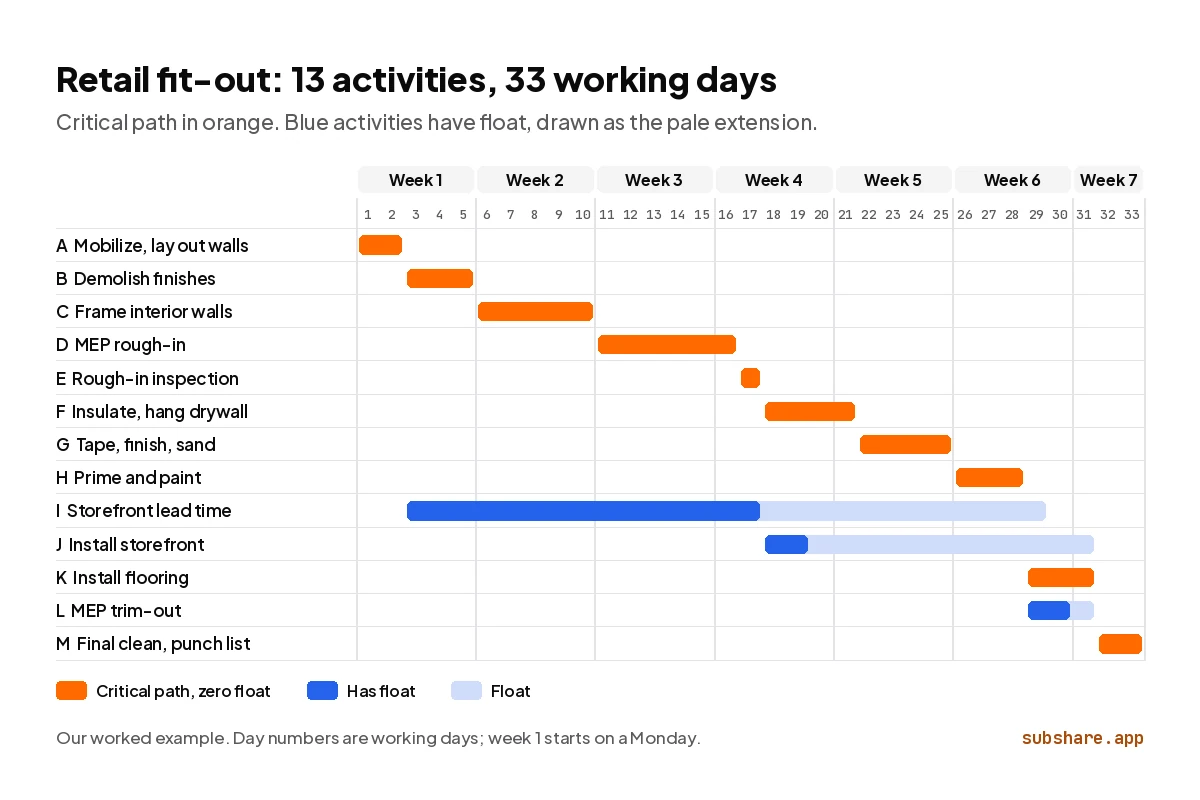
The forward pass works left to right. Mobilizing takes days 1 and 2, demolition days 3 to 5, framing days 6 to 10, and so on down the chain. The storefront has 2 predecessors, so it waits for the later one: glazing delivery on day 17. Installing it takes days 18 and 19.
The backward pass works right to left from day 33. The final clean must start by day 32, so flooring, trim-out and the storefront must all finish by day 31. Flooring takes 3 days and cannot start before day 29, so it has no float. Trim-out takes two, so it has one day spare. The storefront could finish as late as day 31, 12 days after its early finish.
Three things this example shows that hold on real jobs:
- An inspection can be on the critical path. The one-day rough-in inspection sits between the two longest trade activities. If the inspector comes 2 days late, the whole job finishes 2 days late.
- Float is not free time. The glazing order has 12 days of float only if it is placed on day 3. Place it 3 weeks late, 15 working days, and the whole job finishes 3 days late.
- Parallel work hides risk. Flooring and trim-out run side by side in the same rooms. On paper they have room; on site they need a plan for who works where each day.
Try it: change a duration and watch the critical path move
The calculator below runs the same forward and backward pass. Set the rough-in inspection to 3 days and the job finishes on day 35. Set the glazing lead time to 27 and the finish holds, because all 12 days of float are used; at 30 the critical path runs through the storefront instead.
| Activity | Length | Days |
|---|---|---|
| AMobilize and lay out walls | 1–2Critical | |
| BDemolish existing finishes | 3–5Critical | |
| CFrame interior walls | 6–10Critical | |
| DMEP rough-in | 11–16Critical | |
| ERough-in inspection | 17Critical | |
| FInsulate and hang drywall | 18–21Critical | |
| GTape, finish and sand | 22–25Critical | |
| HPrime and paint | 26–28Critical | |
| IStorefront glazing lead time | 3–1712 d float | |
| JInstall storefront | 18–1912 d float | |
| KInstall flooring | 29–31Critical | |
| LMEP trim-out | 29–301 d float | |
| MFinal clean and punch list | 32–33Critical |
Weeks 3 to 5 of this schedule are broken down task by task in our 3-week look-ahead example, which is how the master schedule turns into the next 3 weeks of crew work.
How do you keep a construction schedule up to date?
Update the look-ahead every week and the master schedule at least every month. Each update records what actually happened, re-estimates what is left, recalculates the dates and tells everyone who is affected. A weekly update takes about an hour once the habit is set:
- Record actual start and finish dates for last week's activities.
- Re-estimate the remaining duration of everything in progress.
- Add new activities from changes, RFIs and new information.
- Recalculate and compare the forecast finish with the baseline.
- Note what moved the critical path, and why.
- Issue the new look-ahead to the foremen and subcontractors.
- Tell each crew what changed for them, before they arrive on site.
Keep the baseline untouched. If the owner agrees to a new completion date, save a new baseline and keep the old one, so the record shows when and why the plan changed.
How do you turn the schedule into a crew schedule?
A crew schedule assigns people, not just companies, to each day's work: who goes to which site, at what time, to do what. It is the last step between the plan and the work, and it is the one most often handled by phone calls and group chats.
Start from the weekly work plan. For each task, name the people, the site address, the start time, the drawings they need and how to get in. Send it the day before, and send changes the moment they happen. The FMI and PlanGrid Construction Disconnected survey found that construction professionals spent 5.5 hours a week looking for project data. A crew member who has to call the foreman to find out where they are working is part of that number.
What are common construction scheduling mistakes?
The most common construction scheduling mistakes are typing dates in by hand instead of linking activities, and never updating the schedule once work starts. These eight cover most schedules that stop being used:
- Hard-coded dates instead of logic links, so nothing moves when one activity slips.
- Durations based on hope rather than quantities and crew output.
- No procurement activities, so long-lead items surprise the team.
- Inspections and approvals left out, though they can sit on the critical path.
- Too little detail to manage, or so much that nobody can update it.
- No baseline, so nobody can show what changed or when.
- An update cycle that lapses after the first month.
- A schedule that never reaches the crews who have to follow it (see getting the look-ahead to the crew).
What software is used for construction scheduling?
Construction scheduling software falls into 4 groups: critical path schedulers, project management platforms with scheduling built in, spreadsheets, and crew scheduling tools for the daily plan. Most contractors use more than one.
| Type | Used for | Examples |
|---|---|---|
| Critical path schedulers | Master schedules, baselines, critical path, delay analysis | Primavera P6, Microsoft Project |
| Project management platforms | Schedules alongside drawings, RFIs and budgets | Procore, Autodesk Forma Build |
| Spreadsheets | Look-ahead schedules and weekly work plans | Excel, Google Sheets |
| Crew scheduling tools | Daily plans: who works where, sent to each person | SubShare |
Examples are illustrative, not a ranking.
For the bigger platforms, we have compared what they cost in Procore alternatives, Fieldwire vs Procore and PlanGrid and Forma Build pricing. The broader discipline the schedule belongs to is covered in what is construction management.
Where does SubShare fit?
Disclosure: SubShare is our product, and it is not a critical path scheduler. It has no logic links, baselines or Gantt charts. It covers the last level: the daily crew plan.
SubShare is a crew scheduling board. A foreman puts each job on a person and drags it when the plan changes. Each worker gets one permanent link by text or WhatsApp that opens their week in the phone's browser, with the site address, access details and drawings attached. There is no app to install and no account, and the plan stays readable without signal once it has been opened.
It is free for up to 5 people, then $29 a month for up to 20 and $59 for up to 40. You can try the demo board without signing up.
Construction scheduling: frequently asked questions
What is the critical path in construction?
The longest chain of linked activities from start to finish. Its activities have zero float, so a 1-day delay to any of them delays completion by 1 day. In our example, 10 of 13 activities are critical.
What is float in a construction schedule?
Total float is how many working days an activity can slip without moving the finish date. In our example the storefront glazing has 12 days of float and the MEP trim-out has 1.
What is the difference between a Gantt chart and the critical path method?
A Gantt chart draws a schedule as bars on a calendar; the critical path method calculates the dates from durations and dependencies. Most schedules use CPM to work out the dates and a Gantt chart to show them.
What is a baseline schedule?
The agreed version of the schedule, saved before work starts. Every update is compared with it, so the record shows what moved, when and why. Save a new baseline only when the owner agrees a new completion date.
How do you use PERT for construction durations?
Estimate an optimistic, a most likely and a pessimistic duration, then take (optimistic + 4 × most likely + pessimistic) ÷ 6. For 12, 15 and 24 working days that gives 16 days.
How we wrote this guide
We wrote this guide from published sources on October 24, 2026. Here is what we did:
- Took the origins of the Gantt chart, CPM, PERT and line of balance from their Wikipedia articles, and the Last Planner System's origins and planning reliability figure from the Lean Construction Institute and Ballard's thesis.
- Took the schedule overrun figure from McKinsey's June 2016 report.
- Took the hours spent looking for project data from the FMI and PlanGrid report.
- Built the 13-activity fit-out example ourselves and calculated its dates and float with a forward and backward pass. The durations and production rates are illustrative, not benchmarks.
No organization quoted here sponsored or reviewed this guide. SubShare is the one product we sell, and its section is labeled. If something here is wrong, email [email protected] and we will correct it and update the date on this page.
Related guides
Sources, accessed October 24, 2026
- Wikipedia: Critical path method (Walker and Kelley, late 1950s; critical path and float).
- Wikipedia: Program evaluation and review technique (1958, U.S. Navy, Polaris; 3 time estimates).
- Wikipedia: Gantt chart and Wikipedia: Line of balance.
- Lean Construction Institute: Last Planner System (54% of weekly planned work completed) and Ballard, The Last Planner System of Production Control, University of Birmingham (2000).
- McKinsey: Imagining construction's digital future (June 2016).
- FMI and PlanGrid: Construction Disconnected (2018).
- SubShare pricing.
About the author
Josh Rohrbach · Owner, Rohrbach Construction
Josh Rohrbach owns Rohrbach Construction in Ohio and has run the company since 2022. Running a construction business day to day is the perspective behind SubShare’s guides on managing and scheduling jobs.
Connect with Josh Rohrbach on LinkedIn →Plan the week once. Everyone knows where to be.
30 days of Team features. No card required. Then continue on Free within its limits, or choose a paid plan.
Start free