Construction Scheduling Software: 9 Tools Compared on Price and Fit (2026)
Primavera P6 and a crew scheduling app both “schedule,” but they do different jobs. 9 tools sorted by the schedule they handle, with what a 10-person crew pays a year.
Construction scheduling software: the short answer
Construction scheduling software builds and shares the plan for when work happens and who does it. Pick it by the schedule you need. For a critical path master schedule, Primavera P6 fits large and public jobs and Microsoft Project fits the rest at $30 per user a month. Smartsheet gives a shared Gantt chart from $9 per member a month. Procore and Buildertrend put the schedule inside a full platform, priced by quote. Contractor Foreman bundles scheduling from $49 a month and Fieldwire costs $39 to $89 per user. For the daily crew plan, Bridgit Bench staffs projects months ahead and SubShare sends each worker their week, free for up to 5 people. Microsoft retired Project Online on September 30, 2026.
Search for construction scheduling software and you get lists of 15 tools that do very different jobs. Primavera P6 and a crew scheduling app both “schedule,” but one plans a hospital over three years and the other tells Mike which house to drive to tomorrow. Buying the wrong kind is the most common and most expensive mistake.
So this comparison starts with the schedule, not the software. It covers 9 tools from the master schedule down to the daily crew plan, with each vendor's price checked on November 17, 2026, and works out what a foreman and a 10-person crew pay for each in a year. Disclosure: we make SubShare, a crew scheduling tool. It is listed last, where it belongs in the order, and its section says what it does not do.
What is construction scheduling software?
Construction scheduling software is any program that plans when construction work happens, in what order and by whom, and keeps that plan current as the job changes. It covers 2 different schedules:
- The project schedule. Activities, durations and the links between them, so you can see the finish date and the critical path. This is the master schedule a contract asks for. Tools: Primavera P6, Microsoft Project, the schedule tools in Procore and Buildertrend.
- The crew schedule. People, sites and days: who goes where tomorrow and what they need when they get there. This is the plan the foreman re-makes every evening. Tools: crew scheduling and workforce planning software, or a whiteboard and a group chat.
Most contractors need both, and most software is good at one. Our construction scheduling guide explains the 5 levels in between, from the master schedule to the daily crew plan, and how to build each one.
Which construction scheduling software does what?
The table sorts the 9 tools from the longest plan to the shortest: critical path schedulers first, then project platforms, then crew tools.
| Tool | Schedules | Best for | Published price |
|---|---|---|---|
| Primavera P6 | Project (CPM) | Large and public projects | No; quote |
| Microsoft Project | Project (CPM) | Mid-size master schedules | $30 per user/month |
| Smartsheet | Project (Gantt) | Shared Gantt on a budget | From $9 per member/month |
| Procore | Project; crews as an add-on | General contractors on one platform | No; quote by construction volume |
| Buildertrend | Project (Gantt) | Home builders and remodelers | No; quote by revenue |
| Contractor Foreman | Project and crews | Small contractors, all in one | From $49/month |
| Fieldwire | Tasks and Gantt | Field teams working from drawings | $39–$89 per user/month; free for 5 |
| Bridgit Bench | People across projects | Staffing projects months ahead | No; quote |
| SubShare | Crews, day by day | Daily crew plans sent to phones | $0–$59/month by crew size |
Prices from each vendor's pricing page, checked November 17, 2026, annual billing where offered. Procore's range and P6's figure are third-party estimates; see each section.
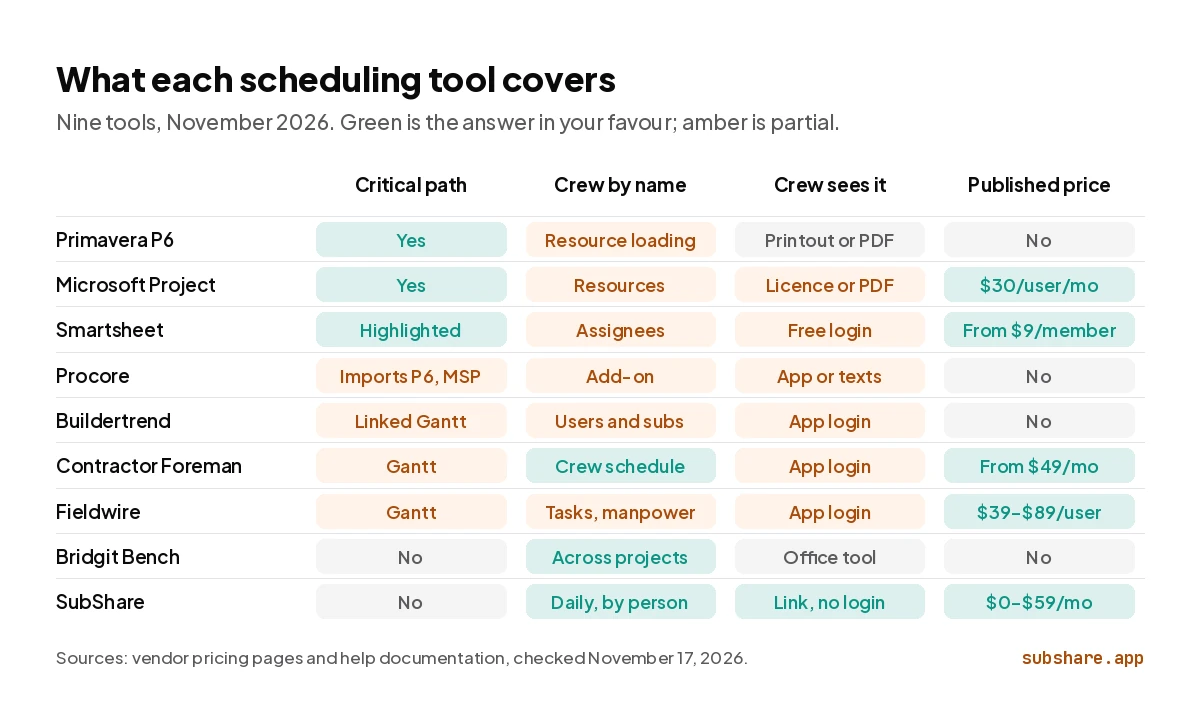
The 9 tools: what each is best for, what it costs, and the catch
1. Oracle Primavera P6
P6 is the critical path scheduler most large contracts are written around. It handles thousands of activities, baselines, resource loading and the what-if and delay analysis a claim needs, and many owners ask for schedule updates as P6 files. P6 Professional runs on Windows; P6 EPPM runs in the browser for whole portfolios. Oracle sells it through its own sales team and partners and publishes no price list.
- Best for: Large commercial, infrastructure and public jobs where the contract calls for a CPM schedule.
- Price: No published price. Oracle Licensing Experts put the P6 EPPM cloud service at about $80 to $120 per full user a month in 2026. Source
- The catch: It takes training to use well, and nobody on the crew will open it. The schedule reaches the field as a printout or a PDF.
2. Microsoft Project (Planner and Project Plan 3)
Microsoft Project does what most mid-size jobs need from a master schedule: linked activities, the critical path, baselines and resource leveling. Microsoft now sells it under the Planner name. Plan 3 is the one that includes the Project desktop app, which is what most schedulers mean when they say “MS Project.”
- Best for: Contractors who need a real CPM schedule but not a P6 budget.
- Price: $30 per user a month, paid yearly, for Planner and Project Plan 3, which includes the Project desktop app. Planner Plan 1 is $10. Source
- The catch: Project Online, the hosted version many firms used, retired on September 30, 2026. Anyone else who edits the plan needs a licence too.
3. Smartsheet
Smartsheet looks like a spreadsheet and turns into a Gantt chart with a click. Dependencies are on every plan, and it can highlight the critical path once they are switched on. Business adds baselines, a timeline view and workload tracking. Crew members can join as free Contributors, so only the person who builds the schedule needs a paid seat.
- Best for: Offices that live in spreadsheets and want a shared Gantt chart for little money.
- Price: Pro is $9 per member a month billed yearly ($12 monthly) for 1 to 10 members, with unlimited free Contributors. Business is $19 ($24 monthly). Source
- The catch: It is a general work tool, not a construction one. There are no drawings, RFIs or site addresses unless you build the sheet for them, and each Contributor still needs a Smartsheet login.
4. Procore
Procore's Schedule tool keeps the project schedule next to everything else on the job and can take in schedules built in P6 or Microsoft Project. Planning your own people is a separate product, Resource Planning, which began as LaborChart and can send each worker their assignments by text or email.
- Best for: General contractors who want the schedule inside the same platform as drawings, RFIs and budgets.
- Price: No published price. An annual fee set by the products you buy and your annual construction volume, with unlimited users. Third-party trackers put contracts at about $4,500 to $60,000 a year. Source
- The catch: You cannot see a price without a sales call, the quote rises with your revenue, and crew scheduling costs extra.
5. Buildertrend
Buildertrend's schedule is a Gantt chart with linked items that subcontractors and clients can see in their own portals. When a date moves, the people tied to it are notified. For a residential builder, having the schedule in the same system as change orders and client updates is the main reason to buy it.
- Best for: Home builders and remodelers who want the schedule tied to the client portal, selections and job costing.
- Price: No published price since 2026. Quotes depend on builder type and annual revenue; its last published tiers ran from $339 to $829 a month on annual billing. Source
- The catch: It is a big system to buy for the schedule alone, and you can only budget for it after a sales call.
6. Contractor Foreman
Contractor Foreman bundles a Gantt chart scheduler and a crew schedule with time cards, daily logs, estimates and invoicing. Prices are by user bracket, not per seat, so the cost moves in steps as the team grows.
- Best for: Small contractors who want a Gantt schedule, crew scheduling and time cards in one inexpensive plan.
- Price: Billed yearly: Basic $49 a month for 1 user, Standard $105 for up to 3, Plus $166 for up to 8, Pro $221 for up to 15 and Unlimited $332. 30-day free trial. Source
- The catch: Breadth over depth. The scheduler is fine for a house or a small commercial job, not for a CPM schedule that has to survive a claim, and everyone who uses it needs a login.
7. Fieldwire
Fieldwire pins tasks to locations on the drawings and shows them as a list, a calendar or a Gantt chart. Each task can carry a manpower figure, and the Gantt view totals it per day, so a superintendent can see how many people a week needs. The app works offline.
- Best for: Field teams who work from drawings and want tasks and a Gantt view on the same phone app.
- Price: Free for up to 5 users and 3 projects. Pro $39, Business $64 and Business Plus $89 per user a month billed annually, about $15 more month to month. Source
- The catch: Every person you invite, subcontractors included, counts as a paid user. Its pricing page does not say which plan includes the Gantt view, so ask before you buy.
8. Bridgit Bench
Bridgit Bench is workforce planning software. Instead of activities on a project, it shows people across projects: who is allocated where, who rolls off next month, and where the gaps are before a new job starts. Operations leaders and project executives use it to staff the company, not to run a single job.
- Best for: Mid-size and large general contractors planning which superintendents, project managers and field staff go to which project over the coming months.
- Price: No published price; quote only. Source
- The catch: It plans months, not tomorrow, and it is built for the office. It does not replace the daily crew plan.
9. SubShare (our product)
SubShare is a crew scheduling board. You put each job on a person with a duration, attach drawings or photos, and drag the job when someone is off sick or a delivery is late. Each worker gets one permanent link by text or WhatsApp that opens their week in the phone's browser, with the site address, access details and files. There is no app and no account, and the plan stays readable without signal once it has been opened.
- Best for: Foremen and supervisors who plan 5 to 40 people a week ahead and re-plan every day.
- Price: Free for up to 5 people and 3 sites. Pro is $29 a month for up to 20 people and Team $59 for up to 40, monthly, with no per-seat charge. Source
- The catch: It has no critical path, dependencies or baselines. If your contract needs a CPM schedule, use one of the tools above for that and SubShare for the crew.
For deeper price breakdowns, see our Fieldwire pricing report, Procore alternatives and Buildertrend alternatives.
What does construction scheduling software cost for a 10-person crew?
For a foreman planning a 10-person crew, a year of construction scheduling software costs from $108 to more than $8,000 at published list prices, and far more on some quotes. The spread comes from who has to pay. Some tools charge only the person who builds the schedule, some charge everyone who opens it, and some charge by crew size or revenue.
| Tool and plan | Who needs a paid seat | How the crew sees the plan | Per year |
|---|---|---|---|
| Smartsheet Pro | The scheduler only | Free Contributor login | $108 |
| SubShare Pro | Nobody; priced by crew size | A personal link, no login | $348 |
| Microsoft Planner and Project Plan 3 | The scheduler, and anyone else who edits | A licence, or a PDF | $360 for 1 licence |
| Primavera P6 EPPM cloud | The scheduler | A printout or PDF | About $960–$1,440 for 1 user |
| Contractor Foreman Pro | Everyone, up to 15 users | App login | $2,654 |
| Buildertrend | Quote | App or portal login | $4,068–$9,948 at last list price |
| Procore | Unlimited users; Resource Planning extra | App login, or texts via Resource Planning | About $4,500–$60,000 |
| Fieldwire Pro | All 11 people | App login | $5,148 |
| Fieldwire Business | All 11 people | App login | $8,448 |
| Bridgit Bench | Quote | Not built for the crew | Quote only |
Our arithmetic from list prices checked November 17, 2026, annual billing where offered; SubShare is monthly only. P6 uses Oracle Licensing Experts' 2026 range of $80–$120 per full user a month. Buildertrend uses its last published tiers and Procore third-party estimates.
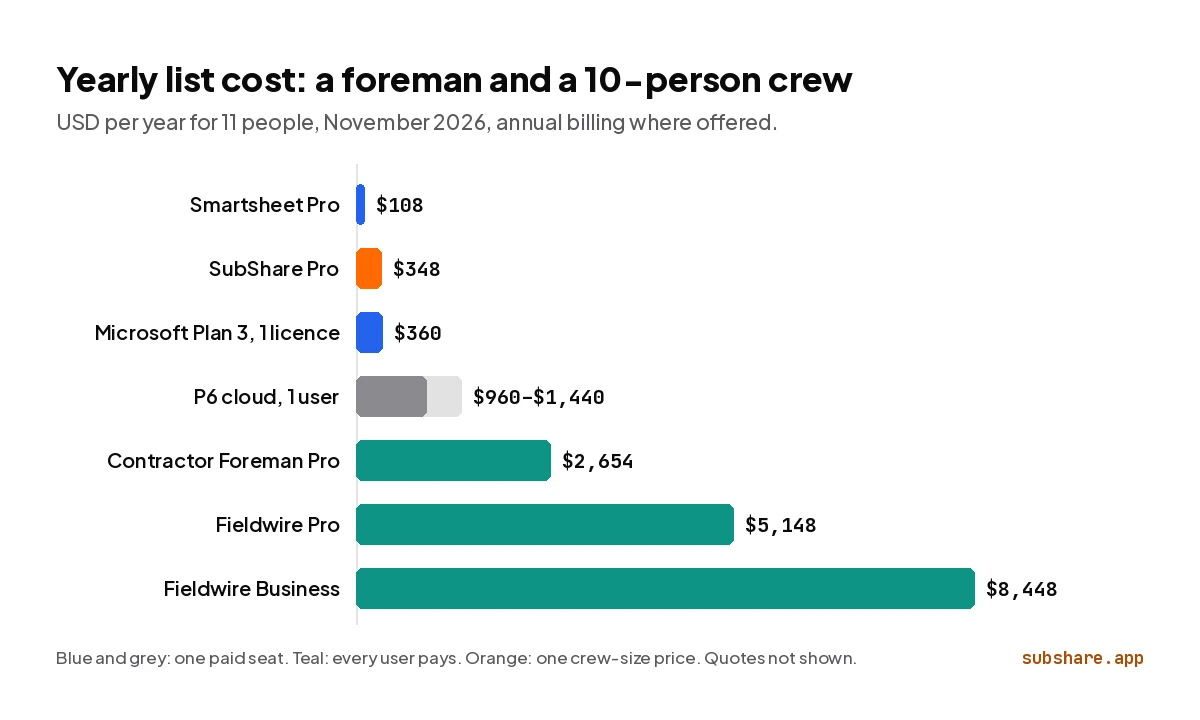
The cheap rows hide work. With Smartsheet, Microsoft or P6, someone still has to get the plan to 10 phones: a free login per person, a PDF in the group chat or a printout on the trailer wall. With Fieldwire you pay for all 11 seats, and in return everyone works in the same app.
A common split is one CPM tool for the scheduler and a crew tool for everyone else. A Microsoft Project licence plus SubShare Pro is $708 a year for this crew, against $5,148 with everyone on Fieldwire Pro.
How do you choose construction scheduling software?
Answer these 5 questions before you book a single demo:
- Does a contract require a CPM schedule? If an owner wants critical path updates, monthly or in P6 format, you need P6 or Microsoft Project, whatever else you buy.
- Which schedule hurts today? If the finish date is fine but crews show up at the wrong site, a better Gantt chart will not help. You need a crew tool.
- Who has to see the schedule, and will they log in? Office staff will. Subcontractors and crew members often will not, which is why an app nobody opens is the most expensive kind.
- How often does the plan change? A master schedule updated monthly can live in any CPM tool. A crew plan that changes daily needs changes to reach people within minutes, not at the next meeting.
- How is it priced as you grow? Work out the price at today's headcount and at twice that. Per-user prices grow with every hire; volume and revenue quotes grow with every good year.
Then trial the top 2 on a live job for 2 weekly update cycles. You learn more from re-planning one real week than from any demo.
Is there free construction scheduling software?
Yes, for small teams. Free plans that are useful on a real job:
- Fieldwire Basic: free for up to 5 users, 3 projects and 100 sheets, with tasks on the drawings.
- SubShare Free: free for up to 5 people, 3 sites and 5 files per site, with each person's week on a link.
- A spreadsheet: our free 3-week look-ahead template is an Excel file laid out by week and crew, with a constraints log.
Smartsheet, Contractor Foreman and SubShare's paid plans start with a free trial; Contractor Foreman's is 30 days and SubShare starts every account on 30 days of Team features. Primavera P6, Procore, Buildertrend and Bridgit Bench have no free plan.
Microsoft Project Online has retired: what should you use now?
Microsoft retired Project Online on September 30, 2026, according to its lifecycle page. Project Online was the hosted version of Project with Project Web App, and many contractors used it to share schedules with their field staff. The Project desktop app and Planner were not affected.
Contractors who relied on it have 3 straightforward routes:
- Keep scheduling in the Project desktop app through Planner and Project Plan 3, and share the schedule another way.
- Move the master schedule into a construction platform with a schedule tool, such as Procore.
- Split the job: keep the master schedule in Project and put the crew-level plan in a crew scheduling tool, so field staff never needed Project Web App in the first place.
Where does SubShare fit?
Disclosure: SubShare is our product. It covers one schedule, the daily crew plan, and nothing above it: no critical path, no dependencies, no baselines, no RFIs or budgets.
SubShare is a crew scheduling board for the foreman or supervisor who decides who does which job. You drag a job to another person or day and that person's plan changes at once. Workers open their week from one permanent link by text or WhatsApp, with no app or password, and the plan works without signal once opened.
SubShare is free for up to 5 people, then $29 a month for up to 20 and $59 for up to 40. You can try the demo board without signing up.
Construction scheduling software: frequently asked questions
What is the best construction scheduling software?
It depends on the schedule. For a critical path master schedule on a large job, Primavera P6; on a mid-size job, Microsoft Project. For a schedule inside a full project platform, Procore or Buildertrend. For the daily plan that tells each worker where to go, a crew scheduling tool such as SubShare.
Is Microsoft Project good for construction scheduling?
Yes, for the master schedule. Planner and Project Plan 3 at $30 per user a month includes the desktop app with the critical path, baselines and resource leveling. It is weaker at the crew level, because each worker who opens the plan needs a licence or a printout.
Is Primavera P6 better than Microsoft Project?
For large and public projects, usually. P6 handles bigger schedules, enterprise portfolios and the delay analysis that claims need, and many owners require P6 files. For a schedule of a few hundred activities, Microsoft Project does the same core job for much less money and training.
Is there free construction scheduling software?
Yes, with limits. Fieldwire is free for up to 5 users and 3 projects, and SubShare is free for up to 5 people and 3 sites. A spreadsheet works too: our 3-week look-ahead template is a free Excel file.
Can I use Excel for construction scheduling?
For a small job or a look-ahead, yes. Excel has no dependencies, so moving one task does not move the tasks that follow, and the file goes out of date the moment a copy is emailed. Most contractors outgrow it when the plan changes more than once a week.
How we compared
We picked 9 tools that cover every level of a construction schedule and that come up again and again when contractors ask what to use, then checked each one on November 17, 2026:
- Took prices from each vendor's own pricing page: Smartsheet, Contractor Foreman, Fieldwire and SubShare. Microsoft's are the US prices listed on its Planner pages.
- Recorded the tools without a price list as quotes: Primavera P6, Procore, Buildertrend and Bridgit Bench. Where we give a figure for them, it comes from a named third party and is labeled as an estimate.
- Took feature claims from vendor pages and help documentation, and the Project Online retirement date from Microsoft's lifecycle page.
- Worked out the yearly cost for one scheduler and a 10-person crew ourselves, at list price.
No vendor paid for placement or reviewed this article. SubShare is the one product we sell, and its section is labeled. Prices change. If a figure here is out of date, email [email protected] and we will correct it and update the date on this page.
Related guides
Sources, accessed November 17, 2026
- Oracle Licensing Experts: Oracle Primavera P6 licensing cost guide 2026 (March 2026) (P6 EPPM cloud price ranges; not affiliated with Oracle).
- Microsoft: Planner plans and pricing and Microsoft Lifecycle: Project Online (retirement on September 30, 2026).
- Smartsheet pricing (Pro and Business prices, member limits, free Contributors, Gantt and dependencies by plan).
- Procore pricing (annual construction volume, unlimited users) and CostBench: Procore pricing estimates.
- Buildertrend pricing (quote by builder type and revenue).
- Contractor Foreman pricing (plans, user brackets, yearly totals, trial).
- Fieldwire pricing and Fieldwire help: Manpower on the Gantt chart.
- Bridgit pricing (no published prices).
- SubShare pricing.
About the author
James M. · Owner/Project Manager, JJB General Contractors
James M. is the owner and project manager at JJB General Contractors, where he runs jobs and coordinates subcontractors on site every day. That hands-on field perspective shapes what SubShare writes about planning crews and getting each person their week.
Connect with James M. on LinkedIn →Plan the week once. Everyone knows where to be.
30 days of Team features. No card required. Then continue on Free within its limits, or choose a paid plan.
Start free